
25 MAY 2026 - Synapse & Chroma for Windows | Razer Insider
Skip to main content
StickyPATCH NOTES

25 MAY 2026 - Synapse & Chroma for Windows

  • May 25, 2026
  • 22 replies
  • 1685 views

DigitalAnomaly
Forum|alt.badge.img

Synapse for Windows - V4.0.86.2605190956 / Chroma for Windows - V4.0.63.2605191000


RELEASE NOTES

25 MAY 2026

Fixed

  • Stability & Reliability
    • App Launch & Crashes
      • Synapse could fail to launch after updating from an older version
      • App could display a blank screen with persistent loading icons at launch
      • Crash when switching between Audio Mixer tabs while playing music
      • Chroma App could get stuck in a "Downloading" state and fail to update
      • Keyboards became non-functional after closing Synapse via Task Manager
    • Installation & Uninstallation
      • Certain devices could fail to install, showing "detecting devices" indefinitely when multiple peripherals were connected
      • RGUpdateInstaller component was not removed automatically when uninstalling Synapse and Chroma App
      • Device installation page could disappear mid-install for certain wireless mice, preventing setup from completing
      • Synapse could fail to install on certain system configurations
  • Device Detection & Connectivity
    • Devices could appear duplicated in the Devices & Modules list during driver installation or after disconnecting
    • Certain wireless mice were not detected by Synapse when connected via dongle
    • Special-edition devices appeared as base models when installed while the device was powered off — the correct edition now displays once the device wakes up
    • Certain laptops showed as "HID Keyboard Device" in Device Manager after installing Synapse
    • Keyboards could become non-functional after initial driver installation until a system restart
    • Synapse incorrectly prompted for a system restart after installing drivers alongside another peripheral
  • Chroma RGB
    • Brightness Controls
      • Adjusting the brightness slider did not reflect on the physical device
      • Brightness slider changes did not persist after refreshing the page
      • Default brightness toggle incorrectly displayed as OFF for certain wireless mice (Bluetooth mode)
      • On laptops, the asterisk brightness indicator was missing when the Plugged In / On Battery link was toggled above 80%
      • Device lighting could randomly stop responding to adjustments
    • Lighting Effects
      • Switching between lighting effects caused noticeable lag on certain keyboards
      • Chroma Studio did not display certain wireless mice connected via Bluetooth
      • Lighting effects could stutter or flicker persistently when Synapse was opened
      • Audio Meter effect was missing from Quick Effects for certain peripherals
    • Windows Dynamic Lighting (WDL)
      • Certain mice were incorrectly identified as WDL-compatible devices
      • Device brightness remained adjustable while set to WDL mode (the panel should be fully greyed out)
      • WDL tooltip was truncated on the Chroma App dashboard
    • Chroma App
      • Lighting icon was displayed incorrectly for certain peripherals in Chroma App
      • Module tile titles in Chroma were not aligned with their Synapse counterparts
      • Chroma tutorial button displayed "Install" instead of "Start Tour" after clearing cache, even when already installed
  • Key Mapping & Customization
    • Button Remapping
      • Keyboard-function assignments on mouse buttons did not work for certain wireless mice
      • Remapped buttons on M1–M5 appeared on unintended buttons on certain keyboards
      • The \ key was incorrectly recorded as the number 3 during Macro recording
      • Assigned button functions did not work on certain mice connected via Bluetooth
    • Hypershift
      • Key output remained active after releasing the Razer Hypershift button
      • HyperShift-bound keys did not work for certain mice
      • On laptops, the F key was pre-assigned to "Toggle Fan Speed Mode" in Hypershift by default, even without an eGPU connected
    • Macros
      • On-The-Fly Macros (OTFM) could be incorrectly assigned to the Multi-Functional Button via double/triple tap
      • "Play while assigned key is pressed" option was missing for macro-assigned sensitivity cycle buttons on certain mice
      • Scroll left/right macro keybinds incorrectly displayed as scroll up/down
      • Macro keybind tooltip appeared misaligned for the Multi-Functional Button
    • Global Shortcuts
      • Global Shortcuts did not trigger on the first attempt after creation
      • Device profile dropdown in Global Shortcuts was sorted in descending order instead of ascending
    • Gaming Mode
      • Gaming Mode could be toggled via FN+F10 even when "Apply in-game only" was enabled
    • Snap Tap & Actuation
      • Snap Tap settings were not retained after closing and reopening Synapse
      • Snap Tap settings carried over to newly created profiles instead of reverting to defaults
    • AI Launcher
      • AI Launcher option was missing from the key assignment panel on certain keyboards and mice
      • "Launch Windows Copilot" was missing from the Windows Shortcuts key assignment list
  • Audio & Sound
    • THX Spatial Audio
      • THX Spatial Audio settings reverted to Stereo upon PC restart for certain headsets
      • Manually adding a game to the THX game list did not work on Windows 11
    • Equalizer (EQ)
      • "Synapse Required" label was missing when adjusting non-custom EQ presets
      • EQ name notification was missing when switching EQ modes via the headset's physical button
    • Sensa HD (Haptics)
      • Haptic feedback was lost after power-cycling the device while Synapse was running — previously required an app restart to recover
      • Sensa HD game icons displayed incorrectly when playing supported games
      • Updated Sensa Mixer UI was not applied
      • Audio-to-Haptic (A2H) profile incorrectly showed as "disabled" on the dashboard even when enabled
    • Microphone
      • Mic enhancement tooltip displayed incorrect information on certain headsets
  • Performance & Hardware Controls
    • DPI & Polling Rate
      • DPI changes did not apply on certain wireless mice connected via Bluetooth
      • Polling rate values became incorrect after waking from sleep — e.g., a 1000 Hz setting could revert to 8000 Hz
      • Higher polling rate options (2000/4000 Hz) could not be selected on certain keyboards after system wake
    • Volume & Media Controls
      • Press-and-hold on dedicated volume buttons did not continuously adjust volume when Synapse was running
      • Command Dial Track Selector and Skip/Backwards media keys did not work in Chrome when Synapse was active
    • Laptop Performance (Blade series)
      • GPU temperature/power color bar displayed red even at low loads (incorrect thresholds)
      • Laptops with a single fan incorrectly showed two fan RPM readings
      • Hyperboost mode UI displayed incorrectly on the Performance tab
      • Fan control UI was cut off and could not be fully scrolled
  • Profiles & Settings
    • Mouse cursor jumped to a different position when switching profiles via a mouse button
    • Game-linked profiles reverted to default after some time
    • Profiles exported from Synapse 3 could not be imported into Synapse 4 (showing a "corrupted file" error)
    • Cloud sync prompts incorrectly appeared in Guest mode
    • Auto-Launch checkbox setting did not save after refreshing
    • Chroma lighting settings (Advanced Effects) reverted to defaults after PC restart on certain headsets
    • Low battery notification appeared even when the device was powered off
  • UI/UX
    • Keyboard layout button highlights were misaligned for certain regional variants (e.g., JP, TUR layouts)
    • Device image was missing from the dashboard for certain keyboards
    • Firmware version was not displayed on the help page for certain wireless mice (Bluetooth mode)
    • Grey-out overlay overlapped with profile options when plugging in a USB headphone on laptops
    • Devices were not shown in the navigation dropdown while viewing the device tab on certain laptops
    • Tutorial video skipped the hotkey information for the Factory Default profile on certain keyboards
    • Chroma Connect did not sync colors correctly on startup for certain third-party integrations
  • Localization
    • Haptic Intensity tooltip was not localized in Chinese, Japanese, and Korean
    • Breathing effect "Random color" and "Smart dimming" labels were not localized in the Lighting tab
    • Custom Mode OSD notification did not capitalize the first letter in Spanish and French
    • Equalizer Adjustment widget labels (Low/Mid/High) were not localized
    • "Pairing Failed" error message was not localized in non-English languages
    • Chroma App Release Notes were not localized in any non-English language
    • Snap Tap, Rapid Trigger, and Continuous Rapid Trigger names were being translated — these now remain in English as brand terms across all languages

Improvements

  • Updated Philips Hue libraries
  • Updated THX driver v3.2.3
    • Razer Nari Ultimate
    • Razer Nari
    • Razer Nari Essential
    • Razer Kraken V3 HyperSense
    • Razer Barracuda Pro
    • Razer Kraken Kitty V2 Pro
    • Razer Kraken V3
    • Razer BlackShark V2 Hyperspeed
    • Razer Barracuda


22 Replies

  • Insider Mini
  • May 25, 2026

Im using the Razer Kraken V4 & the problem after the newest update is that when ever i now Mute my mic it sets the mic volume to 0 (as it supposed to do) but when i Unmute, it should restore the mic volume as it was set to, but now it just keeps hte volume set to 0% every time i Mute / unmute my mic… and i NEED to manually go to the Synapse and restore the mic volume.


i have tryed: 

Reinstalling the synapse app.

tryed to fix it from the windows settings.


none of these worked..  Only solution that i got it to work was, when i CLOSE the synapse totally. then there is no problem with the mic volume settings when ever i mute / unmute, the mic volume set’s up to normal after unmuting as it should be doing! so the PROBLEM is in the Synapse! 


and the problem when i close synapse is that i lose all my RGB lights and macro’s etc.. and that pisses me off -.- 


TrueXiarno
  • Insider Mini
  • May 25, 2026

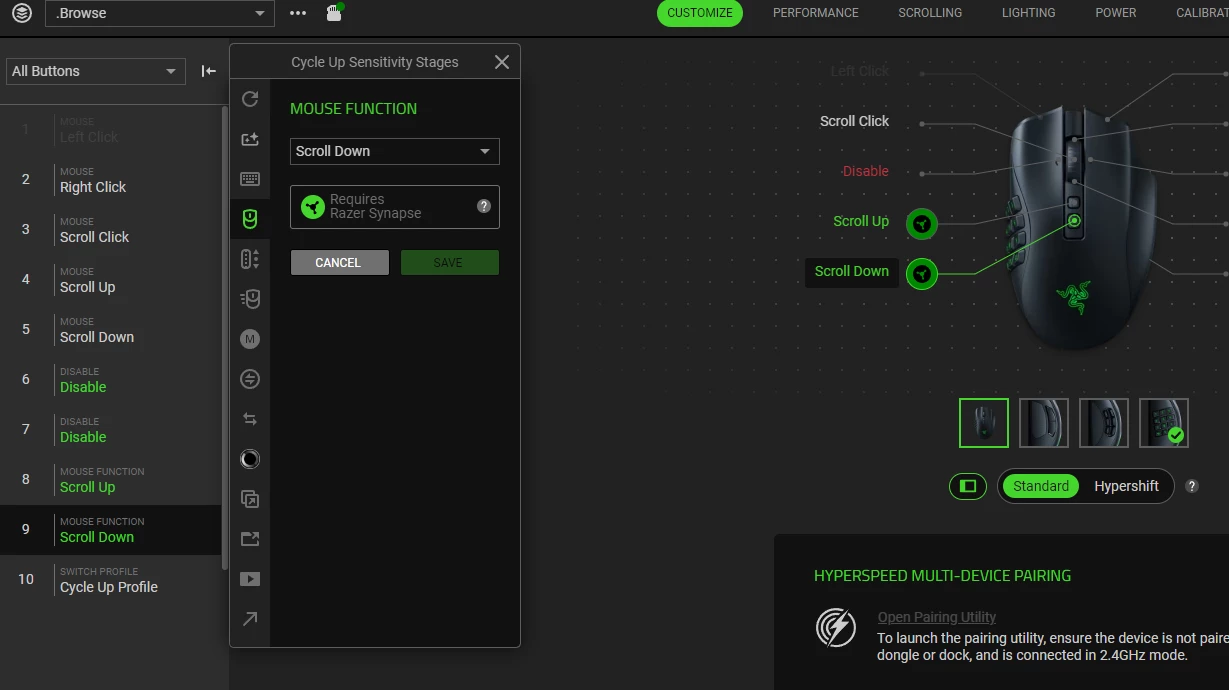
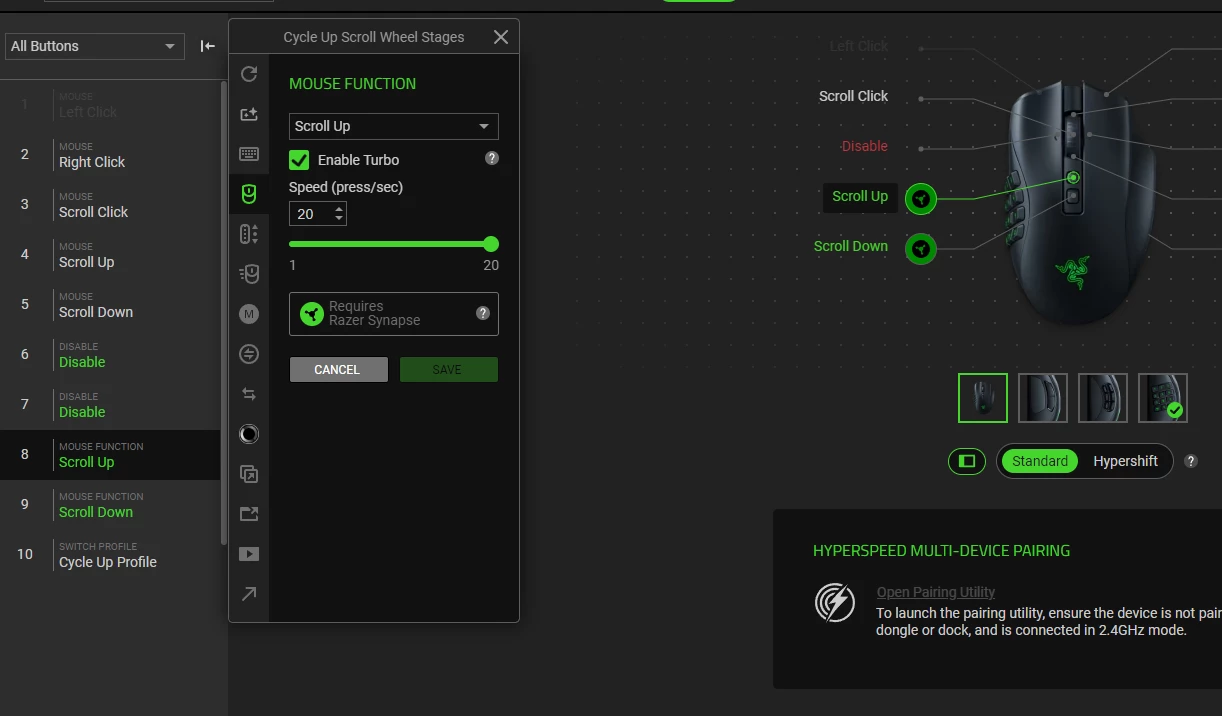
This update completely broke my mouse setup. The only way it works now is somehow by closing Razer Synapse. Even though my custom control only work with Synapse and I got two profile I switch over constantly, now when I want to switch them I gotta re-open the app, switch the profile and immediately completely close Synapse or else it completely breaks. Incredibly annoying. I basically cannot change the turbo  of button 9 on my Razer Naga V2 Pro.

This is why I usually disable updates in app :/


TrueXiarno
  • Insider Mini
  • May 25, 2026

So the turbo button is broken on mouse button 9 of the Razer Naga V2 Pro and cannot be modified at all.


  • Insider Mini
  • May 26, 2026

When do you add the PS5 Controller support on official ?


FiszPL
Vanguard
Forum|alt.badge.img+1
  • VANGUARD
  • May 26, 2026

That’s a really LOOOOONG list of changes/fixes.

But still - after update Pro Click V2 & BlackWidow V4 LP are not detected properly (and if they’re detected, and I turn devices off, turn them on again - they’ll not reappear in Synapse, also they’re not reacting to settings change like Chroma brightness, DPI change etc...)


  • Insider Mini
  • May 26, 2026

This update completely broke the Razer Audio Mixer.

I have tryed Reinstalling the synapse app.

Not resolved :(


  • Insider Mini
  • May 26, 2026
Thank you, Razer, you've broken the software again. The audio mixer doesn't work when you press one button, everything mutes, and when you touch the slider, the gain drops and doesn't respond at all. It'll take another year to fix it. It's better to look at other companies than to continue using this product. While there was a Synapse 3, everything was perfect and problem-free, but some genius created the Synapse 4 and it's a complete nightmare.


Truly insane how much everything breaks from each update. Honestly, this really goes to show that companies that make hardware shouldn’t make software at all outside of drivers. Everything that we actually need synapse to do, windows has a tool for, and everything that windows doesn’t do, we kind of don’t really give a shit about. Why can’t you just make a headset that works as a headset? Why do you companies insist on putting fifty layers of spaghetti code between the hardware and the operating system, which inevitably breaks something and then takes anywhere from months to years to fix? I’m serious, if you uninstall synapse and just install some third party generic equalizer software, things work perfectly and never crash. Why is a single person on GitHub more capable of making your hardware work than your entire company?


Promise_sink
  • Insider Mini
  • May 26, 2026

Is the L4D2 mouse macro first-run setup bug still unfixed?


  • Insider Mini
  • May 27, 2026

Synapse for Windows - V4.0.86.2605190956 / Chroma for Windows - V4.0.63.2605191000

RELEASE NOTES

25 MAY 2026

Fixed

  • Stability & Reliability
    • App Launch & Crashes
      • Synapse could fail to launch after updating from an older version
      • App could display a blank screen with persistent loading icons at launch
      • Crash when switching between Audio Mixer tabs while playing music
      • Chroma App could get stuck in a "Downloading" state and fail to update
      • Keyboards became non-functional after closing Synapse via Task Manager
    • Installation & Uninstallation
      • Certain devices could fail to install, showing "detecting devices" indefinitely when multiple peripherals were connected
      • RGUpdateInstaller component was not removed automatically when uninstalling Synapse and Chroma App
      • Device installation page could disappear mid-install for certain wireless mice, preventing setup from completing
      • Synapse could fail to install on certain system configurations
  • Device Detection & Connectivity
    • Devices could appear duplicated in the Devices & Modules list during driver installation or after disconnecting
    • Certain wireless mice were not detected by Synapse when connected via dongle
    • Special-edition devices appeared as base models when installed while the device was powered off — the correct edition now displays once the device wakes up
    • Certain laptops showed as "HID Keyboard Device" in Device Manager after installing Synapse
    • Keyboards could become non-functional after initial driver installation until a system restart
    • Synapse incorrectly prompted for a system restart after installing drivers alongside another peripheral
  • Chroma RGB
    • Brightness Controls
      • Adjusting the brightness slider did not reflect on the physical device
      • Brightness slider changes did not persist after refreshing the page
      • Default brightness toggle incorrectly displayed as OFF for certain wireless mice (Bluetooth mode)
      • On laptops, the asterisk brightness indicator was missing when the Plugged In / On Battery link was toggled above 80%
      • Device lighting could randomly stop responding to adjustments
    • Lighting Effects
      • Switching between lighting effects caused noticeable lag on certain keyboards
      • Chroma Studio did not display certain wireless mice connected via Bluetooth
      • Lighting effects could stutter or flicker persistently when Synapse was opened
      • Audio Meter effect was missing from Quick Effects for certain peripherals
    • Windows Dynamic Lighting (WDL)
      • Certain mice were incorrectly identified as WDL-compatible devices
      • Device brightness remained adjustable while set to WDL mode (the panel should be fully greyed out)
      • WDL tooltip was truncated on the Chroma App dashboard
    • Chroma App
      • Lighting icon was displayed incorrectly for certain peripherals in Chroma App
      • Module tile titles in Chroma were not aligned with their Synapse counterparts
      • Chroma tutorial button displayed "Install" instead of "Start Tour" after clearing cache, even when already installed
  • Key Mapping & Customization
    • Button Remapping
      • Keyboard-function assignments on mouse buttons did not work for certain wireless mice
      • Remapped buttons on M1–M5 appeared on unintended buttons on certain keyboards
      • The \ key was incorrectly recorded as the number 3 during Macro recording
      • Assigned button functions did not work on certain mice connected via Bluetooth
    • Hypershift
      • Key output remained active after releasing the Razer Hypershift button
      • HyperShift-bound keys did not work for certain mice
      • On laptops, the F key was pre-assigned to "Toggle Fan Speed Mode" in Hypershift by default, even without an eGPU connected
    • Macros
      • On-The-Fly Macros (OTFM) could be incorrectly assigned to the Multi-Functional Button via double/triple tap
      • "Play while assigned key is pressed" option was missing for macro-assigned sensitivity cycle buttons on certain mice
      • Scroll left/right macro keybinds incorrectly displayed as scroll up/down
      • Macro keybind tooltip appeared misaligned for the Multi-Functional Button
    • Global Shortcuts
      • Global Shortcuts did not trigger on the first attempt after creation
      • Device profile dropdown in Global Shortcuts was sorted in descending order instead of ascending
    • Gaming Mode
      • Gaming Mode could be toggled via FN+F10 even when "Apply in-game only" was enabled
    • Snap Tap & Actuation
      • Snap Tap settings were not retained after closing and reopening Synapse
      • Snap Tap settings carried over to newly created profiles instead of reverting to defaults
    • AI Launcher
      • AI Launcher option was missing from the key assignment panel on certain keyboards and mice
      • "Launch Windows Copilot" was missing from the Windows Shortcuts key assignment list
  • Audio & Sound
    • THX Spatial Audio
      • THX Spatial Audio settings reverted to Stereo upon PC restart for certain headsets
      • Manually adding a game to the THX game list did not work on Windows 11
    • Equalizer (EQ)
      • "Synapse Required" label was missing when adjusting non-custom EQ presets
      • EQ name notification was missing when switching EQ modes via the headset's physical button
    • Sensa HD (Haptics)
      • Haptic feedback was lost after power-cycling the device while Synapse was running — previously required an app restart to recover
      • Sensa HD game icons displayed incorrectly when playing supported games
      • Updated Sensa Mixer UI was not applied
      • Audio-to-Haptic (A2H) profile incorrectly showed as "disabled" on the dashboard even when enabled
    • Microphone
      • Mic enhancement tooltip displayed incorrect information on certain headsets
  • Performance & Hardware Controls
    • DPI & Polling Rate
      • DPI changes did not apply on certain wireless mice connected via Bluetooth
      • Polling rate values became incorrect after waking from sleep — e.g., a 1000 Hz setting could revert to 8000 Hz
      • Higher polling rate options (2000/4000 Hz) could not be selected on certain keyboards after system wake
    • Volume & Media Controls
      • Press-and-hold on dedicated volume buttons did not continuously adjust volume when Synapse was running
      • Command Dial Track Selector and Skip/Backwards media keys did not work in Chrome when Synapse was active
    • Laptop Performance (Blade series)
      • GPU temperature/power color bar displayed red even at low loads (incorrect thresholds)
      • Laptops with a single fan incorrectly showed two fan RPM readings
      • Hyperboost mode UI displayed incorrectly on the Performance tab
      • Fan control UI was cut off and could not be fully scrolled
  • Profiles & Settings
    • Mouse cursor jumped to a different position when switching profiles via a mouse button
    • Game-linked profiles reverted to default after some time
    • Profiles exported from Synapse 3 could not be imported into Synapse 4 (showing a "corrupted file" error)
    • Cloud sync prompts incorrectly appeared in Guest mode
    • Auto-Launch checkbox setting did not save after refreshing
    • Chroma lighting settings (Advanced Effects) reverted to defaults after PC restart on certain headsets
    • Low battery notification appeared even when the device was powered off
  • UI/UX
    • Keyboard layout button highlights were misaligned for certain regional variants (e.g., JP, TUR layouts)
    • Device image was missing from the dashboard for certain keyboards
    • Firmware version was not displayed on the help page for certain wireless mice (Bluetooth mode)
    • Grey-out overlay overlapped with profile options when plugging in a USB headphone on laptops
    • Devices were not shown in the navigation dropdown while viewing the device tab on certain laptops
    • Tutorial video skipped the hotkey information for the Factory Default profile on certain keyboards
    • Chroma Connect did not sync colors correctly on startup for certain third-party integrations
  • Localization
    • Haptic Intensity tooltip was not localized in Chinese, Japanese, and Korean
    • Breathing effect "Random color" and "Smart dimming" labels were not localized in the Lighting tab
    • Custom Mode OSD notification did not capitalize the first letter in Spanish and French
    • Equalizer Adjustment widget labels (Low/Mid/High) were not localized
    • "Pairing Failed" error message was not localized in non-English languages
    • Chroma App Release Notes were not localized in any non-English language
    • Snap Tap, Rapid Trigger, and Continuous Rapid Trigger names were being translated — these now remain in English as brand terms across all languages

Improvements

  • Updated Philips Hue libraries
  • Updated THX driver v3.2.3
    • Razer Nari Ultimate
    • Razer Nari
    • Razer Nari Essential
    • Razer Kraken V3 HyperSense
    • Razer Barracuda Pro
    • Razer Kraken Kitty V2 Pro
    • Razer Kraken V3
    • Razer BlackShark V2 Hyperspeed
    • Razer Barracuda


Any word yet on if or when they plan to fix the haptic issue with the Razer Freyja???


  • Insider Mini
  • May 27, 2026

Truly insane how much everything breaks from each update. Honestly, this really goes to show that companies that make hardware shouldn’t make software at all outside of drivers. Everything that we actually need synapse to do, windows has a tool for, and everything that windows doesn’t do, we kind of don’t really give a shit about. Why can’t you just make a headset that works as a headset? Why do you companies insist on putting fifty layers of spaghetti code between the hardware and the operating system, which inevitably breaks something and then takes anywhere from months to years to fix? I’m serious, if you uninstall synapse and just install some third party generic equalizer software, things work perfectly and never crash. Why is a single person on GitHub more capable of making your hardware work than your entire company?

does github work for the razer freyja as well and with no problems?


  • Insider Mini
  • May 27, 2026

Is there a way to rollback drivers? It appears my soundbar Razer Leviathan v2 no longer has functional base, or it almost feels like my subwoofer isn’t working?! Hard to describe but game sounds, and all other sounds, sound flat! =(


TrueXiarno
  • Insider Mini
  • May 28, 2026

Honestly seems like this update broke a ton of things


  • Insider Mini
  • May 28, 2026
After updating Razer Synapse 4, the Razer Audio Mixer stopped working correctly. All four tracks were merged into one. Replacing the cable, resetting the settings, and reinstalling Razer Synapse 4 yielded no results. The device firmware is up to date. No one has provided a solution to this issue. Support is completely unresponsive.

  • Insider Mini
  • May 29, 2026

I really wish I’ve had read feedback before “upgrading” to Synapse 4. It might work slightly faster and is a little less demanding for the PC but that means nothing because of the macros not working properly. EVERYTHING is worse about that part of Synapse. Macros literally slow down with each cycle they play out. A macro that takes a minute to complete will take 2,5 minutes to work after cycling like 4 times. Not to mention that the macro redacting experience is worse in every way. The mouse movement tracker (the absolute option) preview is completely off- whatever it shows in no way represents what I actually tried to record. Both X and Y axis are off to right and down. That does not affect how the macro actually plays out but the system overall is still unusable due to it slowing down significantly. I’ve tried to read up on this problem, found multiple posts on different sites including this very one. Some of those posts are months, almost a year old. I haven’t seen a single answer from Razer support. How is this even a problem? And how has this bug hasn’t been fixed?


Garrettec
  • Insider Mini
  • May 30, 2026

This update completely broke my mouse setup. The only way it works now is somehow by closing Razer Synapse. Even though my custom control only work with Synapse and I got two profile I switch over constantly, now when I want to switch them I gotta re-open the app, switch the profile and immediately completely close Synapse or else it completely breaks. Incredibly annoying. I basically cannot change the turbo  of button 9 on my Razer Naga V2 Pro.

This is why I usually disable updates in app :/

I have the exact same problem. I won't repeat the information, you've already described everything perfectly. I just want the moderators (if they even read their forum) to know that this is not an isolated issue and they absolutely broke something that was somewhat working. Bravo Razer, they must be writing software updates using "agentic coding" now... For the first time in 10 years, I am absolutely seriously thinking about buying my next mouse and keyboard from someone other than Razer. Habit is habit, but right now using Razer has turned into a constant war with the software.


TrueXiarno
  • Insider Mini
  • May 30, 2026

This update completely broke my mouse setup. The only way it works now is somehow by closing Razer Synapse. Even though my custom control only work with Synapse and I got two profile I switch over constantly, now when I want to switch them I gotta re-open the app, switch the profile and immediately completely close Synapse or else it completely breaks. Incredibly annoying. I basically cannot change the turbo  of button 9 on my Razer Naga V2 Pro.

This is why I usually disable updates in app :/

I have the exact same problem. I won't repeat the information, you've already described everything perfectly. I just want the moderators (if they even read their forum) to know that this is not an isolated issue and they absolutely broke something that was somewhat working. Bravo Razer, they must be writing software updates using "agentic coding" now... For the first time in 10 years, I am absolutely seriously thinking about buying my next mouse and keyboard from someone other than Razer. Habit is habit, but right now using Razer has turned into a constant war with the software.


Support actually contacted me after I posted this comment and complained.

They made me do a bunch of testing and also downloading an app that download log or whatever. Hopefully somethings comes out of that.

Honestly that make me wanna switch to another mouse service but I don’t know any other mouse that have exactly the feature I want or/and better.


Garrettec
  • Insider Mini
  • May 30, 2026

Support actually contacted me after I posted this comment and complained.

That sounds reassuring, I hope they will fix it. 

but I don’t know any other mouse that have exactly the feature I want or/and better

Same problem here. I got used to the Naga series. It feels like it was created for my palm. Button shortcuts have become second nature, so the switch, if it happens, will be very painful.


Thank you for letting know that tech support replied to you. Now, the morning ritual of unplugging, plugging in, turning off, and turning on the mouse will feel like a temporary inconvenience and not like another step towards completely changing peripherals to another manufacturer.


TrueXiarno
  • Insider Mini
  • May 30, 2026

Support actually contacted me after I posted this comment and complained.

That sounds reassuring, I hope they will fix it. 

but I don’t know any other mouse that have exactly the feature I want or/and better

Same problem here. I got used to the Naga series. It feels like it was created for my palm. Button shortcuts have become second nature, so the switch, if it happens, will be very painful.


Thank you for letting know that tech support replied to you. Now, the morning ritual of unplugging, plugging in, turning off, and turning on the mouse will feel like a temporary inconvenience and not like another step towards completely changing peripherals to another manufacturer.

No problem

Dang, you got it harder than me. For me I need to close Razer Synapse when I start actually using my computer after opening it in the morning. But when I change to my gaming preset, I need to open Razer Synapse, switch to my gaming preset and for some reason that preset works fine so I need to keep it open but if I switch back to my browsing preset I gotta make sure to close Razer Synapse.


Thank you, Razer, you've broken the software again. The audio mixer doesn't work when you press one button, everything mutes, and when you touch the slider, the gain drops and doesn't respond at all. It'll take another year to fix it. It's better to look at other companies than to continue using this product. While there was a Synapse 3, everything was perfect and problem-free, but some genius created the Synapse 4 and it's a complete nightmare.


After the recent synapse update (I think) it seems the sliders and the mute buttons (and possibly other stuff) don't work on the Razer Audio Mixer for me either.

You can work around this by doing both:
1. Re-setting any channel assignment in the mixer customize page. This will restore slider control for all channels except mic.
2. Toggling input from mic -> xlr -> mic on the mic page. Will restore mic functionality. 

It would seem that Synapse is not properly loading configurations with mapping on the device and changing this config resets it. 


NB: You’ll need to do this every time you reboot it doesnt persist.


  • Insider Mini
  • May 31, 2026

Hypershift

Key output remained active after releasing the Razer Hypershift button”

I thought this means fixed? but my mouse now stuck in Hypershift forever?
 

And my keyboard also stuck in hypershift, basicly none of them are working now, Good Job.
maybe should have just move to another brand.


I applied the turbo function twice and was using it for nearly a year due to game movement, but after the patch, the movement was stuttering and I changed it to 5-6 times and fortunately it worked normally. Unfortunately, another problem arose, and other macro functions did not work properly during turbo operation. It's not a big problem when using other macro functions alone, but it doesn't slow down or run very much while using the turbo.