
Keyboards not recognized by Synpase
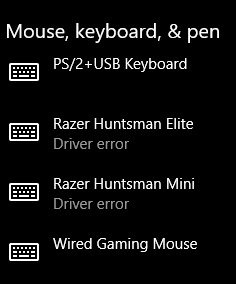
I've had the problem most people have where their products are not recognized by Synapse and I've tried reinstalling Synapse, unplugging my keyboards, and restarting my PC. I don't know if there's anything I missed but when I checked my devices in settings, it says there is a "Driver error" for my keyboards. I searched up what driver updates there could be and the only result I could find is about a firmware update(which I tried and no success). Is there any fix to this?





Sign up
Already have an account? Login
Log in with Razer ID to create new threads and earn badges.
LOG INEnter your E-mail address. We'll send you an e-mail with instructions to reset your password.