Razer Kiyo stopped working and flickering | Razer Insider
Skip to main content
Question

Razer Kiyo stopped working and flickering

  • June 6, 2024
  • 37 replies
  • 3863 views

Hello everyone,

I bought a Razer Kiyo (Model RZ19-0232) 15 months ago and have been using it daily for work meetings. The camera is typically on for about 15-30 minutes per meeting, and rarely exceeds an hour.

Today, during a call, I decided to turn on the ring light as usual. It turned on normally, but after a few minutes, it started flickering. When I tried to turn off the light, it wouldn't turn off, and the camera went off as well.

I disconnected and reconnected the USB cable, and the camera was recognized by Zoom. However, when I tried to select it and turn it on, it started flickering again and showed no video image.

Now, my computer doesn't recognize the camera at all. I've tried different USB ports and left it disconnected for a while before reconnecting. I am using a Mac with an Intel chip, connected through an Apple Multiport adapter.

It seems the camera has become completely unusable after just 15 months of use. Any ideas on what's happening?

37 Replies

webDeepCerisehead149

first, Check for Firmware Updates otherwise Reinstall Drivers and Software. These steps may help you


 Thanks,  webDeepCerisehead149.

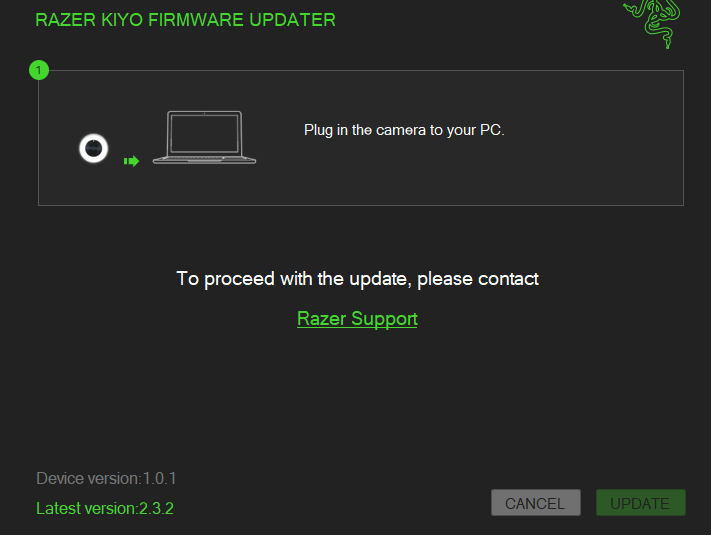
I tried updating the firmware but it’s not possible. Note in the screenshot that the UPDATE button is disabled.

It sends me to Razer support (https://mysupport.razer.com/app/answers/detail/a_id/3558)


I installed the software that was in support. When I opened the camera it started flickering and stopped working. After that the laptop stopped recognizing the camera.


Any clue?


02SirMox14
  • Insider Mini
  • August 23, 2024

Same issue here.. Any solution for this?


  • Insider Mini
  • December 3, 2024

Also have the same problem - on a Mac mini


  • Insider Mini
  • March 3, 2025

I ran into this issue, also the camera makes a static noise if you put you ear next to it, it doesn't work, windows or mac doesn't recognize the device anymore.

As of the posting of this comment, no solution has been found.


  • Insider Mini
  • March 17, 2025

I’m also having the same problem. Neither mac nor windows recognize the camera, and it just keeps flickering. When using razer synapse, I can see my razer kiyo until I click on it, and then the app freezes up and the camera disappears.


PurpleNavyzonepoly371

i have the same problem, i have tried reinstalling, drivers, uptading firmware, reinstalling synapse and nothing


Fujoshky
  • Insider Mini
  • March 21, 2025

Exact same issue here.


  • Insider Mini
  • March 31, 2025

Same issue here. My PC isn’t recognising the camera at all. 


Same issue here exactly after 15 months of use. Updating the firmware and drives didn’t help. It looks like it’s broken for good. 


Grubiqn
  • Insider Mini
  • May 21, 2025

Same issue here after 8 months working perfectly today i got exactly the same issue my wife pc and my pc doesnt recognize it at all,connect,light up then start flickering and buzzing sound near the cammera ring.Please Razer support tell us what to do or give us new firmware,old one is 2 years old!


I have the exact same problem. In the middle of a meeting the camera started flickering and the computer was not able to recognise it anymore. I updated the firmware, but still, even through Synapse, the device either seems disconnected, or is recognised and as soon as I open the Kiyo tab, the app freezes and then Kiyo is not visible among my devices anymore.


retroHeatWavealley171

Same happened to me these days. I hardly tried evering …………… not a full year.


AuraGuardian448

Same thing happened to me. Tried all troubleshooting I could but does not seem to be working.


  • Insider Mini
  • June 10, 2025

Exact same issue - any resolution?


polyWeldonBluecounty101

Exact same issue - any resolution?

Same mine just stopped working randomly recently… so weird everyone’s having this issue around the same time I tried everything that was recommended honestly looks like we all have to get a new cam lol


polyWeldonBluecounty101

i have the same problem, i have tried reinstalling, drivers, uptading firmware, reinstalling synapse and nothing


Same


sleekFuchsiaPinkdome722

any update on this? I’m having the same issue


Seeko94
  • Insider Mini
  • June 29, 2025

Today I have the same issue .

I thought the camera was broken or something but it seems something in razer synpase caused the issue.

I tried on another PC without the razer synpase and the issue happen too.

Im worried the device got defective by the last update from Synpase.


Same, this is on a mac – I’ve never used Synpase with this camera. Worked flawlessly, but now just flickers on and off.


My friend that is a solution for solving a flickering video feed from the camera, not a solution for the camera it self turning on and off rapidly.


Some people on forums wrote that a fuse could be burned in the camera …. 


Grandiosetomb

Same issue. started yesterday two days shy of the one year mark. Updated drivers/firmware. Synapse doesn’t recognize it at all. swapped ports for the update and then it just didn’t work anymore. Rebooted PC and swapped ports again but nothing.


Seeko94
  • Insider Mini
  • July 2, 2025

Time to avoid razer from now on . I will consider new products . Specially with Synpase 4 that is full of bugs. They keep moving from a version of software to another and it get worse everytime.