Razer Kiyo stopped working and flickering | Razer Insider
Skip to main content
Question

Razer Kiyo stopped working and flickering

  • June 6, 2024
  • 37 replies
  • 3823 views

Show first post

37 Replies

Hellmasker
  • Insider Mini
  • July 8, 2025

Same issue here, though I’ve had my Kiyo for 5-6 years. Luckily I had a Kiyo Pro ready to go, but judging from the comments here, my OG Kiyo is dead. Solid run tbh, I’ll be heading out to buy another Pro (or two) today. 


  • Insider Mini
  • July 17, 2025

This is a hardware failure, and for those who don’t have a warranty can only salvage this by shorting the F1 Fuse with solder. It is not recommended to short it as that may cause a future problem with your usb connection. The other solution, like some have tried is the replace the F1 fuse, by buying another from Mouser. Is it worth it? Depends for some.


Same issue here: ~2 years old Kiyo webcam worked fine today (was using OBS) until it suddenly didn’t:

  • Static noise (like electricity buzz)
  • Ring light flickering and can’t be adjusted / turned off
  • Camera not recognized by PC or Razer Synapse

Notably, my Synapse shows “Updated Recently” as today, so it could be that a Synapse update broke the webcam drivers or something. With Synapse not recognizing the webcam anymore, it seems impossible to fix it. 


Same issue occured to my camera


Same but for the first time using it (bought “usefd as new”)its really a shame


Jadetechnodepot937

 Thanks,  webDeepCerisehead149.

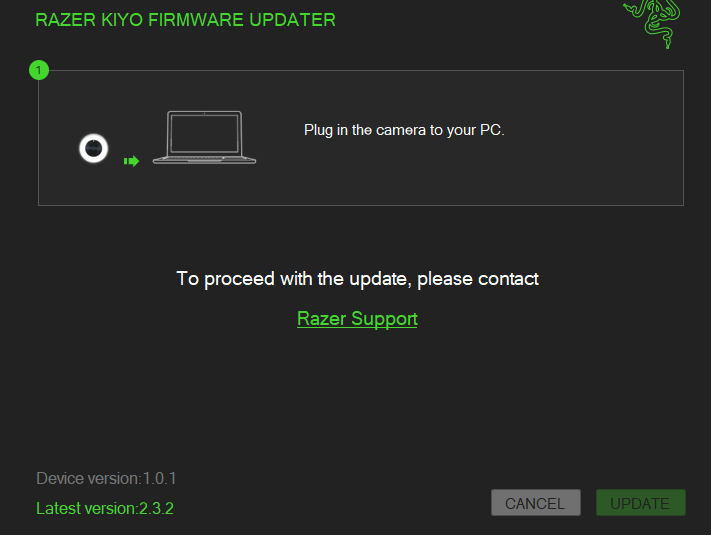
I tried updating the firmware but it’s not possible. Note in the screenshot that the UPDATE button is disabled.

It sends me to Razer support (https://mysupport.razer.com/app/answers/detail/a_id/3558)


I installed the software that was in support. When I opened the camera it started flickering and stopped working. After that the laptop stopped recognizing the camera.


Any clue?


You can update the firmware in this scenario. I was able to do it. Here’s how I performed the update:

  1. Since you are on 1.0.1, first, get the 2.0.3 R1 version of this firmware update tool and we’ll run that first: https://rzr.to/o5go5b
  2. When you first plug-in the camera, the UPDATE button will be green briefly.
  3. Quickly click the UPDATE button, and you have to be VERY fast.
  4. The update might get to about 23% and stop, this happened to me.
  5. You’ll need to disconnect and reconnect the camera from USB to try again.
  6. Keep doing STEPS 2 to 5 until you can get past 23% and it will finish up to 100%.
  7. You’ll get a message to unplug the camera from USB one last time and plug it in again. Do that.
  8. Now get the firmware update for 2.3.2 R2: https://rzr.to/Wkd5P9
  9. Follow the same process you used to update from 1.0.1 to 2.0.3 R1, STEPS 2 to STEP 7.
  10. Congratulations! You’re a hackerman! Next hack, get your time back for how hard it was to install this update: 


P.S. Razer Kiyo Firmware Instructions: https://mysupport.razer.com/app/answers/detail/a_id/1664/kw/kiyo%20firmware


I might have got somewhere with this. After disconnecting and connecting a bunch of times, I was able to quickly turn the ring light off. The camera then worked fine for 10 minutes or so whilst I was on a meeting. Just tried another again and it seemed to work as the light was off. Not sure how long it will last but seems to work without the light. 


This is a hardware failure, and for those who don’t have a warranty can only salvage this by shorting the F1 Fuse with solder. It is not recommended to short it as that may cause a future problem with your usb connection. The other solution, like some have tried is the replace the F1 fuse, by buying another from Mouser. Is it worth it? Depends for some.

Thank you for this! I was pulling my hair out. Goodbye RAZER, I guess. This is the 3rd device I’ve bought from them that has shorted out in before the warranty.


  • Insider Mini
  • November 19, 2025

Exactly the same issue here! Although I can get it the camera to be acknowledged by Windows *sometimes*, however whenever I actually activate it - via any video calling software, or even via Razer Synapse control panel, it gives me the first frame of the video then totally stops working, and stops being acknowledged as a visible device. This is really frustrating and seems to have only started happening since I began to use the ring-light, which started flickering very shortly after the first time I turned it on, then a few weeks later, I’m experiencing this same disappointment. Not cool for a premium product that was meant to be a big step above the cheap alternatives supposedly with good engineering quality.


bestOPALPinkLavender920

Boo. I really liked this camera. It is weird that this seems like such a common issue for everybody. This happened to me in less than one year of usage. 

I will reconsider buying Razer products tbh


  • Insider Mini
  • December 18, 2025

Also have the same problem and found this thread… i dont know how long i bought it, but light flickering, when it plugs, it shows device second or two later starts flickering, device vanishes from the synapse or discord, and do a static noise… it’s GG i guess, i will reconsider another brand… i had a full razer setup back in the days, and since time goes by i’ved switched to another brands and i’m sad this brand is going this direction


bicyclePaleGreenfast953

Same issue with no clear solution. Sad to see a good company like razer going downhill due to poor tecnology and support.