Why is there no Mac software for the Kiyo Pro? | Razer Insider

Skip to main content
Question

Why is there no Mac software for the Kiyo Pro?

  • March 23, 2023
  • 34 replies
  • 31631 views

Show first post

34 Replies

  • Insider Mini
  • August 6, 2025

Razer Synapse 4 is now released for macOS, but Razer Kiyo products are not yet supported. Anyone has a clue when Kiyo products will be supported?
https://www.razer.com/eu-en/synapse-4-mac

Is the list of compatible products for macOS evolving quickly? And have older products been supported?


alexbochel
  • Insider Mini
  • April 8, 2026

Still no sign of Kiyo support on synapse for mac :/


Fonucci
  • Insider Mini
  • October 7, 2026

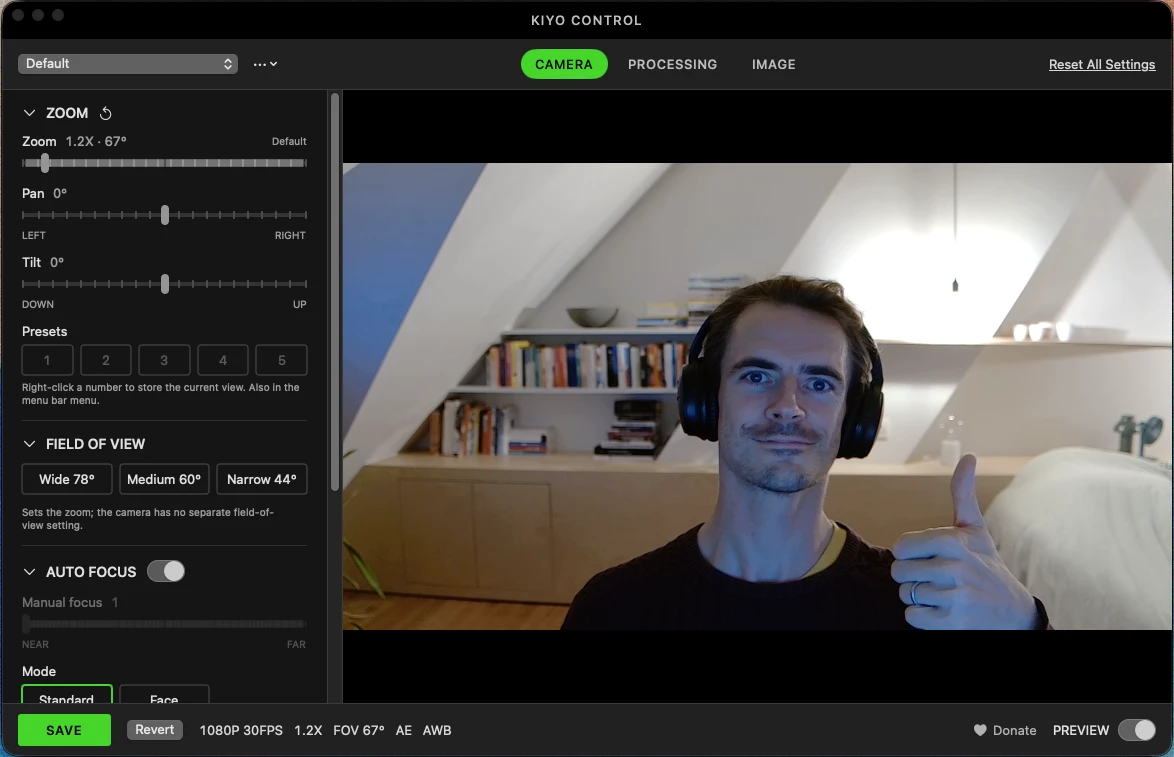
Like a lot of people here, I got tired of waiting for Kiyo Pro Ultra support in Synapse for Mac, so I built my own: Kiyo Control. It's free and open source.

What it does

  • Live preview: changes apply instantly, nothing sticks until you hit Save

  • ISO, shutter speed, metering, exposure compensation, face autofocus, AF tracking, mirror, noise reduction, lens distortion correction

  • Zoom, pan/tilt, field of view presets, white balance, brightness and the rest

  • Profiles, automatic backups, and a menu bar app that reapplies your settings when the camera connects

  • Save writes the Razer settings to the camera itself, so they stick on other computers too

Install: one line in Terminal, or download the zip: https://github.com/f0ns/kiyo-control

Unofficial, not affiliated with Razer. HDR isn't supported yet, because nobody knows the command. If you have Windows + Synapse and can capture USB traffic while toggling HDR, that would complete it.


alexbochel
  • Insider Mini
  • October 7, 2026

Like a lot of people here, I got tired of waiting for Kiyo Pro Ultra support in Synapse for Mac, so I built my own: Kiyo Control. It's free and open source.

What it does

  • Live preview: changes apply instantly, nothing sticks until you hit Save

  • ISO, shutter speed, metering, exposure compensation, face autofocus, AF tracking, mirror, noise reduction, lens distortion correction

  • Zoom, pan/tilt, field of view presets, white balance, brightness and the rest

  • Profiles, automatic backups, and a menu bar app that reapplies your settings when the camera connects

  • Save writes the Razer settings to the camera itself, so they stick on other computers too

Install: one line in Terminal, or download the zip: https://github.com/f0ns/kiyo-control

Unofficial, not affiliated with Razer. HDR isn't supported yet, because nobody knows the command. If you have Windows + Synapse and can capture USB traffic while toggling HDR, that would complete it.

Cool! I have tried other software for it that works great, the only issue is none of them have HDR. Until one has HDR I am still waiting/looking for a new camera xD


Fonucci
  • Insider Mini
  • October 7, 2026

If someone has  Windows + Synapse and can capture USB traffic while toggling HDR, I’ll get it done.


Fonucci
  • Insider Mini
  • October 7, 2026

I think I got HDR in now, added it to the readme:
 

Unconfirmed HDR uses the camera's backlight compensation: shadows come up, highlights stay. Whether Synapse's HDR sends a different Razer command is unknown; the Dell UltraSharp HDR command (ff 11) is rejected.

Fonucci
  • Insider Mini
  • October 7, 2026


Updated the repo.

Razer if you need some help with Synapse: I’m open to discuss how I can help boost development to get the support for all your beautiful products on mac for all your customers.


alexbochel
  • Insider Mini
  • October 7, 2026


Updated the repo.

Razer if you need some help with Synapse: I’m open to discuss how I can help boost development to get the support for all your beautiful products on mac for all your customers.

Legend. I can’t wait to download this!


Fonucci
  • Insider Mini
  • October 7, 2026

If you like it give the star a repo, feedback is always welcome to improve (github has an issue queue for that).

Enjoy!