

[CHROMA] Starlight Single Color Reverts to Gradient

- Community Cowboy

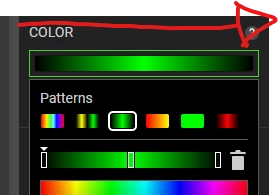
In Chroma Studio, with the Starlight preset, when trying to change the color on the flat/single color setting, whenever I change the default green to another color, it automatically switches to gradient.
Unsure if this works on other presets.
Need Help? Start a thread in the Support Forum. DM's may be delayed. Ignored DM's = I don't know. Follow me on Twitter @omgdkdz

This topic has been closed for replies.

Sign up
Already have an account? Login
Log in with Razer ID to create new threads and earn badges.
LOG INEnter your E-mail address. We'll send you an e-mail with instructions to reset your password.