


Audio stutters/robotic when opening OBS after Synapse July 2026 update | Razer Insider
Skip to main content
Solved

Audio stutters/robotic when opening OBS after Synapse July 2026 update

  • August 7, 2026
  • 3 replies
  • 39 views

xyphoe

I was away for 2 weeks, I come back and Synapse updates - now when I open “OBS Studio” immediately audio across my PC stutters and goes robotic - even YouTube videos start going half speed!


HELP!! I’ve got a stream to do! I’ve made no changes in/to OBS and it was perfectly fine for years.

I’ve tried updating OBS to the latest version. I’ve also completely uninstalled all Razer software/drivers, unplugged all Razer devices, restarted and installed Synapse from fresh - it has made no difference.

What do I need to do to fix this?

Thanks!
Best answer by xyphoe

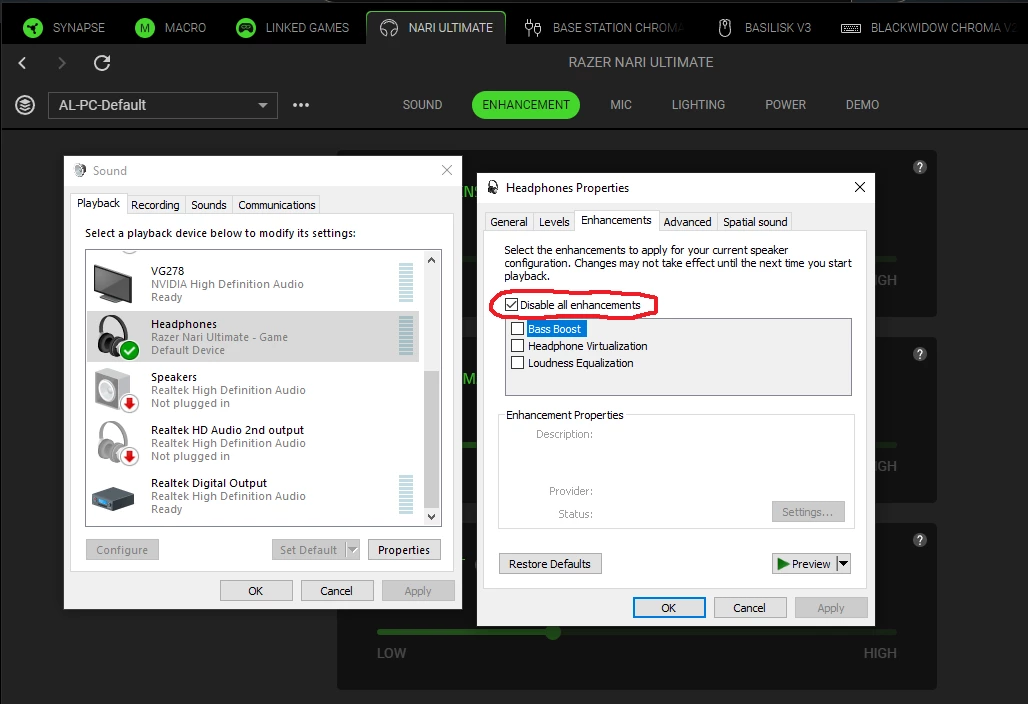
OK I eventually found the fix for this. I've never had to change this setting before, but this update seems to have changed this in Windows for some reason. You need to open Windows "Sounds" and go to the "Playback" tab. You can easily find this too in Synapse from the "SOUND" tab too, scroll down to "SOUND PROPERTIES" and click "Open Windows Sound Properties". Find your headphones there, in my case it was "Razer Nari Ultimate - Game" then click the "Properties" button. Click the "Enhancements" tab then click "Disable all enhancements" - this is despite all the below enhancements not being selected anyway!! And click "Apply" then "OK". 

THE "Disable all enhancements" MUST BE TICKED/SELECTED

This resolved my issue.

Razer should look into why their most recent update changed this setting. The last Windows update on my PC was 16th July, long before this issue occurred and updated THX Driver (28th July) and Synapse release (5th August).

3 Replies

xyphoe
  • Author
  • Insider Mini
  • August 7, 2026

I should add I am using Razi Nari Ultimate (along with Blackwidow Chroma V2 keyboard, Basilisk V3 mouse and Base Station Chroma - however all 3 of these devices were left unplugged after reinstall of Synapse and tested with just the Nari).


xyphoe
  • Author
  • Insider Mini
  • August 9, 2026

OK so this is only happening with OBS Studio.

Running an AAA game, no audio issues.


I did a test in OBS. Created a whole new Scene Collection, and started creating my scenes slowly piece by piece whilst having some audio playing (eg from a YouTube video) - all was fine to start with but as more sources were added, particularly captures or ones that play media (I have a lot effects on my streams) audio issues started to crop up… slight audio glitches, clicks and lag. As more was added, it got worse and worse.

It’s definitely a Synapse + OBS thing.

From the update/install applied on the 5th August → 


I last streamed / used the PC with OBS on the 23rd July and all was fine. I went away on holiday, switched on the PC on 1st August… the first opening OBS to setup a stream was 7th August which is when I noticed this issue. Ties in with this Synapse update and previous patches within it.


xyphoe
  • Author
  • Insider Mini
  • Answer
  • August 10, 2026

OK I eventually found the fix for this. I've never had to change this setting before, but this update seems to have changed this in Windows for some reason. You need to open Windows "Sounds" and go to the "Playback" tab. You can easily find this too in Synapse from the "SOUND" tab too, scroll down to "SOUND PROPERTIES" and click "Open Windows Sound Properties". Find your headphones there, in my case it was "Razer Nari Ultimate - Game" then click the "Properties" button. Click the "Enhancements" tab then click "Disable all enhancements" - this is despite all the below enhancements not being selected anyway!! And click "Apply" then "OK". 

THE "Disable all enhancements" MUST BE TICKED/SELECTED

This resolved my issue.

Razer should look into why their most recent update changed this setting. The last Windows update on my PC was 16th July, long before this issue occurred and updated THX Driver (28th July) and Synapse release (5th August).