Blackshark V2 X no sound | Razer Insider
Skip to main content
Question

Blackshark V2 X no sound

  • August 26, 2025
  • 1 reply
  • 22 views

bubblez92

There is absoult NO sound playing, I see on Discord that the mic is working, but i can’t hear any thing, i did a lot a trouble shooting, tried different posibilities for the aux to put in, did the aktivation thingy. my PC hates the new headset i guess

This topic has been closed for replies.

1 Reply

Razer.Aero
Forum|alt.badge.img
  • Razer Support
  • August 26, 2025

Hi bubblez92,

I understand that your Razer BlackShark V2 X headset is not producing sound. Here are the steps to fix the issue:

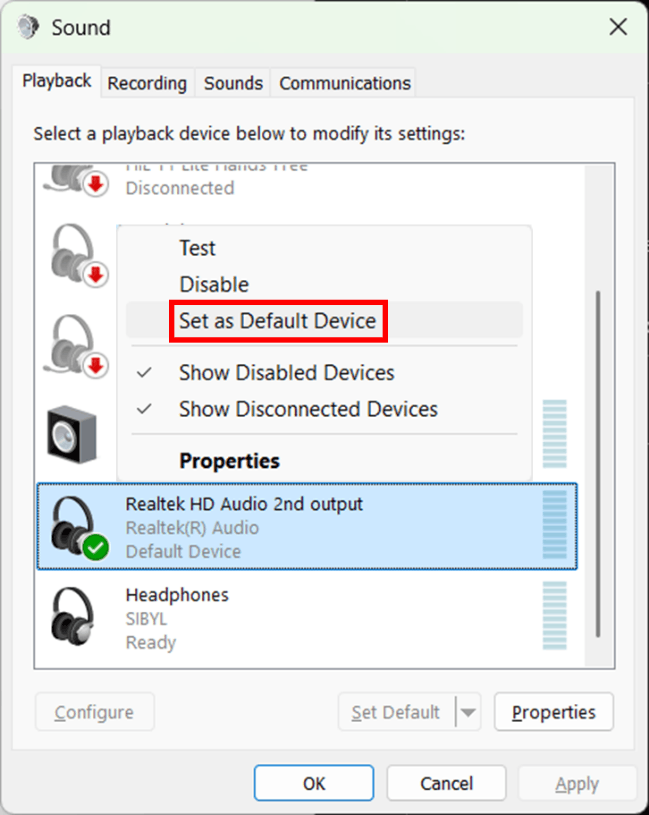
1. Make sure the headset is set as the default playback device.

  • Right-click the speaker icon in the system tray and select "Sound settings".
  • Under the "Advanced" section, click "More sound settings".
  • In the "Playback" tab, right-click your audio device (for example, Realtek HD Audio) and select "Set as Default Device". A green checkmark indicates it is set as default.
  • Playback tab in the sound settings window

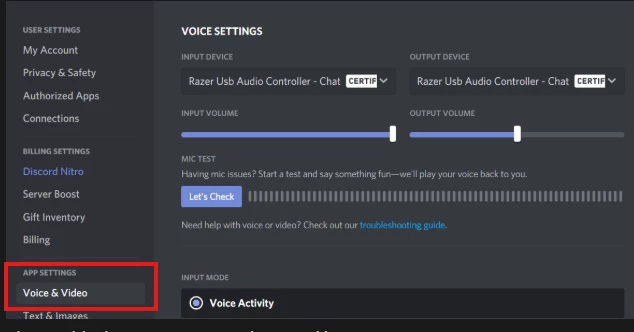
2. Please define the Input and Output settings in the Discord Voice Settings. See the sample screenshot below.


You can also visit this article for troubleshooting guide. ​​​​​Feel free to send me a PM with your device’s serial number if you need further assistance. All the best!

*Thread locked to curb the conversation to PMs.