


Razer released an update that silent installed while system was in use, ‘forced’ parameter, Ignored errors and destroyed the usb-c functionality, ran alongside other updates and ignored windows conflicts and errors leading to the PC crash reboot as firmware, drivers, apps where installing with conflicts.
logs all show status codes as successful but the details and description are clearly failed attempts, but the update is forced to run regardless of system conflicts and Razer didnt bother to add error handling for the install.
- 16+ hours spent chasing the issue
- 12 of those hours were caused by incorrect event logs entered by Razer
- $250 headset was modified by Razer without notice to the user
- The change was forced to install regardless of the user’s system or any conflicts
- As a result, the product now has to be refunded or replaced by taking it to a store
- Under consumer rights and section 274, I will ask the store to cover the reasonable costs caused by the failure
- The store can then recover those costs from Razer under law
- Costs to be covered:
- 16+ hours of my time
- 2 trips: one to drop off the headset, and one to collect the replacement
- A replacement, if they want to attempt a repair first
Package/App Names & Versions
Razer App Engine / Synapse 4.0.896; THX Spatial Audio 4.1.28.1054; Razer driver packages 2.3.0.809
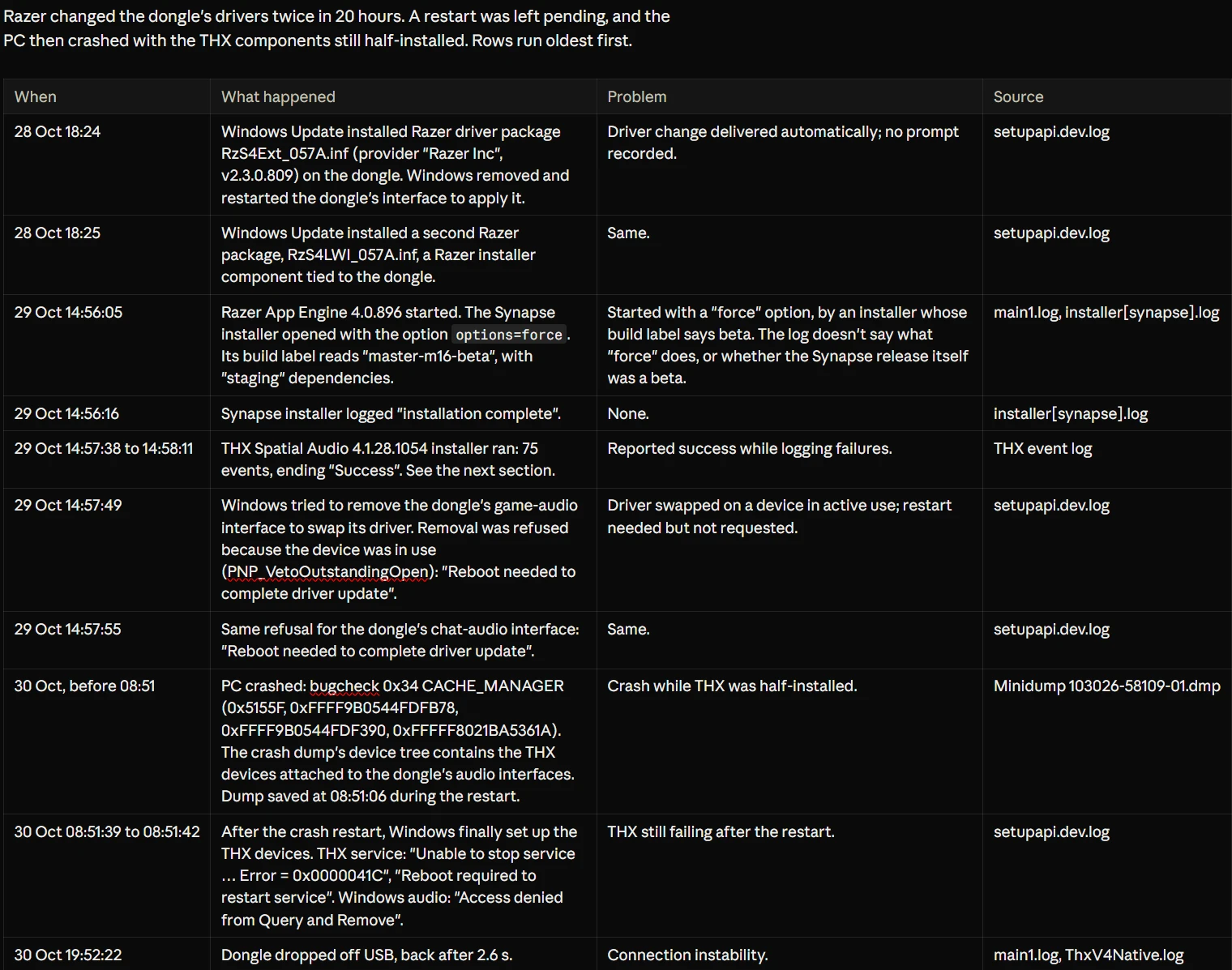
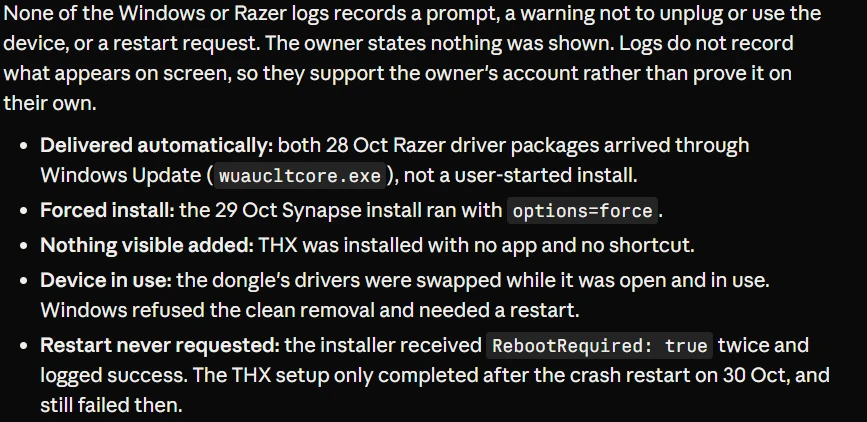
Razer App Engine 4.0.896 started. The Synapse installer opened with the option options=force. Its build label reads "master-m16-beta", with "staging" dependencies.
THX Spatial Audio 4.1.28.1054 installer
Razer driver packages arrived through Windows Update (wuaucltcore.exe), not a user-started install.
Details and events, timeline below
So the headset still worked, it just stopped charging and then would be detectable via any cable on two pc’s, not even just power or a red charging light, no audio lines working either but the wireless audio and mic still functioned and only the sounds for function buttons was gone.
2 USB-C 240gb/s PD chip cables → nothing
3x USB-A to usb-c, qc ./ no qc → nothing
there is not communication with the port, the controller is unresponsive with no data lines or power getting through.
the battery is fine and charging with a external charger with the right battery settings got it to 100% and it worked as usual.
then i start finding alot of logs and events from the time it roughly broke as the next day it was drained and unusable which show that razer pushed a beta THXCA firmware update with ‘Forced’ set and it reports everything as status succesful even though the rest of the event shows it couldnt start/find/install what it was trying to but it continues regardless as its forced and its reporting everything inaccurately.
Razer changed the dongle's drivers twice in 20 hours. A restart was left pending, and the PC then crashed with the THX components still half-installed. Rows run oldest first.
I eventually found 75 events for THXCA for only one day and the same day issues started, all silently installing and modifying system drivers while system is in use and not even stopping when it fails to find what it was stopping or installing/uninstalling, oh and its a Beta update so probably has issues and shouldnt be silent installed and asked to also control other services and drivers as well as its own.
Initial Logs & events of note
THXCA Specific Event Viewer logs. (Found After the top image)
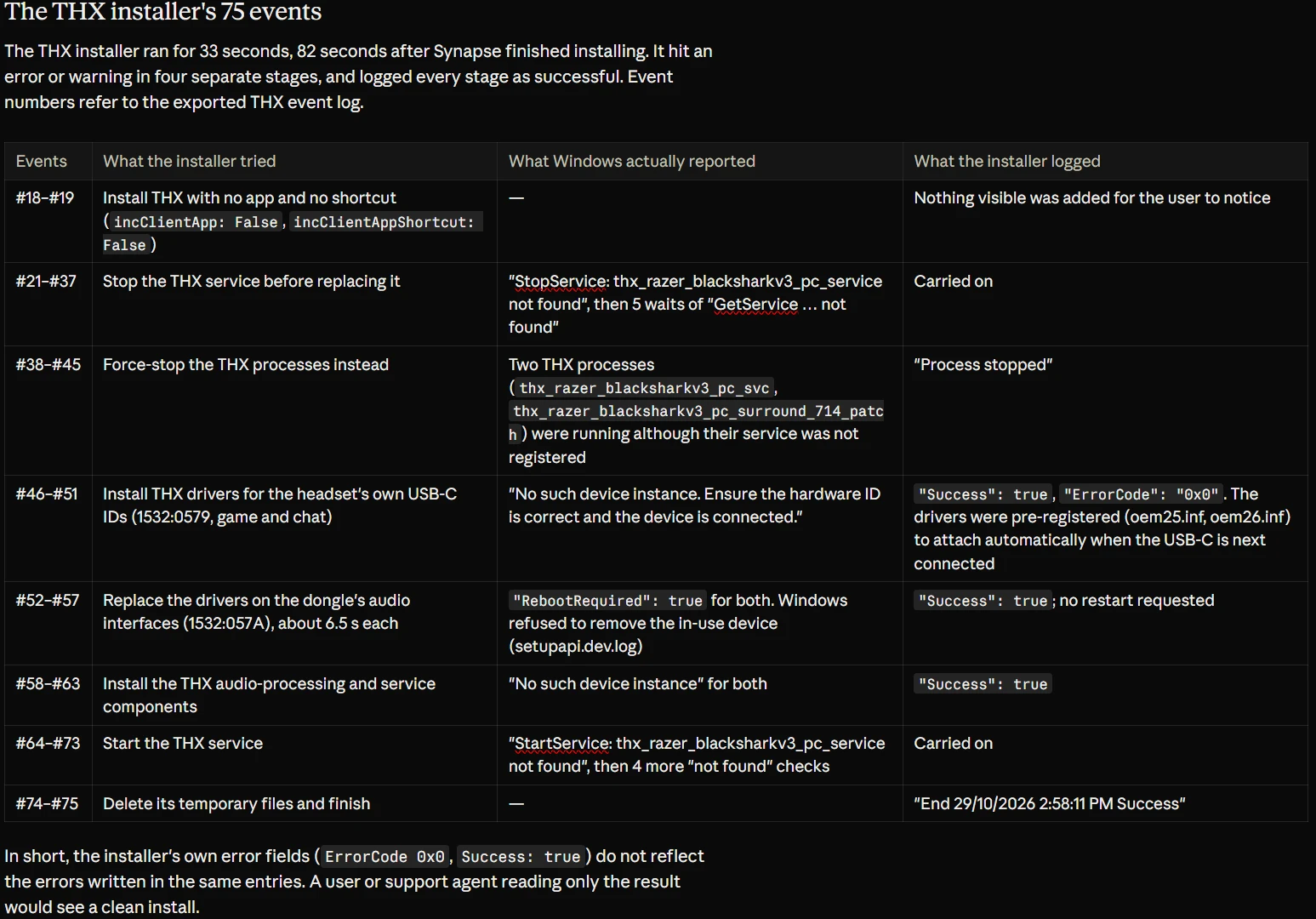
Note the razer log files and any other driver repositories for the device where searched with AI and given instructions to research the possible locations as well as scanning all of appdata/ProgramFiles/documents and it found stuff based on reported files locations and standards, after finding the THXCA event folder i searched and found twice it had serious issues and said success with subsequent events failing to complete but success status so i had Opus 5.5extra go through all 75 and user has IT systems And network engineer background but thats what was and wasnt done solely by the AI model, also the physical tests line up but disclosure incase.
Razer, why cant you be bothered to test your updates, why do you show negligence installing updates silent without user notice and without any error handling and forced to continue even if an app stops it or conflicts.
Why cant you tell users before just like you do with the patch notes, why cant you let the installers pause for conflicts and wait for a decision, why cant you respond to other users with the issue publicly so others can get help, why should i go in store , throw a headset through a display then say its all good succesful update and then jump on it till its broken and say updates done and finished all up to date.