Razer Blackshark V3 audio delay | Razer Insider
Skip to main content
Question

Razer Blackshark V3 audio delay

  • December 2, 2025
  • 1 reply
  • 26 views

Skjeggemann

Is there a way to turn of the ‘’delay’’ audio tune in?

for example watching movie and rewind or going forward the audio takes 3 sec before its back to normal.

This topic has been closed for replies.

1 Reply

Razer.ScarletRouge

Hey there. ​@Skjeggemann 

I understand that you are having an audio delay issues with your Razer Razer Blackshark V3. Could you please confirm if the issue occurs with both connection (wired and wireless)?  Please try these troubleshooting steps on this link to help resolve the issue.
 

  • Power is important. Make sure your headset is fully charged before troubleshooting.

  • Switch it ON. Make sure the wireless mode is ON or the button is switched to the correct wireless mode. Check your product user guide on how to configure the wireless mode of your headset.

  • Get the latest Windows update.

  • Update the firmware on your headset if it is on the list.

  • Download and run the Pairing Utility of your headset. If your device is not listed, skip this step.

  • Fix sound or audio problems in Windows.

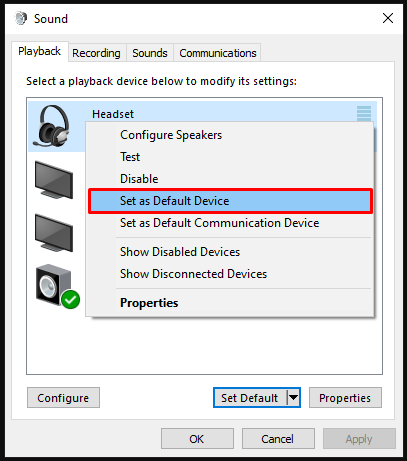
  • Ensure your headset is set as the default playback device.

    Default playback device

  • Rule out software issues. Close all audio enhancing software including Razer Synapse, Razer 7.1 Surround Sound, THX Spatial Audio and check if the issue persists.

    Razer Synapse on the system tray

  • If closing Razer Synapse fixed the issue, reinstall your headset drivers, including Razer SynapseRazer 7.1 Surround Sound or THX Spatial Audio. Restart your PC then test your headset.

  • Check if the issue persists with a different PC.


If the issue persists after performing the troubleshooting steps, please send me a private message together with your device's serial number and proof of purchase/receipt in PDF format so I can check its warranty details for a possible warranty claim. You can upload your proof of purchase to your Google Drive and send me the link. Make sure that the link is set the sharing settings to "Anyone with the link can view". Thank you!


*Thread locked to curb conversation to PM.