Razer Kraken TE THX spatial audio button issue | Razer Insider
Skip to main content

Razer Kraken TE THX spatial audio button issue

  • October 16, 2020
  • 10 replies
  • 1219 views

so, first off everything is functioning correctly EXCEPT the actual button on the USB controller doesn't turn THX on/off after rebooting. worked fine on install, first reboot next day and i can only turn THX on/off in the synapse program. i reinstalled synapse and the button worked again until rebooting the next day, then i had the same problem. Not product breaking but i'd like to use the controller...any ideas?
This topic has been closed for replies.


10 Replies

  • November 26, 2020
I also have this issue after getting my headset today. It works for like a minute in between installs of the Synapse app but that's all. Have you found a solution?

  • December 20, 2020
Guys, after 6 months of trying to figure out a way to fix it I've finally found the solution. To fix the button not doing anything, you have to open Settings > Privacy > Voice Activation and then disable "Choose your default app for headset button press". I hope this helps :)

  • January 21, 2021
Didn't work for me, disabled the Voice Activation, but still the button doesn't nothing.

Sye_The-Vie
Vanguard
  • VANGUARD
  • January 22, 2021
I hope the following thread/s (on my post) helps all of you /thx-not-available-with-call-of-duty-cold-war-razer-nari-ultimate.67501/#post-714653 /kraken-te-7-1-no-sound.67043/#post-706436 Otherwise send me what you see on your Synapse audio tab menu and Windows device manager audio menu

  • Insider Mini
  • January 22, 2021
Sye_The-Vie
I hope the following thread/s (on my post) helps all of you /thx-not-available-with-call-of-duty-cold-war-razer-nari-ultimate.67501/#post-714653 /kraken-te-7-1-no-sound.67043/#post-706436 Otherwise send me what you see on your Synapse audio tab menu and Windows device manager audio menu
I did what you said did not work for me. There is nothing changed when I say set to default settings.

Sye_The-Vie
Vanguard
  • VANGUARD
  • January 22, 2021
msevket
I did what you said did not work for me. There is nothing changed when I say set to default settings.
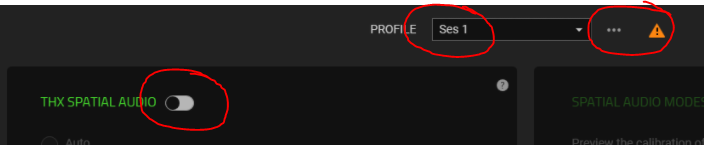
Your "THX SPATIAL AUDIO" needs enabling, and I see an exclamation mark on your synapse. I am guessing Ses 1 is your computer description (name). If not you need to create a sound profile for your PC. Click the 3 dots and select "add" to create a new sound profile under your pc name. See if there is a new Synapse update~~~

  • Insider Mini
  • January 22, 2021
I created a new sound profile. And I keep printing the exclamation mark but unfortunately nothing changes.

Sye_The-Vie
Vanguard
  • VANGUARD
  • January 22, 2021
I do recall I had a same issue, just cannot trace back what I did to fix it. I just uninstall everything and step by step figure out. Which works most of the time. Try contact RAZER support on this one if you have to..

  • Insider Mini
  • January 22, 2021
Sye_The-Vie
I do recall I had a same issue, just cannot trace back what I did to fix it. I just uninstall everything and step by step figure out. Which works most of the time. Try contact RAZER support on this one if you have to..
I contacted them and they couldn't do anything. They said wait for the update and I have been waiting for this for 2 months.

  • March 8, 2021
iPete102
Guys, after 6 months of trying to figure out a way to fix it I've finally found the solution. To fix the button not doing anything, you have to open Settings > Privacy > Voice Activation and then disable "Choose your default app for headset button press". I hope this helps :)
I disable "Choose your default app for headset button press" and restart the pc. This worked for the volume button, but not for the THX button...