Sidetone on Razer Kraken V3 X | Razer Insider
Skip to main content
Question

Sidetone on Razer Kraken V3 X

  • June 8, 2024
  • 2 replies
  • 524 views

I just purchased a Razer Kraken V3 X and I’m having trouble looking for and enabling sidetone. I tend to speak extremely loud, and sidetone helps me control my volume so I’m not constantly shouting. The option isn’t showing up in Synapse when I go to audio, all I get is volume and sound properties, which takes me to windows sound properties. I don’t mind using the audio playback through windows, but there is a delay that is driving me crazy and I would rather use the razer sidetone. Please help?

2 Replies

  • Insider Mini
  • December 8, 2024

I also have this perplexing issue. EVERY SINGLE BIT OF SUPPORT SAYS IT IS SUPPOSED TO EXIST.

Yet it seems that Razer has disabled it for this CLOSED ear headset specifically, EVERONE I KNOW says I YELL into my microphone, and who wouldnt? this is basically ear protection with speakers inside of it.

I’m not worknig the flight line Razer. Give me side tone. its 2024, EVERY HEADSET EVER SHOULD HAVE IT


  • Insider Mini
  • September 19, 2025

Hey folks, I was actually looking for the specs on my Kraken to remind me what the button next to the volume wheel is when I found THIS page and coincidentally I just answered a reddit question on the Sidetone.


The button is for THX. Whatevs. Barely use it.


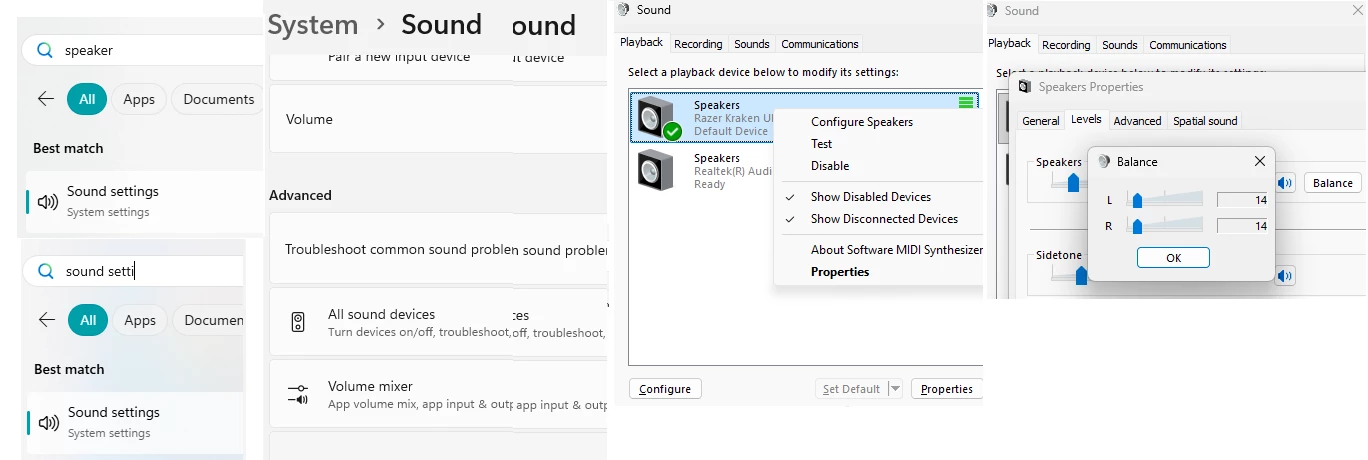
Find the Sound Properties on Windows, either clicking it under the Kraken tab on the Razer app or Win searching for Speaker or Sound Settings. Then navigate over to more sound options. You need to find the window with the tabs for Playback, Recording, etc…


Open the Kraken Speaker properties and you’ll see yet more tabs. The Levels tab has not only the Balance that I had to fix but also this Sidetone option, one I didn’t even know existed. You know what else I never knew existed? A well-hidden option to change each ear volume individually.


Please dislike, unsubscribe and leave a silly comment up above.