Razer Laptop Screen Tearing | Razer Insider
Skip to main content

Razer Laptop Screen Tearing

  • April 14, 2020
  • 9 replies
  • 61 views

I close an application but I still get screen tearing from it even after I shut it down what is causing this?
This topic has been closed for replies.


9 Replies

M-S-G
  • Insider
  • April 14, 2020
Oh, this could be a faulty graphics card. Have you ever done a recovery?

  • Author
  • April 14, 2020
M-S-G
Oh, this could be a faulty graphics card. Have you ever done a recovery?
do you mean like factory reset? Yeah i did it yesterday when it wasnt going away but i still have the same issue

M-S-G
  • Insider
  • April 14, 2020
What Razer Blade model do you have? How old is it? Technically gifted? Remove the cover and disconnect the CPU and GPU unit fans, clean with compressed air and ethanol. Maybe the units don't get enough cooling.

  • Author
  • April 14, 2020
Razer Blade 14, around a year now, i got it for 100 bucks off of my dads friend, thanks for the help

M-S-G
  • Insider
  • April 14, 2020
Yes, the 14" is already a bit older. I would clean the fans here. I think a lot of dust has settled.

Joikansai
Vanguard
  • Community Ranger
  • April 15, 2020
Rakadu
I close an application but I still get screen tearing from it even after I shut it down what is causing this?
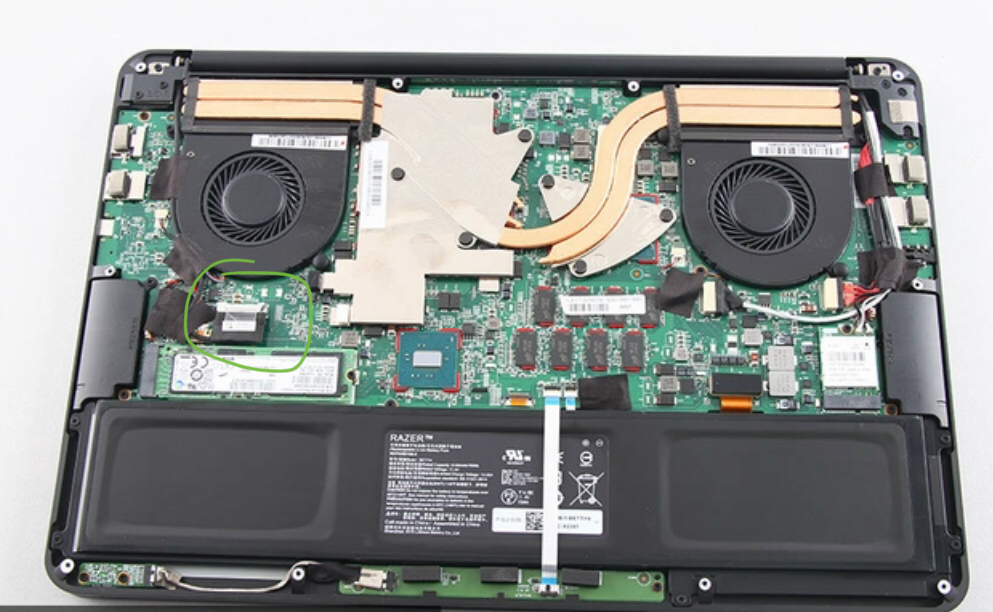
Try to tightening display connector, I believe on Blade 14 is on that green mark, the bottom right is for battery and the other one (under right fan) is for ac adapter power supply when I’m not wrong.

The only way to eliminate tearing is to use vsync/gsync. However, you can reduce its impact by keeping the frames steady DQFanSurvey

  • Author
  • April 17, 2020
WarmBlackfrontcove738
The only way to eliminate tearing is to use vsync/gsync. However, you can reduce its impact by keeping the frames steady DQFanSurvey
wow its like im playing games on my windows 10 background how did you know

  • Author
  • April 17, 2020
Joikansai
Try to tightening display connector, I believe on Blade 14 is on that green mark, the bottom right is for battery and the other one (under right fan) is for ac adapter power supply when I’m not wrong.
This semi worked, thanks!