Razer Pro Click and "Windows + ;" shortcut | Razer Insider
Skip to main content

Razer Pro Click and "Windows + ;" shortcut

  • December 11, 2021
  • 4 replies
  • 49 views

YannLootgieter
Hello, I want to know if it is possible to set a button of the Razer Pro Click mouse to execute the shortcut "Windows (+) ;" which opens the emoji panel of Windows 10. Thanks! :smile_::rolleyes:
This topic has been closed for replies.

4 Replies

FiszPL
Vanguard
Forum|alt.badge.img+1
  • VANGUARD
  • December 13, 2021
Yes, it's possible to do via marco in Synapse 3.

YannLootgieter
  • Author
  • Insider Mini
  • December 13, 2021
FiszPL many, many thxxx for answering, but I must say that I don't how to do it in Synapse. I need some help, thxxx

FiszPL
Vanguard
Forum|alt.badge.img+1
  • VANGUARD
  • December 13, 2021
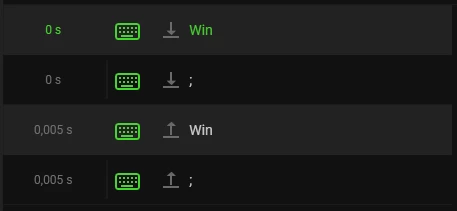
Just go to Synapse -> macro tab, then click on "+" sign to add a new macro. Then you can record a macro. When it starts press the key combination that you want to assign in a macro and click on stop. Also to make key combination to work you must rearrange the lines a bit - you must have 2 hold buttons one below the other for eg. press down WIN and below press down ; Just like on screenshot below. You can edit delay for each line.

YannLootgieter
  • Author
  • Insider Mini
  • December 15, 2021
FiszPL, hello thank you very much for your help! it's really great :smile_:! Good day and Merry Christmas and very happy end of the year 2021:smile_: