Razer Tartarus Keypad Help | Razer Insider
Skip to main content

Razer Tartarus Keypad Help

  • September 9, 2024
  • 2 replies
  • 36 views

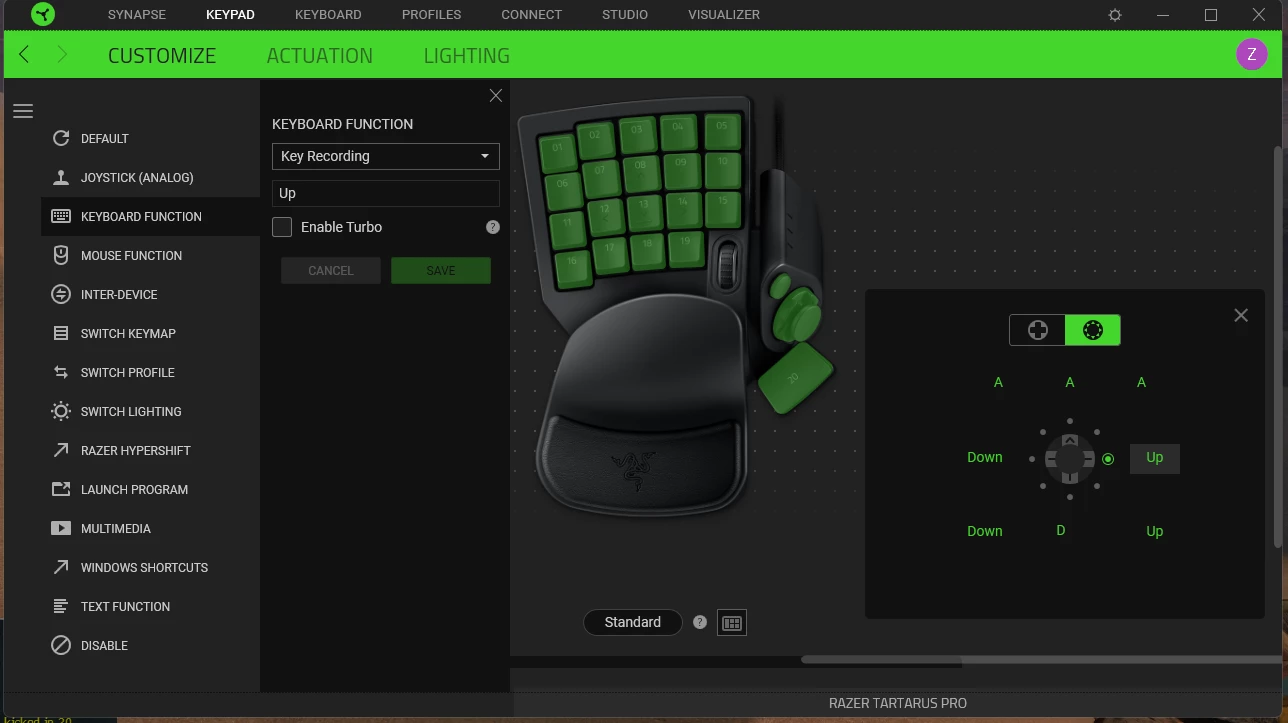
Hello, i have been using the Tartarus keypads for a few years and love them for the most part. I seem to have run into an issue that i haven’t been able to figure out how to fix so i am looking for some help. I was setting up a new profile for the new Wukong game and now i seem to have screwed up my D-Pad for all of my profiles and games. I can now only move forward, left, right and backwards none of the omni directions work any more like they used too. Pretty hard to jiggle peek when if you rotate the joystick you completely stop each time you hit the forward left or right inputs. When i am on synapse i click on the d pad and you have two joystick options one is the omni directional one and the other is only the 4 inputs up down left and right. If i click the omni directional and go into a game i have no movement at all but if i select the the 4 inputs one movement works I feel that i have done something in synapse to screw everything up but i don’t know what??? I have reset and deleted all profiles and i have deleted and reinstalled synapse but same issue, is there a keybind im forgetting about to make the omni directional movement to work? Oddly enough if i stop synapse from running completely i get the omni-directional movement back so ya not sure what to do so reaching out here. Thanks

2 Replies

CyanProcessretroplace836

This is absolutely atrocious. The Tartarus key mapping was just fine how it is, and as much as I’m glad that they added the joystick function to the Tartarus, there’s no way to have the games register the keys that we are putting into the device in the first place for this function to work outside of mapping the keys as a controller.


I use this as an MMO gamer, and every time I push the joystick towards a corner, my character just flat stops in place. I wanted to add this onto this post because I think what they’re going through is the same thing that I’m going through.

@Whiteroadeasy615 , there’s an option on the bottom of the Keypad>Customize section on the bottom right to add the omni directional, this might help you in other games but it will not correctly correspond with the game you’re playing unless you switch the game over to controller mode.

@Razr development or whoever it concerns: Please give the option to keep things to how they used to be if there isn’t already an option ( I certainly can’t find it ) or simply understand that taking away any form of input from your controllers is going to cause discourse like this.


CyanProcessretroplace836

Side Note: If I’m ranting about something that was added and no thought was put into the corner inputs, I recommend adding a “Smart” input as an option that will predict the next movement. For example, if I’m moving left and my next input is top/left, it’s natural that my next movement would be forward, thus, fixing the lack of input coming from the corner inputs.

@Whiteroadeasy615, the only fix I’ve found that may help you is to fully switch out the controller inputs made for the radial controls, into keyboard functions:


I realize my mapping is completely hecked, however, I set the top buttons to go forward, the bottom corners going towards the general direction according to which side, left with bottom left, and right with bottom right and back as walking backwards. From there you can add the peeks to those so it acts how you where using it before and hopefully this clears things up for you and whatever dev that’s about to find the shitshow I just handled roflmao