

Razer Ortana Chroma V3 X key spamming after Windows+L | Razer Insider
Skip to main content
Question

Razer Ortana Chroma V3 X key spamming after Windows+L

  • Feb 23, 2025 6:39 PM UTC
  • 7 replies
  • 288 views

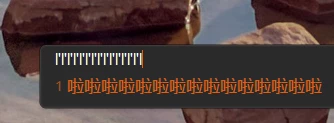
Just got the keyboard yesterday, everytime I do Windows+L the l key just ends up getting stuck most of the times.
Things I’ve done:

  • Removed macros and disabled snap tap then uninstalled synapse.
  • Tried to research for the keyboard driver but mine doesn’t exist.
  • Plugged it into different ports.
  • Cleaned the keyboard.
  • Reinstalled synapse.

Please help me, this is very frustrating as I have to reconnect the keyboard everytime it happens.
7 Replies

  • Insider Mini
  • Sep 20, 2025 8:21 AM UTC

Did you ever figure this out? Having the same issue with the same keyboard.


  • Insider Mini
  • Jan 24, 2026 6:10 PM UTC

Have you found the problem ? i have the same keyboard and the same issue, but can’t get to solve the problem


  • Insider Mini
  • Jan 31, 2026 6:13 PM UTC

I have the same keyboard and the same issue, alter press win+L,keyboard repeat press l key. I believe it’s Razer synapse bug.  Quit Razer synapse win+L will be ok. Can anyone solve this???


venturePastelPinkcity514

Hey! That sounds really annoying. Since you’ve already tried reinstalling Synapse and different ports, it might be a firmware or hardware issue. A few things you could try:

  1. Check if there’s a firmware update for your keyboard on Razer’s site.

  2. Test the keyboard on another PC to see if the problem happens there too.

  3. If it still acts up, reach out to Razer support — it could need a replacement.


  • Insider Mini
  • Feb 7, 2026 7:21 PM UTC

Hello, 

The same issue. After Windows + L sometimes keyboard starts spamming ( to password box on windows lock screen ). 

Quitting Razer Synapse helps - no problem with spamming so that is software issue. Razer doesn’t provide firmware for this model of keyboard. The issue is so frustrating. 


  • Insider Mini
  • Feb 14, 2026 8:32 PM UTC

Uninstalled Your buggy soft and installed OpenRGB.  All problems fixed. 


  • Insider Mini
  • Feb 15, 2026 9:42 AM UTC

it’s their software probably, i even reinstalled windows and still the same problem when synapse is on.