














[MONTHLY SILVER] July 2026 30,000 Silver Drawing
-
Recently active
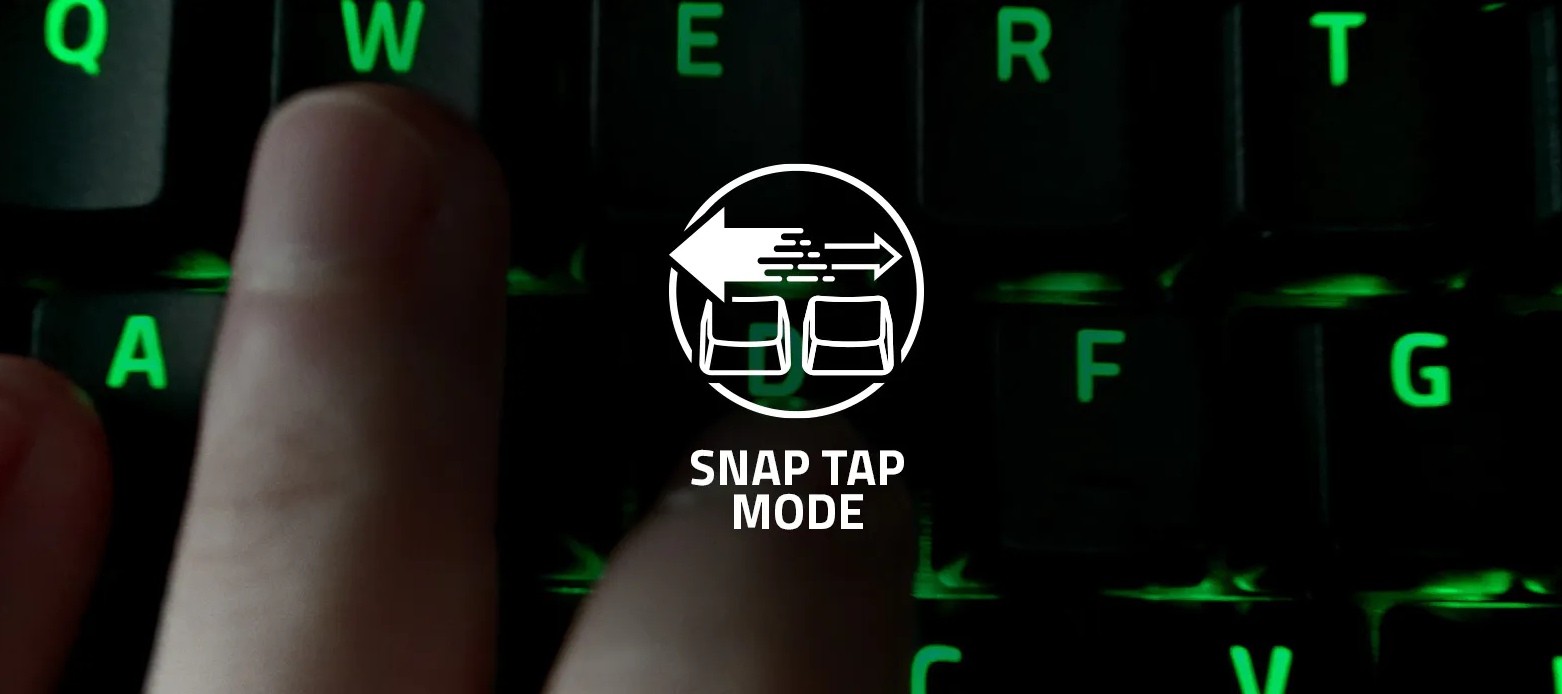
What is Snap Tap Mode and how do I get this functionality? Snap Tap prioritizes the latest input between two selected keys without having to release the previous one. To learn more about Snap Tap, visit Snap Tap Technology.List of supported devices:Huntsman V3 Pro Huntsman V3 Pro Mini Huntsman V3 Pro TKLTo get this functionality ensure that your Razer Synapse 3 is updated to the latest version after 9 July 2024 (Version: 3.9.0630.062714) and your keyboard is updated to the latest firmware.To enable Snap Tap, you can either toggle it in Synapse or press “FN” + “L SHIFT”.
Low-Profile Ergonomics, High-Performance Wireless – This is the Razer DeathStalker V2 Pro: https://rzr.to/deathstalkerv2pro. Featuring the all-new Razer Low-profile Optical Switches for lightning-fast actuations and Razer HyperSpeed Wireless technology for low-latency gaming, experience top-tier performance with our ultra-slim keyboard. * * * A low-profile predator with a lightning-fast sting – Coming soon on July 26th. Sign up to be the first to catch our grand reveal: https://rzr.to/low-profile-optical
A corrupted profile or faulty profile settings can often cause dimly lit or nonfunctional LEDs on Razer keyboards. This video will show you how to fix and increase the brightness of your Razer keyboard's lighting. Please note that any damages caused by upgrading or modifying your Razer product are not covered by Razer's Warranty Policy. For more information, see Razer's Warranty Policy. Visit the Support page: How to fix a Razer keyboard when macro keys do not work, LED does not turn on, or the Chroma lighting display the wrong color nor sync with other devices - - - Insiders, what do you think the next Support video should be? Comment with a topic. Great suggestions will be rewarded with the repeatable "Nice" achievement. Also, for every 20 comments on this thread and the YouTube video, I'll be giving away a random "Great" Achievement. Insiders, be sure to leave your Insider ID in the YouTube comment to be eligible. Lastly, for those of you who subscribe to the Support channel
Flickering or stuttering of lighting effects on your Razer keyboard can be caused by connection or firmware issues. This video will show you how to fix stuttering or intermittent flickering of lighting effects on your Razer keyboard. Please note that any damages caused by upgrading or modifying your Razer product are not covered by Razer's Warranty Policy. For more information, see Razer's Warranty Policy. Visit the Support pages regarding: Software and Firmware Updates for Razer Peripherals and How to perform a clean re-installation of Razer Synapse 3 & 2.0 on Windows - - - Insiders, what do you think the next Support video should be? Comment with a topic. Great suggestions will be rewarded with the repeatable "Nice" achievement. Also, for every 20 comments on this thread and the YouTube video, I'll be giving away a random "Great" Achievement. Insiders, be sure to leave your Insider ID in the YouTube comment to be eligible. Lastly, for those of you who subscribe to the Support
Say hello to the Sneki Snek Keycap! Add this adorable keycap to your Sneki Snek collection today and save 10 trees with every purchase of Sneki Snek merch. Help us inch closer to our goal of saving 1M trees with our #GoGreenWithRazer campaign today: https://rzr.to/Sneki-Snek-Keycap
Raise the bar for keyboard performance, feel and acoustics with the all-new Razer Huntsman V2 and Huntsman V2 TKL. Armed with our lightning-fast optical switches and doubleshot PBT keycaps, these tournament-ready keyboards will have you dominating the competition. Now available in both the quick, snappy Razer Clicky Optical Switches and the Gen-2 Razer Linear Optical Switches with sound dampeners for a better sound profile: https://rzr.to/huntsmanv2
Getting your Razer keyboard out of demo mode can help fix an unresponsive Razer keyboard. Please note that any damages caused by upgrading or modifying your Razer product are not covered by Razer's Warranty Policy. For more information, see Razer's Warranty Policy. Visit the Support page: How to fix an unresponsive Razer keyboard with a hard reset or by exiting out of Demo Mode * * * Insiders, what do you think the next Support video should be? Comment with a topic. Great suggestions will be rewarded with the repeatable "Nice" achievement. Also, for every 20 comments on this thread and the YouTube video, I'll be giving away a random "Great" Achievement. Insiders, be sure to leave your Insider ID in the YouTube comment to be eligible. Lastly, for those of you who subscribe to the Support channel, we'll be doing massive Silver giveaways for each milestone, so be sure to tell your friends, smash that like button and subscribe to the channel.
Your keyboard. Your rules. Enter the world of keyboard customization with our new range of accessories compatible with our keyboards including the Razer BlackWidow V3 Mini HyperSpeed: https://rzr.to/keycaps-customize ⌨ Go for a stealthy look with the Razer Phantom Keycaps ⌨ Make squad goals a reality with our matching coiled cables ⌨ Take comfort to the next level with our new Ergonomic Wrist Rest
Meet the Razer BlackWidow V3 Mini HyperSpeed Phantom Edition - equipped with our new Stealth Pudding Keycaps with translucent sides to allow the brilliance of Razer Chroma RGB to shine through while also sporting a stealthy black look. Learn more: rzr.to/blackwidowv3mini
Enjoy freedom through form with the all-new Razer BlackWidow V3 Mini HyperSpeed - a sleek and compact 65% wireless mechanical gaming keyboard designed to provide the perfect balance of form and function. Powered by Razer HyperSpeed Wireless Technology and fitted with our iconic Razer Mechanical Switches, doubleshot ABS keycaps, all while retaining arrow keys for a versatile gaming experience like no other. https://rzr.to/blackwidowv3mini
Feel the absolute speed of green with the Razer Huntsman TE. Outfitted with our lighting fast Razer Optical Switches, this compact tenkeyless keyboard now comes with Razer Green PBT Keycaps that'll make the competition glow with envy. Learn more: https://rzr.to/huntsmanTE-greenkeycaps
This video will show you how to fix a Razer keyboard with spamming issues. A Razer keyboard that spams keys or does not register input when pressed can be due to a faulty switch or other hardware issues, faulty firmware, driver or the device is in "Demo Mode." Please note that any damages caused by upgrading or modifying your Razer product are not covered by Razer's Warranty Policy. For more information, see Razer's Warranty Policy. Visit the Support Page: Keys on Razer keyboard are physically stuck, sticky, loose, unresponsive, spamming, or repeating when pressed - - - Insiders, what do you think the next Support video should be? Comment with a topic. Great suggestions will be rewarded with the repeatable "Nice" achievement. Also, for every 20 comments on this thread and the YouTube video, I'll be giving away a random "Great" Achievement. Insiders, be sure to leave your Insider ID in the YouTube comment to be eligible. Lastly, for those of you who subscribe to the Support chan
This video will show you how to replace keycaps on a Razer keyboard. Please note that any damages caused by upgrading or modifying your Razer product are not covered by Razer's Warranty Policy. For more information, see Razer's Warranty Policy. Visit the Support page on Replacing Keycaps on a Razer Keyboard: https://mysupport.razer.com/app/answers/detail/a_id/4539 - - - Insiders, what do you think the next Support video should be? Comment with a topic. Great suggestions will be rewarded with the repeatable "Nice" achievement. Also, for every 20 comments on this thread and the YouTube video, I'll be giving away a random "Great" Achievement. Insiders, be sure to leave your Insider ID in the YouTube comment to be eligible. Lastly, for those of you who subscribe to the Support channel, we'll be doing massive Silver giveaways for each milestone, so be sure to tell your friends, smash that like button and subscribe to the channel.
The Razer Huntsman TE has revolutionized the playing field for mechanical keyboards. By providing a fundamentally new optical switch, the Huntsman family of keyboards eliminates debounce delay. Although mechanical keyboards can utilize software to try and compensate for debounce delay, optical switches actuate via light. Light actuation makes the switch faster, more durable (up to 100 million keystrokes), and reduces debounce delay to the speed of light. Literally. Under codename “Project Jamie”, the Huntsman took Razer’s top engineers years to develop. The keyboard can now be seen in competitive play, being used by some of Team Razer’s best pro players. TACO (CS:GO) and Arteezy (Dota 2) both rely on the Huntsman TE to gain the competitive edge. Team Razer’s pro players not only use this keyboard in competitive play, they helped develop the Huntsman, through dozens of iterations in a fast feedback loop directly with Razer engineers. Starting with the switch, engineers at Razer
Keyboard How to fix an unresponsive Razer keyboard Razer BlackWidow 2019 Firmware Updater Razer keyboard spams keys or does not register input when pressed How to change the LED lighting color of a Razer keyboard The Chroma lighting on Razer keyboards does not sync with Razer devices The keyboard key is physically sticky, stuck or loose Razer Synapse does not recognize or detect my Razer device How to clean Razer devices
Hi, My keyboard is almost new, i own it about 3 months. Today my battery dropped to 10% so i decided to charge it. However, at first it didn’t charge at all, then synapse showed me 100% battery level while connected by wire, then i unpluged it and the level dropped to 10% again. I already tried updating firmware, re-installing synapse, checked the wires, dongles and etc. Nothing helped.
My keyboard battery life drop very fast, just got it for almost 1 week. How can i extend my RAZER BLACKWIDOW V4 PRO 75% battery life? While the ads say it has a 2100 hours of battery lifetime on Power Saving Mode. And also on my 2nd charge, it only show 5% charging and no change.
I was saving up to buy the keyboard but i checked to day and saw that it was out of stock do collabs get restocks or do i have to go to a reseller
Where can I buy a full sized BlackWidow v4 keyboard in UK layout with orange switches? It’s frustrating to be able to buy everything in US layout but extreamilty limited in UK format. Does anyone else fine this to be an issue? I don’t want to jump ship to another brand with MX Brown switches (or equivalent) but I may have to…
I' have' tried' anything' including' a' new' Windows' installation' but' as' you' can' see' my' keyboard' has' this' strange' problem' of' adding' this'' apostrophe' before' the' space' character.Any' idea' ?Thanks' in' advance.
I picked up a BlackWidow V4 Pro Full Size about a month or two ago. About 2 weeks ago, my left shit key stopped working fully and now only works every 1 out of 4 presses or so and even when it does work, it will stop working about 50% of the time. Nothing has been spilt on it and I have removed the key to see if something was stuck under it but I didn't see anything. I also have an issue with certain keys activating twice with one click like my N and my S key, but that's not as much of an issue as the shift issue.Does anyone know how to either fix it or am I going to have to sadly replace my keyboard as I use my left shift key all the time?
I will preface this post by listing everything I have done to troubleshoot this issue, including buying a brand new Pro AND THEN having that pro replaced with another pro after contacting customer service:Previous tartarus v2, then new Pro AND NOW replacement Pro have experienced unplayable lag when keymap swapping for several months now, starting any time a game is launched. Issue requires unplugging and reinserting the device every time after starting a game for it to return to a properly functioning state. EVERY SINGLE TIME. Issues are actually worse with the pros, if that’s believable! The pros sometime outright wipe my current keymap after games start.I have attempted (in rough order)-Bought a new device-Different usb ports.-Deleting profiles and creating new profiles.-Disabling its recognition as a 360 controller so steam no longer recognizes it as such (with a computer restart after disabling it)-Disabling various parts and combinations of its drivers and restarting the computer
Hi, as in Tittle, keyboard doesn’t light properly. Only Left side of keyboard lightning in all colours to letter F. All that part. I cant change it through Synapse 2 and 3, my Pc even read it as Bw Ultimate 2016. For 8 years everything has been good. Evrything started since my pc started read my Keyboard as Razer Bootloader. I tried to fixed in my own and now I have Blackwidow Ulitmate 2016 xD. Please help me I am starting loosing my mind
So as a razer fan boy i bought this keyboard to add to my collection. Well this is by far the worse keyboard i have ever owned. The Keyboard gets about 3-7 hours of use a week, max Question *** Its beeen ovver a year from my purchase, and i was hoping i could maybe replace the switches?yes i tried cleaning, contacting support, updating software , switching USB ports and telling the kyboard (cmon man!) nothing has changed, but growing frustrations when i get canceled mid sprint playing Tarkov.) ^ (thats how it works lol, playing games on this keyboard is a headache, or writing emails to my boss) HALP GL HF GG
i recently bought the ortana v3 tenkeyless hello kitty keyboard and out of nowhere a handfull of keys arent working anymore, in demo mode they dont work either. ive tried a couple solutions but nothing has worked. they keyboard is almost unusable at this point, enter, backspace, and z are the most important but theres a few others like f10-12, and \
Already have an account? Login
No account yet? Create an account
Enter your E-mail address. We'll send you an e-mail with instructions to reset your password.