Left Handed DeathAdder 3.5G - Can't Configure | Razer Insider
Skip to main content
Question

Left Handed DeathAdder 3.5G - Can't Configure

  • January 21, 2026
  • 2 replies
  • 15 views

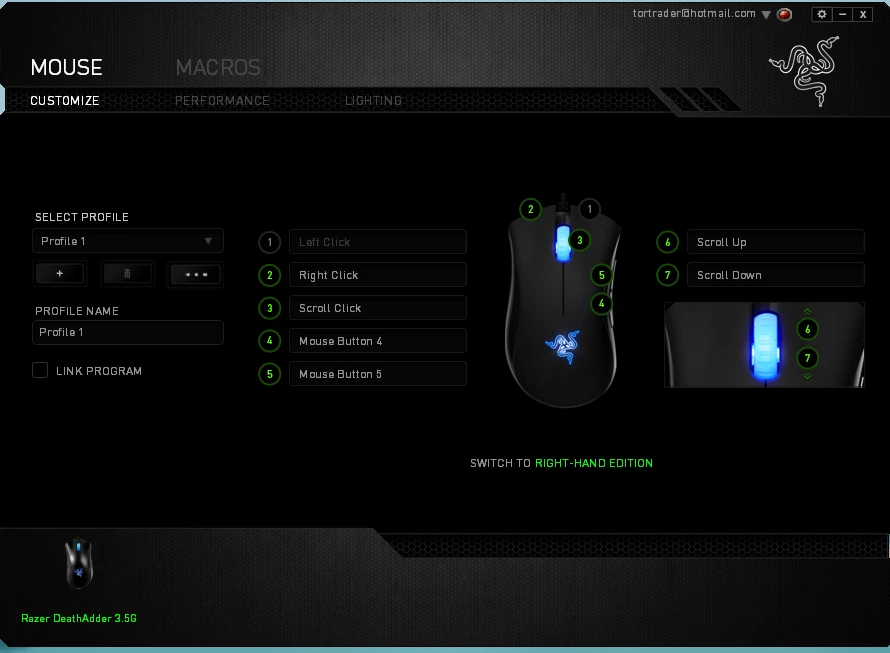
I’m installing this mouse on a laptop that was re-imaged and all my programs wiped. Downloaded and installed Synapse 2.0. It recognizes the mouse but I am stuck with click buttons that match the right-handed version. I am able to toggle between the left- and right-handed modes, but the control never follows.

I don’t see a “save” button to force the left-handed mode into the mouse. Exporting the profile only creates a save file for a folder.

What am I missing?


2 Replies

FiszPL
Vanguard
Forum|alt.badge.img+1
  • VANGUARD
  • January 22, 2026

There’s no save, because all settings should be saved instantly.

Also it’s an old unsupported version of Synapse, and I’m afraid not fully compatible with the newer OS (maybe it’s overriden on the OS level).

If you’re on Windows 11 for eg. go to settings → Bluetooth and devices → Mouse - there will be setting to change (swap) buttons on the OS level.


I had the same issue when i moved over to windows 11, them left handed razer deathadders are brilliant but now discontinued and unsupported. i'v used 3 of them over the last 12-13 years i think, and they’ve served me well for all gaming, Was forced to retire the mouse in the end and moved over to the Razer viper ambidextrous mouse which was actually pretty good but the scroll wheel started going on a mad one after about 4 months haha! As a left handed gamer i’v struggled like mad to find a gaming mouse that works for me. I understand that not every left handed person uses a mouse in there left hand so from a manufacturing point of view it doesn’t make much sense to make them.