Naga V2 HyperSpeed for Apple Mac | Razer Insider
Skip to main content

Naga V2 HyperSpeed for Apple Mac

  • April 27, 2024
  • 8 replies
  • 1916 views

I’m using an Apple Mac laptop to play my Favorite game that I’ve been playing for years but  My favorite razer Mouse does not have the software support for Apple Mac so I’m kind of crippled or limited for what I can do and I really just need support for my mouse for my Apple Mac.  gaming on Apple isn’t that bad. I just need support for my mouse on an Apple Mac so I can have all the features. My favorite mouse that i use is a RAZER Naga v2 HyperSpeed. I just really need this to happen.

8 Replies

  • Insider Mini
  • November 12, 2024

I’ve just bought this mouse and after the purchase I understood that macos is not supported. The features are not working without this software and those features are the main reason for me to but this mouse.

That is totally disappointing. I prefer the company to emphasize this lack of support at all product pages but this is not the case. 

I believe there should be plenty of macos users having the same problem. Because not all the users of this mouse are buying it for the gaming. I bought it for the function keys to assign them some special commands during software development and some other daily  tasks. I hope somebody see this message and act and develop the required software for macos. 


watchTerraCottagreat813

The Razer Naga V2 Hyperspeed mouse has limited native support on macOS. While the mouse itself will function with basic functionality, the Razer Synapse software, which is required for customization like button remapping and RGB control, is not officially supported on macOS. However, there are third-party options and workarounds to achieve some level of customization. 

Here's a breakdown:

  • Basic Functionality:

    The Naga V2 Hyperspeed will work as a standard mouse on macOS, allowing for cursor movement and clicks. 

  • Razer Synapse:

    Razer Synapse, the software used to customize the mouse's features on Windows, is not compatible with macOS. 

  • Third-Party Software:

    • Razer macOS: This GitHub project provides a way to customize RGB and potentially other features on Razer devices, including some Naga models, but might not support all features of the V2 Hyperspeed. 
    • SteerMouse: This paid software offers button remapping, including for the Naga V2 Hyperspeed, and cursor speed customization, but does not control RGB. 
  • Workarounds:

    • Windows Setup: You can use a Windows computer to configure the mouse with Synapse, save the settings to the mouse's onboard memory, and then use it on your Mac. This allows you to retain button mappings and other settings. 
    • Older Synapse Versions: Some users have reported success with using older versions of Razer Synapse (version 2) on macOS to provide runtime support for the mouse. 

In conclusion, while the Razer Naga V2 Hyperspeed isn't fully supported on macOS, you can still use it with basic functionality and potentially gain some customization options through third-party software or by configuring it on a Windows machine first. 


SealBrownpulsePEARL112

Hey everyone! I saw this thread while looking for others with the same frustration - I've been using a Naga V2 Hyperspeed on my Mac and was tired of not being able to use the side buttons properly.


I just released a free, open-source macOS app that solves this exact problem: https://github.com/DParent10/NagaController/releases


*What it does:**

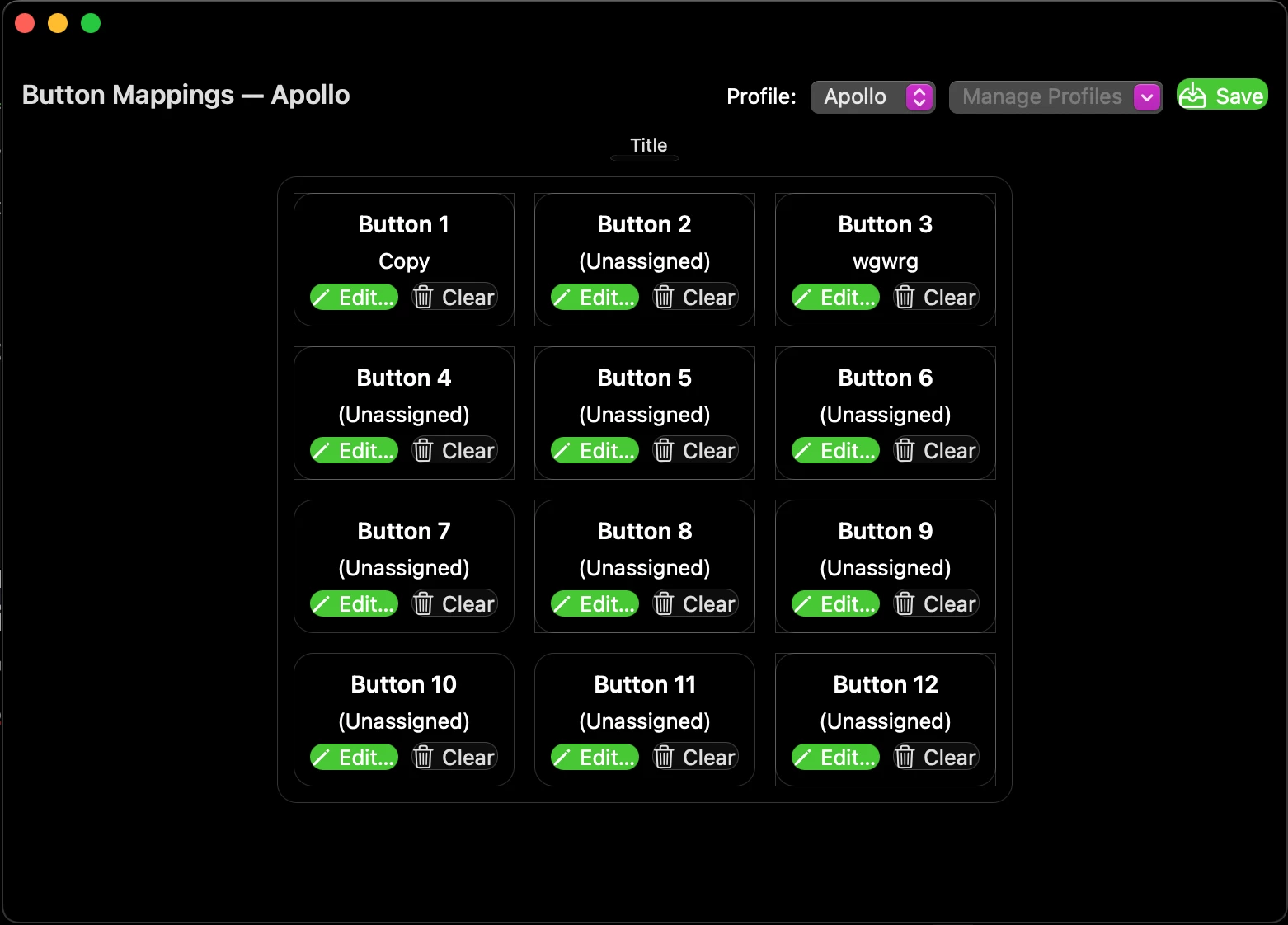
- Remaps all 12 side buttons to any key combination you want

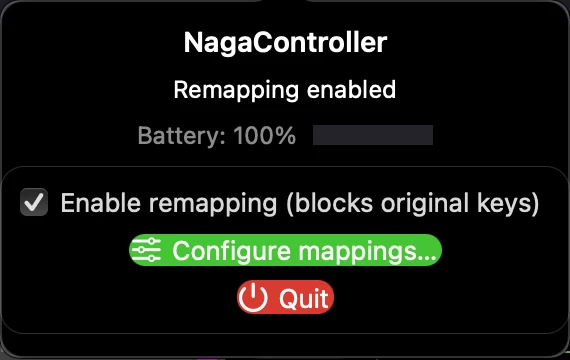
- Shows battery level when connected via Bluetooth

- Lives in your menu bar with easy on/off toggle

- Works specifically with the Naga V2 Hyperspeed


**Quick setup:**

1. Download the app from the release page

2. Move to Applications, right-click → Open (one-time Gatekeeper bypass since it's unsigned)

3. Grant Accessibility permission

4. Configure your button mappings through the menu bar


It's completely free and open source. I built this because I needed it for my own work (I'm also a developer like @sefaozkan), and figured others would benefit too.


@iclayca - This should give you full control over your side buttons for gaming

@sefaozkan - Perfect for assigning those development shortcuts you mentioned

@watchTerraCottagreat813 - Thanks for mentioning third-party options! This is another one to add to the list


I just released v0.1.0 today, so feedback is very welcome. If you run into any issues, please let me know on GitHub.


Hope this helps you all get more use out of your Naga on Mac!


Note: This is an independent project, not affiliated with Razer Inc.


SealBrownpulsePEARL112

Update on NagaController v0.1.0:

The app is now fully signed with an Apple Developer ID and notarized by Apple! 🎉

What's changed:

  • ✅ No more Gatekeeper bypass needed - just download and run
  • ✅ Professional DMG installer (drag-and-drop to Applications)
  • ✅ Seamless installation experience

Download: https://github.com/DParent10/NagaController/releases/latest

Installation is now as simple as:

  1. Download NagaController-v0.1.0.dmg
  2. Open and drag to Applications folder
  3. Launch and configure!

Thanks for the interest


  • Insider Mini
  • October 20, 2025

Update on NagaController v0.1.0:

The app is now fully signed with an Apple Developer ID and notarized by Apple! 🎉

What's changed:

  • ✅ No more Gatekeeper bypass needed - just download and run
  • ✅ Professional DMG installer (drag-and-drop to Applications)
  • ✅ Seamless installation experience

Download: https://github.com/DParent10/NagaController/releases/latest

Installation is now as simple as:

  1. Download NagaController-v0.1.0.dmg
  2. Open and drag to Applications folder
  3. Launch and configure!

Thanks for the interest

This is fantastic - I believe ;)

Im currently working with Razer Naga Trinity that ive used for years with my PC. Now that I’ve switched over to Mac Studio + MBP, im struggling to make it work properly with Macs.


I downloaded the app (looks epic), but understandably it doesnt wanna work with my Naga Trinity.


However, im gonna go ahead and buy the Naga V2 Hyperspeed and run it through your app.


Thanks!


SealBrownpulsePEARL112

Actually, would you mind testing it with your Naga Trinity first? The app might already work - or at least partially!

I'd love to add proper Trinity support. Could you help me gather some diagnostic info?

Here's how:

  1. Open Terminal (Applications → Utilities → Terminal, or search "Terminal" in Spotlight)

  2. Run these commands (copy and paste each line, press Enter):

   cd /Applications
./NagaController.app/Contents/MacOS/NagaController
  1. The app will launch and show diagnostic info in the Terminal window

  2. If prompted to grant Terminal permissions (Accessibility and/or Input Monitoring):

    • It's safe to grant these temporarily for testing
    • Remember to revoke them afterward: System Settings → Privacy & Security → Accessibility/Input Monitoring → uncheck Terminal
    • Note: You'll see the diagnostic logs I need even without granting these permissions
  3. Turn on "Enable remapping" in the menu bar

  4. Press each side button on your Trinity (1-12 or however many you have)

  5. Share the output - especially any lines that say [HID]:

    • Option 1: Post right here in this thread (easiest!), You could DM me the results also.

    • Option 2: Create a GitHub Issue if you have an account: https://github.com/DParent10/NagaController/issues/new

This will help me (and other Trinity users) get proper support added!

Might save you from needing to buy a new mouse. 🎮


  • Insider Mini
  • October 21, 2025

Actually, would you mind testing it with your Naga Trinity first? The app might already work - or at least partially!

I'd love to add proper Trinity support. Could you help me gather some diagnostic info?

Here's how:

  1. Open Terminal (Applications → Utilities → Terminal, or search "Terminal" in Spotlight)

  2. Run these commands (copy and paste each line, press Enter):

   cd /Applications
./NagaController.app/Contents/MacOS/NagaController
  1. The app will launch and show diagnostic info in the Terminal window

  2. If prompted to grant Terminal permissions (Accessibility and/or Input Monitoring):

    • It's safe to grant these temporarily for testing
    • Remember to revoke them afterward: System Settings → Privacy & Security → Accessibility/Input Monitoring → uncheck Terminal
    • Note: You'll see the diagnostic logs I need even without granting these permissions
  3. Turn on "Enable remapping" in the menu bar

  4. Press each side button on your Trinity (1-12 or however many you have)

  5. Share the output - especially any lines that say [HID]:

    • Option 1: Post right here in this thread (easiest!), You could DM me the results also.

    • Option 2: Create a GitHub Issue if you have an account: https://github.com/DParent10/NagaController/issues/new

This will help me (and other Trinity users) get proper support added!

Might save you from needing to buy a new mouse. 🎮

I sent you a DM :)


Sadly for my this application does not work. It might be because I’m running it on my company MacBook.

Do I need to install Razer MacOS software?

It doesn’t matter what I set in button mapping, I always get buttons I’ve set in Razer Synapse on Windows.