nagav2 hyperspeed onboard memory not work | Razer Insider
Skip to main content
Question

nagav2 hyperspeed onboard memory not work

  • Mar 27, 2023 2:45 AM UTC
  • 10 replies
  • 1643 views

gw011

nagav2 hyperspeed onboard memory not work
exit synapse or another using rollback key setting default
help

10 Replies

  • Insider Mini
  • Mar 28, 2023 4:04 PM UTC

same here 


  • Insider Mini
  • Apr 4, 2023 2:05 PM UTC

Same. Setting up bindings (taking care not to use function that say they require synapse). The moment synapse is closed, everything reverts to defaults. (Sensitivity settings did stay for a while, but disappeared overnight). Just keep synapse running you might say? No, absolutely not.


  • Insider Mini
  • Apr 14, 2023 4:34 AM UTC

Hey I have the same issue, I wrote in to support since 20th Mar after the 20230315 update.


They've escalated it to their software team and are still investigating.


But I'm losing faith because it's nearly a month since I reported this case and they're buying time by giving me all kinds of trial-error solutions under the sun. 


FiszPL
Vanguard
Forum|alt.badge.img+1
  • VANGUARD
  • Apr 14, 2023 5:55 AM UTC

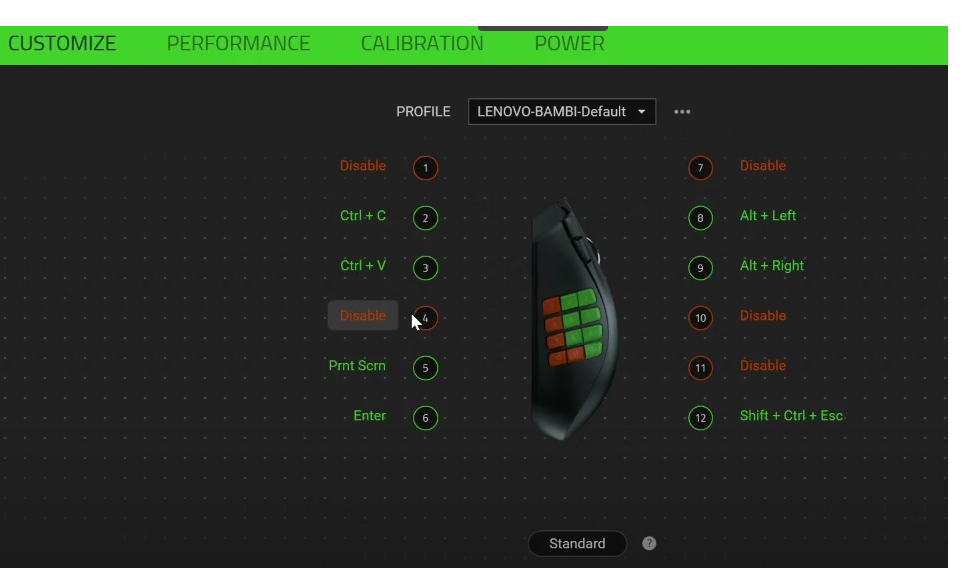
Show your Synapse config, show where the keys are bound to.

Be aware, that Macros will be NOT stored into internal memory, as Naga X Hyperspeed have only 1 onboard memory, and for storing macros, you’ll need mouse that have at least 4 (or more) onboard memory. So after when you’ll exit synapse, it’ll not work.


  • Insider Mini
  • Apr 14, 2023 6:10 AM UTC

Show your Synapse config, show where the keys are bound to.

Be aware, that Macros will be NOT stored into internal memory, as Naga X Hyperspeed have only 1 onboard memory, and for storing macros, you’ll need mouse that have at least 4 (or more) onboard memory. So after when you’ll exit synapse, it’ll not work.

Refer to this link for my Synapse config.h There are no macros bound. 

https://drive.google.com/file/d/1gwl2y_VM9Ht38piHX5joTL8OYmalDHSH/view?usp=sharing


FiszPL
Vanguard
Forum|alt.badge.img+1
  • VANGUARD
  • Apr 14, 2023 6:15 AM UTC

Show your Synapse config, show where the keys are bound to.

Be aware, that Macros will be NOT stored into internal memory, as Naga X Hyperspeed have only 1 onboard memory, and for storing macros, you’ll need mouse that have at least 4 (or more) onboard memory. So after when you’ll exit synapse, it’ll not work.

Refer to this link for my Synapse config.

https://drive.google.com/file/d/1gwl2y_VM9Ht38piHX5joTL8OYmalDHSH/view?usp=sharing

Please click on any custom (green) keybind, then post a screenshot how it’s bound to the button.


  • Insider Mini
  • Apr 14, 2023 1:01 PM UTC

Show your Synapse config, show where the keys are bound to.

Be aware, that Macros will be NOT stored into internal memory, as Naga X Hyperspeed have only 1 onboard memory, and for storing macros, you’ll need mouse that have at least 4 (or more) onboard memory. So after when you’ll exit synapse, it’ll not work.

Refer to this link for my Synapse config.

https://drive.google.com/file/d/1gwl2y_VM9Ht38piHX5joTL8OYmalDHSH/view?usp=sharing

Please click on any custom (green) keybind, then post a screenshot how it’s bound to the button.

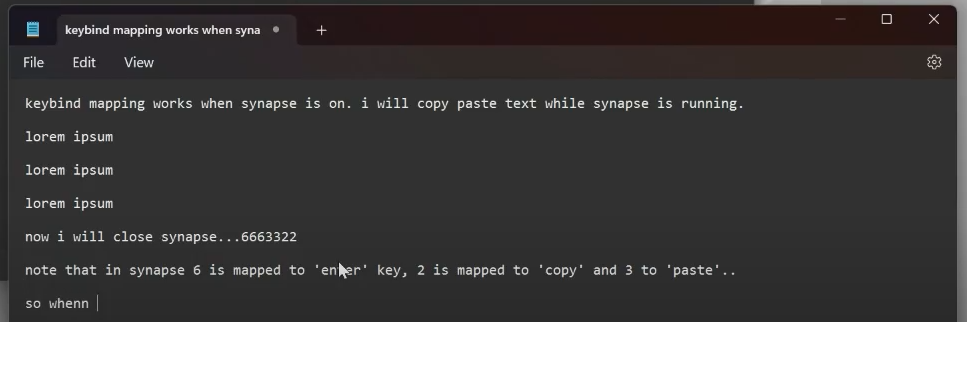
The configs and screenshot are in the google drive link above. I’ve pasted the screenshots below.


FiszPL
Vanguard
Forum|alt.badge.img+1
  • VANGUARD
  • Apr 14, 2023 1:53 PM UTC

Show your Synapse config, show where the keys are bound to.

Be aware, that Macros will be NOT stored into internal memory, as Naga X Hyperspeed have only 1 onboard memory, and for storing macros, you’ll need mouse that have at least 4 (or more) onboard memory. So after when you’ll exit synapse, it’ll not work.

Refer to this link for my Synapse config.

https://drive.google.com/file/d/1gwl2y_VM9Ht38piHX5joTL8OYmalDHSH/view?usp=sharing

Please click on any custom (green) keybind, then post a screenshot how it’s bound to the button.

The configs and screenshot are in the google drive link above. I’ve pasted the screenshots below.


I saw the video, but it doesn’t show the keybind thingy, that I want.

Click on CTRL + V keybind or Enter keybind, make a screenshot of whole synapse window (with the left side panel, where you assign keybind functions).


  • Insider Mini
  • Apr 30, 2023 2:41 PM UTC

Hi all, the Razer Sr. Technical Support team has alas resolved the issue.

You may update Razer Synapse 3 to version 3.8.428.42117 and re-test your mouse to see if the keybinds work offline without Synapse 3. It works for me.


Google Drive link of the instructions by technical support team: https://drive.google.com/file/d/189dhiTLGSZNv6Olb3UH-jTnn7JbVKOVC/view?usp=share_link

Google Drive link of the update and re-test of the mouse: https://drive.google.com/file/d/1gt7IdnNRsGK3dBWtoC_FTXWR7G4IGuhn/view?usp=sharing

Google Drive shared folder: https://drive.google.com/drive/folders/1dyoOVA7KtVVvrM6VR-KAy74Yuq742p1P?usp=share_link


  • Insider Mini
  • Apr 30, 2023 4:32 PM UTC

yes it seems to work ! thank you.