

Why is Minecraft only registering through curseforge? | Razer Insider
Skip to main content
Question

Why is Minecraft only registering through curseforge?

  • November 6, 2023
  • 2 replies
  • 165 views

BlueZealous

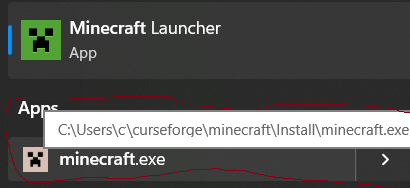
So I started up minecraft to play a different game for the Razer Squad Rewards. After about 30 minutes I decided to check and well the timer has not gone up since playing. So I decided to go through the Razer Cortex app itself and booted it up that way. It took me to another Minecraft launcher I didn’t even know I had. Is this like the old launcher before Minecraft migrated? I know the new launcher comes from the Microsoft store as a downloaded app? If so, thankfully I still had the other one downloaded, but what I also found weird about it is that in the file location it is considered under CurseForge, so I’m really confused about it.


If anyone could have some clarification on it that would be great. In the picture I’m showing the one that says Minecraft.exe and has a white creeper face on it is the one that is currently counting the time for the Squad Rewards. 
 

2 Replies

  • November 8, 2023

Hey there!


Thank you for sharing your issue with us here. My name is Michelle, and I’m part of the Razer Cortex technical support team. I am delighted to be of your assistance. 


The one you launched that can track your time is the old version. The time canbe counted because Razer Cortex support it in Squad Rewards. 


Razer Cortex support Minecraft Java Edition, Windows version, and the .exe version. The .exe version did not have any launcher before. After being acquired by Microsoft, this version gets a new launcher. Many versions are launched by it. This update made Razer Cortex hard to know which version our users is launching.


The current tracking algorithm allows Razer Cortex to track most games from gaming platforms such as Steam, Epic, Ubisoft Connect, EA, XBOX, and direct games with an independent launcher. However, for games with different launchers and  big updates like Minecraft, it is hard to monitor all versions. 


Hope my answer helps you have a better understanding on this issue. 


Enjoy playing and good luck. 


Please feel free to let us know if you need further assistance. We’d always love to help. 


Michelle


Honestly I ran into something very similar a while back while testing different Minecraft installs/mod setups across multiple launchers. 

What confused me at first is that CurseForge often creates/uses its own managed Minecraft instance, so Razer Cortex sometimes detects the executable path differently depending on which launcher actually started the game.

One thing that helped me troubleshoot it was comparing:
- the actual running .exe path in Task Manager
- launcher-specific install folders
- whether the game was being launched through CurseForge, Microsoft Launcher, or directly through Java

I also found that some modded setups create duplicate runtime paths which can confuse tracking software and overlays.

While digging into it I ended up comparing a few setup/troubleshooting references, including:
https://downloadjennymod.org/

That guide actually helped me better understand how different launchers/modded environments structure Minecraft directories and installs.

From my experience, this usually isn’t a “virus” or broken install issue — it’s mostly launcher abstraction + how Cortex hooks into running executables for tracking.

Curious if your Cortex tracking started behaving normally after launching Minecraft directly without CurseForge in the background?