After today's Windows update my Tartarus pro's thumb joystick started to have major issues | Razer Insider
Skip to main content
Solved

After today's Windows update my Tartarus pro's thumb joystick started to have major issues

  • August 9, 2025
  • 47 replies
  • 2125 views

RazerIDIsFuckedUp

After a recent Windows 11 update (and with the latest version of Razer Synapse 4), my Razer Tartarus Pro started having a serious issue with the analog stick.

Symptoms:

  • The analog stick directions are mapped incorrectly regardless of how they are assigned in Synapse:

    • Right input registers as Up

    • Left registers as Down

    • Up registers as Left

    • Down registers as Right

  • This misalignment happens consistently when I remap any of the main keys on the device.

  • If I create a fresh profile and only map the stick directions, it works initially — but the moment I assign or change other keys, the stick mapping breaks again.

Before the update, the analog stick worked exactly as configured in Synapse and was unaffected by changes to other keys.

Troubleshooting I’ve tried so far:

  • Full Synapse 4 reinstall

  • Creating a new profile for Tartarus Mapping

  • Complete driver removal (including from Windows DriverStore)

  • Blocking Windows from replacing the driver via Group Policy

The problem persists in all cases. This makes the analog stick unreliable and effectively unusable in normal use.

Please escalate this to the engineering team — I can provide detailed reproduction steps, screenshots, and system information if needed.
Best answer by FuckingRazerSoftware


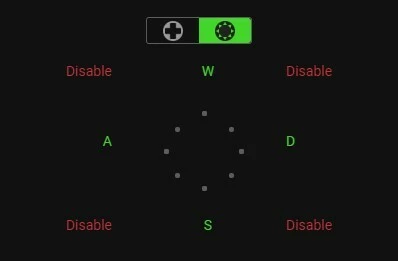
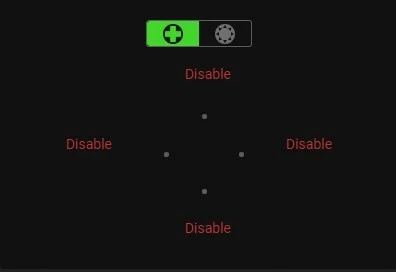
DPAD settings

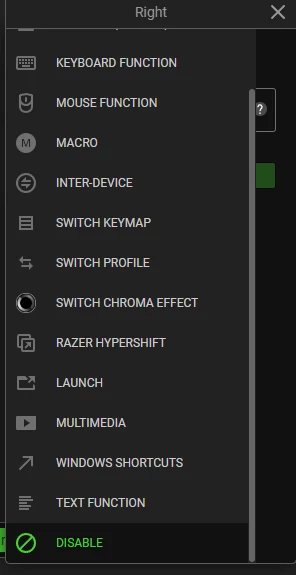
When Clicking on Dpad buttons to disable, scroll down to Disable. 4way dpad is not customisable, use 8way with diagonals disabled for WASD.

May need to delete all Keymaps and make a new one, May need to delete all profiles and start over.

47 Replies

  • Insider Mini
  • August 9, 2025

I have the same issue.  I followed the same steps as you did and found that the thumb stick would work for like a minute after creating a new profile or resetting an existing one then go back to being treated like a joystick.  


Yep I have the same issues and I tried everything so far. I contacted the support team and nothings resolved yet. It really sucks because I want to make reviews of the razer products I have and I swear by them to my friends and family. But its hard to not make whats happening to my tartarus pro not sound bad. Hopefully it can just get fixed so I can praise their costumer support for being on the ball with and unexpected problem


zgoku1
  • Insider Mini
  • August 9, 2025

OMG… I thought it was just me. I figured I must have installed something wrong and caused a conflict, but it turns out there have been so many others experiencing the exact same issue for hours now?! I really need to get some work done, but my D-pad is broken, and it’s making things incredibly inconvenient!


kennethhansen73

same issue had to reinstall synapse 3 again that works but no macros


PEARLtechnoPaleAqua093

I have the same issue


Issue with the joystick here too since today’s update :(  

my joystick is working in the windows checking tool, but doesn’t work in my apps anymore (I've mapped Ctrl-Z in photoshop, which i pretty annoying if it’s not working rn!!) and on pc starting Tartarus is not recognized right away, I have to restart Synapse to make it show in the app.

I hope this will be resolved soon as it is my usual working tool as an artist!


Same issue


Slatlin
  • Insider Mini
  • August 9, 2025

I am having a similiar issue in the New Battlefield 6 beta, if I map my thumbstick to WASD like normal , works great. As soon as I try to make another key on the tarterus pro it reverts to joystick movement even though it is still set to WASD. I can create a new profile and if I only change thumpad keybinds it will work, change anything else it reverts.


zeltwood
  • Insider Mini
  • August 9, 2025

I am experiencing this as well. 😟


I have my joystick mapped to Q on left and E on right. When I type those keys on my keyboard, they are correct. When I use the joystick, those keys are not being used like I told Synapse to do.


Please give us this control back. The Tarterus Pro is amazing. This new glitch sucks.


Same problem, can’t use my Tartarus pro for the time being as I bound specific key binds to the thumbstick. Please fix glitch and give us control back.


DPAD settings

When Clicking on Dpad buttons to disable, scroll down to Disable. 4way dpad is not customisable, use 8way with diagonals disabled for WASD.

May need to delete all Keymaps and make a new one, May need to delete all profiles and start over.


I have the same problem but not with any Windows update (I am on Windows 10), only with the update to Synapse.

The only solution I found was to switch to the 8-way setting, disable the corners, and map my previous 4-way functions to the same slots in the 8-way.

I absolutely DESPISE that I cannot disable automatic updates, and that I cannot rollback/install to a previous version.


  • Insider Mini
  • August 10, 2025

I'm playing Star Trek Online, and the macros I assigned to those keys now won't work. I first tried doing the repair, which didn't work, so I tried reinstalling, and that didn't work either. The problem is definitely a software issue.


Okay, deleted Synapse 4. Install Synapse 3, logged in with my account and used my profile and everything works like before. Just avoid Synapse 4.


After following the suggested solutions, the only one that worked was deleting Synap4 and reinstalling the previous version, 3. Now the joystick is working properly for myself using it for WOW 


DPAD settings

When Clicking on Dpad buttons to disable, scroll down to Disable. 4way dpad is not customisable, use 8way with diagonals disabled for WASD.

May need to delete all Keymaps and make a new one, May need to delete all profiles and start over.


I did a repair after this and it worked!


I attempted the above fix, disabling all the 4-way settings and mapping the desired keys onto the 8-way while disabling the diagonal directions. After refreshing the behavior is unchanged.


I then disabled all the directions on both 4 and 8 way, then refreshed.

Unchanged.


The D-pad joystick seems to be completely decoupled from user settings now. It just can’t be changed.

Please address this.


I’m sure you don’t want us to migrate back to an older version of your software. Please make the new version work in a way that serves why we use your product.


RazerIDIsFuckedUp

Try to create new profile, and again remap all of the keys with this disabling hint. On an old profile for me it also didn’t work, but with a new profile (not just mapping, but totally new profile, on the left of the window), this troubleshooting works perfectly!


RazerIDIsFuckedUp


DPAD settings

When Clicking on Dpad buttons to disable, scroll down to Disable. 4way dpad is not customisable, use 8way with diagonals disabled for WASD.

May need to delete all Keymaps and make a new one, May need to delete all profiles and start over.

Thanks man! That saves the day.
But of course I still expecting from Razor team to address all of these claims, and fix that problem.


  • Insider Mini
  • August 10, 2025

Same thing happened to me too. Been pulling my hair out until I found this thread.


  • Insider Mini
  • August 10, 2025

Thanks ​@FuckingRazerSoftware  that worked.

For others, I created a new profile, disabled everything as mentioned in the above post, then configured keys on remaining 8-way keypad. Then I configured remaining keys on the main keypad. Worked first time.


Yess I did the same fix, and it didn’t work until I did a repair. Didn’t need to create a new profile.
Thanks guys !! 🙏🤙


People keep mentioning a “repair”. Is this an option inside Synapse or something else?


Slatlin
  • Insider Mini
  • August 10, 2025

yesterday wouldn’t work at all, anytime I opened synapse I would lose the 3 key on any keyboard (on a laptop with external keyboard), D pad would work after assigning any other key.


re-installed synapse 3 didn’t fix it, re-installed synapse 4, didn’t fix it. 


Went to bed.. got up this morning and everything works fine……..