


Basilisk V4 Pro + HyperFlux V2 scroll wheel issue: intermittent scroll wheel failure | Razer Insider
Skip to main content
Question

Basilisk V4 Pro + HyperFlux V2 scroll wheel issue: intermittent scroll wheel failure

  • Oct 30, 2026 5:05 AM UTC
  • 8 replies
  • 54 views

RTsdqq
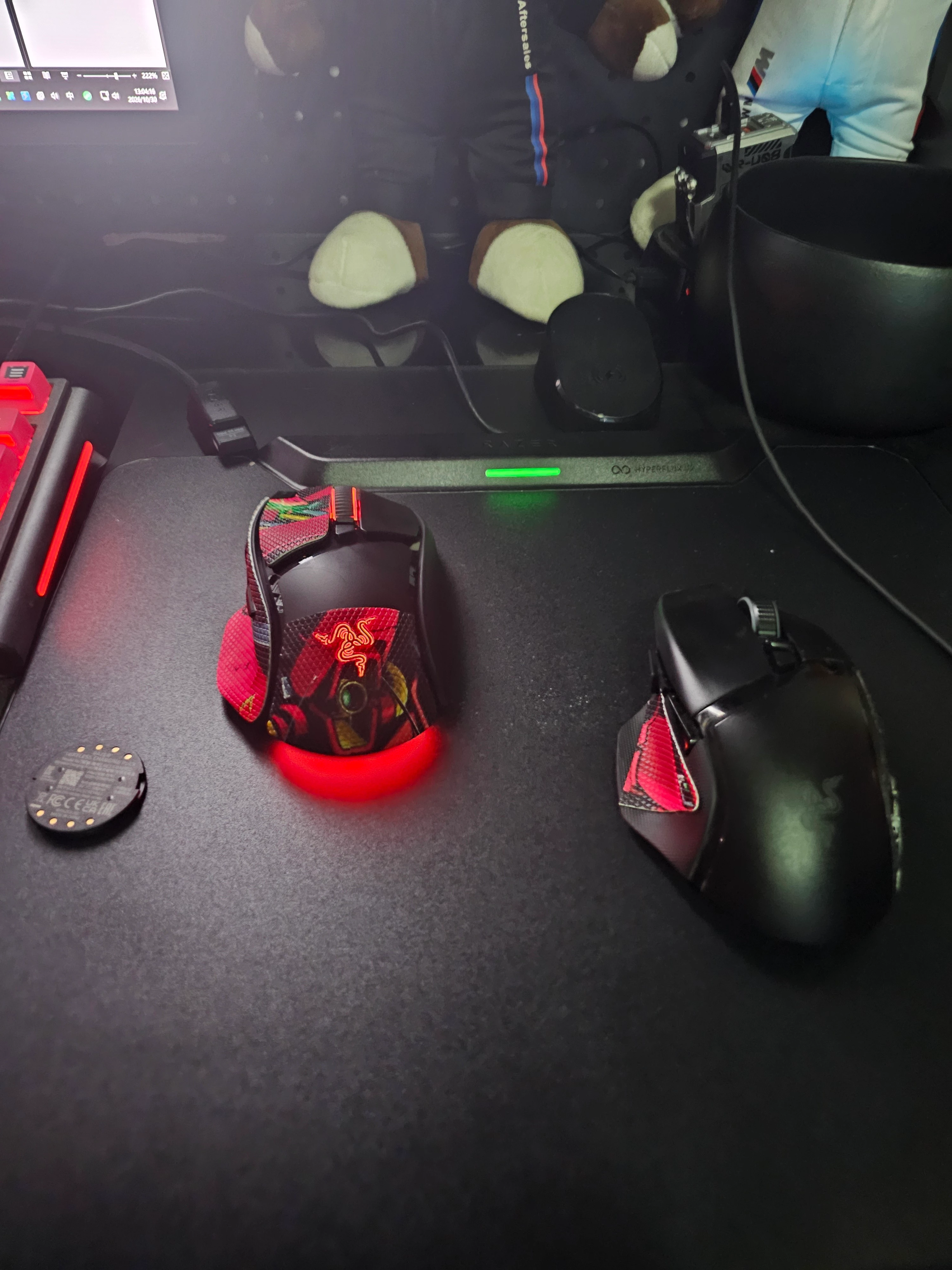
I'm a player from China. I bought the latest Basilisk V4 Pro together with the new HyperFlux V2 Hard Edition charging pad. The pad has already been replaced once by Razer's official service with a brand-new unit, and the mouse was sent for inspection and returned as "no problem". However, the two still do not work together: with the charging module installed the scroll wheel fails intermittently, and when the mouse is placed on the pad it is basically unusable.

I'm posting here because local support only tested the mouse alone and could not reproduce the combination issue. I'd like to ask whether other players have seen this, and whether Razer engineering can test the full set.

Setup:

- Mouse: Basilisk V4 Pro, firmware 1.03.00 R1

- Charging mat/module: HyperFlux V2 Hard Edition

- Receiver: original 2.4 GHz dongle (NOT the mat's receiver, NOT Mouse Dock V2 Pro, no mixed charging pucks)

- Synapse: 4.0.86.2610281118

- All items are new sealed units. Mouse and mat have already been replaced once; the issue still occurs.

Symptom:

The scroll wheel intermittently stops working during normal use. It is not every time, but after installing the HyperFlux V2 charging module the failure probability increases significantly. When the mouse is placed on the mat for wireless charging, the scroll wheel is basically unusable.

Tests:

1. Charging module installed, mat disconnected, original 2.4 GHz receiver: intermittent scroll failure.

2. Charging module removed, mat disconnected, original 2.4 GHz receiver: scroll wheel works normally.

3. Mouse on HyperFlux V2 mat: scroll wheel unusable.

4. USB-C wired: no scroll failure observed.

5. Firmware updated to 1.03.00 R1: issue persists.

6. Two different new units (mouse/mat replaced): issue persists.

Service history:

The mouse was sent in for inspection. Service tested only the mouse and returned it as "no problem". They did not test the combination of mouse + charging module + mat + original receiver, and a short test cannot catch an intermittent fault. Because support requested inspection, the 7-day no-reason return window expired while the case was delayed.

What I am asking:

- Has anyone else seen scroll wheel failure only when the HyperFlux V2 charging module is installed?

- Is there a correct puck/part number for V4 Pro + HyperFlux V2 Hard Edition that I may have missed?

- Any workaround besides removing the module / not using the mat?

- Razer: please test the complete set, not just the mouse, and provide the test conditions/report.

I can share videos, serial numbers (redacted), order/RMA records and the four test combinations.

This is not a "mouse is dead" post — the mouse works with the module removed. It looks like a charging-module/scroll-wheel interaction or compatibility issue. If you have the same combo, please reply with your experience.

8 Replies

  • Insider Mini
  • Nov 2, 2026 2:21 PM UTC

bro, I got a new mouse from razer which is the second basilisk v4 pro with a different serial number and everything. I have the same issue with or without dongle pairing. I believe this is a firmware or software issue that they have to be on top of.


  • Insider Mini
  • Nov 4, 2026 4:03 PM UTC

Exactly the same problem and combination here. Scrolling randomly stops working. A temporary fix: turn the mouse upside down and you will hear the “click” of the scroll wheel clutch engaing. Fixes it for a minute or so until the problem reoccurs, which it does.

Going to return this POS to Amazon.


  • Insider Mini
  • Nov 4, 2026 8:07 PM UTC

it has to be firmware bro


Monstieur
  • Insider Mini
  • Nov 5, 2026 5:08 AM UTC

I have the same problem with the Basilisk V4 Pro and the HyperFlux V2. Exchanging the mouse did not work either. The Smart Reel function is broken. The wheel gets stuck and stops working till you turn the mouse upside down. It could be some kind of magnetic issue with the HyperFlux V2. Turning off Smart Reel fixes the issue.


Your tests are really helpful, especially the comparison with the charging module removed, since that points away from a faulty wheel itself. If you have not already, it is worth testing the mouse on a different surface and USB port, and noting whether the failure follows the module rather than the mat. Sharing the exact test combinations with support, as you offered, should also help them reproduce the full setup instead of testing the mouse alone.


Monstieur
  • Insider Mini
  • Nov 5, 2026 7:25 AM UTC

The issue happens only on certain spots on the HyperFlux V2, presumably based on the magnetic field. It happens most frequently in the center, and the mouse actually recovers if you simply move it to the side of the pad. If you remove the wireless charging puck from the mouse, it does not malfunction even on the center of the pad. So it's related to wireless charging and not direct exposure to the pad.


  • Insider Mini
  • Nov 5, 2026 8:23 AM UTC

Yes - disabling Smart Reel fixes it for me too. Or turning the mouse upside down to get the mouse wheel clutch to “engage” again.


I also notice the lighting on my mouse gets disabled around about the same time my wheel scroll stops working...


Monstieur
  • Insider Mini
  • Nov 5, 2026 9:01 AM UTC

It is not strictly upside down. Just stopping the charging makes it engage again. Move it to the edge of the pad or lift it up and hold still. Remove the charging puck from the mouse and Smart Reel works perfectly.