Before you post - 7.1 Surround and THX Spatial FAQ | Razer Insider
Skip to main content
Sticky

Before you post - 7.1 Surround and THX Spatial FAQ

  • February 14, 2025
  • 114 replies
  • 10653 views

Show first post

114 Replies

  • Insider Mini
  • September 16, 2025

Yup. I tried that as well and still cant get my activation code


  • Insider Mini
  • September 17, 2025

still can’t receive the new code. DO you have any other way?


FiszPL
Vanguard
Forum|alt.badge.img+1
  • Author
  • VANGUARD
  • September 17, 2025

still can’t receive the new code. DO you have any other way?

Only support can help here: https://mysupport.razer.com/app/


  • Insider Mini
  • October 9, 2025

What about fixing thx spatial sound to work with windows 11? I had to update to windows 11 because support for windows 10 ends this month. Have any methods or fixes for that?


RawSiennapulsetech128

hello i used to have my headphones registered in THX spatial but i got a new ssd and installed windows on it then dumped my old ssd only to find that my THX spatial old code didnt work (don’t remember the error msg) so i requested, got, copied and pasted a new code into the THX spatial app but it says it’s invalid(error msg: the code you have entered does not seem to be valid. please try again), tried requesting a new code again but it didn’t give me a new one.. i even restarted my PC but it didn’t work as well. so now i’m stuck and have no idea how to message support other than here Q_Q


FiszPL
Vanguard
Forum|alt.badge.img+1
  • Author
  • VANGUARD
  • October 16, 2025

hello i used to have my headphones registered in THX spatial but i got a new ssd and installed windows on it then dumped my old ssd only to find that my THX spatial old code didnt work (don’t remember the error msg) so i requested, got, copied and pasted a new code into the THX spatial app but it says it’s invalid(error msg: the code you have entered does not seem to be valid. please try again), tried requesting a new code again but it didn’t give me a new one.. i even restarted my PC but it didn’t work as well. so now i’m stuck and have no idea how to message support other than here Q_Q

If your THX Spatial (i assume it’s external THX Spatial app) - was registered before, then on new OS, you’ll just need to login with your account (where previously the code was activated).


FiszPL
Vanguard
Forum|alt.badge.img+1
  • Author
  • VANGUARD
  • October 20, 2025

7.1 works fine, but there's a problem with THX. I previously activated it in my account, but after reinstalling THX, it requests an activation code even though it shouldn't

Did you’ve tried what I’ve posted earlier about login, and not using already used code for THX?


  • Insider Mini
  • October 20, 2025

What about my Question? I updated to windows 11 and now my THX Spatial Sound Doesn’t work.


FiszPL
Vanguard
Forum|alt.badge.img+1
  • Author
  • VANGUARD
  • October 20, 2025

What about my Question? I updated to windows 11 and now my THX Spatial Sound Doesn’t work.

External THX Spatial app or the one built in with Synapse? If something is not working I’d recommend contacting Razer directly via: https://mysupport.razer.com/app/


  • Insider Mini
  • October 22, 2025

What about my Question? I updated to windows 11 and now my THX Spatial Sound Doesn’t work.

External THX Spatial app or the one built in with Synapse? If something is not working I’d recommend contacting Razer directly via: https://mysupport.razer.com/app/

THX Spatial App.


well i think first we have to registered


  • Insider Mini
  • October 29, 2025

well i think first we have to registered

it is registered


FiszPL
Vanguard
Forum|alt.badge.img+1
  • Author
  • VANGUARD
  • October 29, 2025

well i think first we have to registered

it is registered

Still you didn’t provided any detailed information - what exactly is not working. App is not running? Some errors? Screenshots of the problem?


  • Insider Mini
  • October 29, 2025

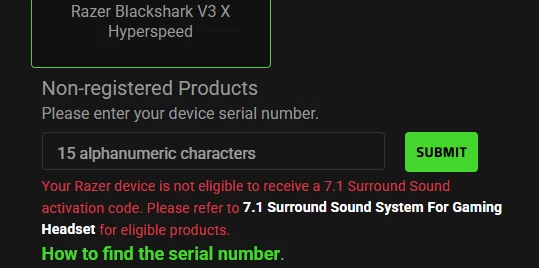
i bought a blackshark v3 x hyperspeed, it already exist in the 7.1 support list (Razer BlackShark V3 X HyperSpeed (RZ04-054201)).

But i can’t get the active code. it say this device is not able to receive the code…….


Hello, I would like to buy THX Spatial Audio. Can anyone help me? I am from Peru.

everclubDarkLava298

So the fact that I never received a code then go to resend code and it says register device then I go to do that and it says device already registered so I’m in an infinite loop of bullcrap with no actual help is so freaking funny to me. Why did I spend almost $80 on this junk? Last time I am ever supporting Razer since they can’t properly support their customers


  • Insider Mini
  • November 7, 2025

well i think first we have to registered

it is registered

Still you didn’t provided any detailed information - what exactly is not working. App is not running? Some errors? Screenshots of the problem?

The app was not working with windows 11 for a bit for some reason. I don’t know if it was because Spatial Sound capabilities were not added into the sound settings in the windows 11 update or what, but the surround sound just would not activate on the thx app


iZares
  • Insider Mini
  • November 19, 2025

Hi,

Due to many questions and misunderstandings I’ve created a small FAQ regarding 7.1 Surround and THX Spatial.

It is important to understand that 7.1 Surround IS NOT THX Spatial. These are 2 different surround technologies.

Before you create a new post on Razer Insider about 7.1 Surround or THX Spatial please use the search function and check below FAQ (and also manual included with the peripherals).

Which headsets are 7.1 Surround supported?

Full list is here: https://mysupport.razer.com/app/answers/detail/a_id/614


Which headsets are THX Spatial supported?

List for Synapse 3 devices is here: https://mysupport.razer.com/app/answers/detail/a_id/13808

The same devices + Kraken V4 / V4 Pro are supported via Synapse 4 software: https://www.razer.com/synapse-4 


I’ve registered headset with RazerID, got 7.1 surround key, but getting “The code you have entered does not seem to be valid. Please try again”

It’s likely you’ve installed THX Spatial app, instead Surround 7.1 app. Please uninstall THX Spatial app, download 7.1 surround https://www.razer.com/eu-en/71-surround-sound and activate with the received key.


Why am I getting a ”This device is already registered” error when registering BlackShark V2 X headset on RazerID?

It’s possible your headset is counterfeit and/or it’s from un-authorized distributor and/or reseller (like Aliexpress, Shopee, Lazada, eMAG, 3rd party Amazon sellers etc…). The best way is to return headset back, and get it from authorized source like Razer.com or Razer authorized resellers.


I’ve registered my headset with RazerID, but haven’t received 7.1 Surround activation code on my e-mail.

Please check spam folder on your e-mail. If the e-mail with activation code is not there, then please use self-service tool to receive 7.1 Surround activation code: https://mysupport.razer.com/app/answers/detail/a_id/6301


I’ve  purchased a BlackShark V2 / V2 Pro / Kraken V3 / V3 Pro etc… and didn’t received an activation code, and THX Spatial is asking for it.

Headsets like Blackshark V2 / V3 Pro / Kraken V3 / V3 Pro and so on… have THX Spatial built-in in Synapse software, no activation needed. If you’ve already installed external THX Spatial audio – uninstall it.


I have Blackshark v2 x,  and I was trying to activate the 7.1 surround, but when i install it, it doesn’t open, and isn’t installing correctly, I tried reapairing, uninstalling - installing, I tried deleting everything of razer, I tried to many things and it doesn’t work anyways, just the rzappengine doesn’t open but it is as a proccess in the task manager. (Srry for my english isn’t my main) 


iZares
  • Insider Mini
  • November 19, 2025

I have a problem with rzappengine, I just get blackshark v2 x, and I'm trying to open rzappengine, but i doesn't work, the files are not installed correctly bc it says "Completed" and the button to "open" but when I try to open it, it just doesn't work. I was seeing task manager and this is running, and with the thing in the right bottom site where the apps as discord, steam, and more, are on seccond plane, It appears, but just have the option to Close and Open your account, but it's empty when I right click it. May you help me with this please?


FiszPL
Vanguard
Forum|alt.badge.img+1
  • Author
  • VANGUARD
  • November 20, 2025

I have a problem with rzappengine, I just get blackshark v2 x, and I'm trying to open rzappengine, but i doesn't work, the files are not installed correctly bc it says "Completed" and the button to "open" but when I try to open it, it just doesn't work. I was seeing task manager and this is running, and with the thing in the right bottom site where the apps as discord, steam, and more, are on seccond plane, It appears, but just have the option to Close and Open your account, but it's empty when I right click it. May you help me with this please?

I’d try uninstall it. Download and run razer driver cleanup tool: https://mysupport.razer.com/app/answers/detail/a_id/20339/ (but I’d also clean the registry with CCleaner for eg.). Restart PC, download 7.1 surround installer, run it as an administrator.


 I bought the Kraken V4 X headset.


Now I've set everything up and THX spatial audio is working fine, but when I look in BF6 and in the app, I can only select Stereo or THX spatial audio as my profile.

But BF6 has other profiles. How can I activate them?


  • Insider Mini
  • December 7, 2025

Im trying to register my blackshark headset and i put in the number it says next to Model No. but it says the product number is invalid, i  thought i might've misinterpreted the 0 as an O, but tried every combination of the 2 but it did not work. Anyone got an idea what i could do?


  • Insider Mini
  • December 8, 2025

I bought the Razer Blackshark v2 X, but I can't get the code for 7.1 surround sound. I registered the headphones, and the system says that the code will be sent to my email, but it's not there, not even in the spam folder. I've requested the code about 10 times, but it's been a day, and I still haven't received it. I haven't used Razer products before, and because of that, I don't understand how to contact technical support, as there are answers to already asked questions everywhere. Is there another way to get my 7.1 sound code?


FiszPL
Vanguard
Forum|alt.badge.img+1
  • Author
  • VANGUARD
  • December 9, 2025

I bought the Razer Blackshark v2 X, but I can't get the code for 7.1 surround sound. I registered the headphones, and the system says that the code will be sent to my email, but it's not there, not even in the spam folder. I've requested the code about 10 times, but it's been a day, and I still haven't received it. I haven't used Razer products before, and because of that, I don't understand how to contact technical support, as there are answers to already asked questions everywhere. Is there another way to get my 7.1 sound code?

Have you used the online self-request service? https://mysupport.razer.com/app/answers/detail/a_id/6301


  • Insider Mini
  • December 9, 2025

I bought the Razer Blackshark v2 X, but I can't get the code for 7.1 surround sound. I registered the headphones, and the system says that the code will be sent to my email, but it's not there, not even in the spam folder. I've requested the code about 10 times, but it's been a day, and I still haven't received it. I haven't used Razer products before, and because of that, I don't understand how to contact technical support, as there are answers to already asked questions everywhere. Is there another way to get my 7.1 sound code?

Have you used the online self-request service? https://mysupport.razer.com/app/answers/detail/a_id/6301

Yes, I already mentioned that I had requested a code via email, but it never arrived.