Blackshark v2 bluetooth | Razer Insider
Skip to main content
Question

Blackshark v2 bluetooth

  • November 26, 2025
  • 1 reply
  • 13 views

I cannot get the bluetooth to work on my headset. It says its connected with audio and mic but thereis no sound.It works with dongle and wired.


This topic has been closed for replies.

1 Reply

Razer.Aero
Forum|alt.badge.img
  • Razer Support
  • November 29, 2025

Hi dailyLightPinklink263,

I understand you're experiencing Bluetooth connectivity issue with your Razer BlackShark V2 there is no sound, although it works with a dongle and wired connection. Have you tried connecting the headset to another Bluetooth-enabled device? Does the issue persist? Can you try playing audio from a different app to see if the issue might be app-specific?

Please try the steps below to isolate the problem:
1. Ensure your headset is fully charged before beginning any troubleshooting steps.
2. Turn on your headset and make sure it's in the correct wireless mode.
3. Install the latest Windows update to ensure your system is current.
4. Update the firmware on your headset,
5. Use Windows troubleshooting tools to fix any sound or audio problems. refer to Fix sound or audio problems in Windows.
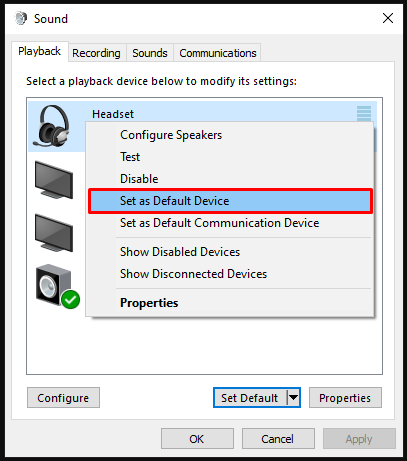
6. Ensure your headset is selected as the default playback device in your audio settings.

Default playback device

7. Try using your headset with a different PC to determine if the issue is system-specific.
 

If the error persists, please send me a PM with your device's serial number so I can verify its model and check for other workaround. All the best!


*Thread locked to curb the conversation to PMs.