Blackwidow v4 Low-Profile HyperSpeed Wireless random ghost key pressing | Razer Insider
Skip to main content

Blackwidow v4 Low-Profile HyperSpeed Wireless random ghost key pressing

  • September 29, 2026
  • 3 replies
  • 35 views

Hello, 

I have a brand-new Razer BlackWidow V4 Low Profile HyperSpeed Orange switches and I am experiencing an issue that I need help resolving.

When I switch to wireless mode, the keyboard starts experiencing severe, random key ghosting and input spamming like:

  • The Spacebar acts as if it is constantly being held down.

  • It randomly triggers Windows key shortcuts (e.g., Windows Key + random characters), launching various applications.

  • Pressing a single alphanumeric key types that same character 5 or 6 times in a row.

When I switch to wired mode, none of these issues occur.

The same thing happened a few days ago when I toggled from wired to wireless mode during an active Windows session. Rebooting Windows while in wireless mode temporarily resolved it until today. Frankly, I expect a keyboard at this price tag to switch seamlessly between wired and wireless modes without requiring a system restart.

Some notes:

  • I also use a Razer Naga wireless mouse.

  • The wireless dongle is positioned right next to the keyboard, supposedly not interfering with the Naga mouse.

  • The keyboard is updated to the latest firmware.

  • The keyboard is connected to a laptop.

Could this be a faulty hardware unit or unit lot? I’ve only had the keyboard for a week with light use, so this is very disappointing. I’m starting to believe the quality is poor, especially since I already had to return a previous unit due to a sticking Backspace key—something that shouldn't happen on a brand-new keyboard at any price point. For a premium product like the BlackWidow V4 Low Profile, it should function flawlessly out of the box.


3 Replies

NELiXERY1738
  • Insider
  • September 30, 2026

Besides updating latest Synapse version, also use the standalone updater i.e. this one https://mysupport.razer.com/app/answers/detail/a_id/20292.

You can also try any/all of the below troubleshooting:

  • Plug the dongle into a rear port as opposed to front port (direct to PC, avoid hub)
  • Isolate keyboard by disconnecting mouse first
  • Test Bluetooth to see if the 2.4 connection is faulty

If any of the above don’t fix it, raise a support ticket with serial numbers and request either replacement or refund. Good luck.


  • Author
  • Insider Mini
  • October 3, 2026

I will leave some information here of what I’ve tried:

The original ghosting and random key presses in HyperSpeed mode appear to be resolved after updating the firmware on both the keyboard and its dongle (only the keyboard was up to date) .
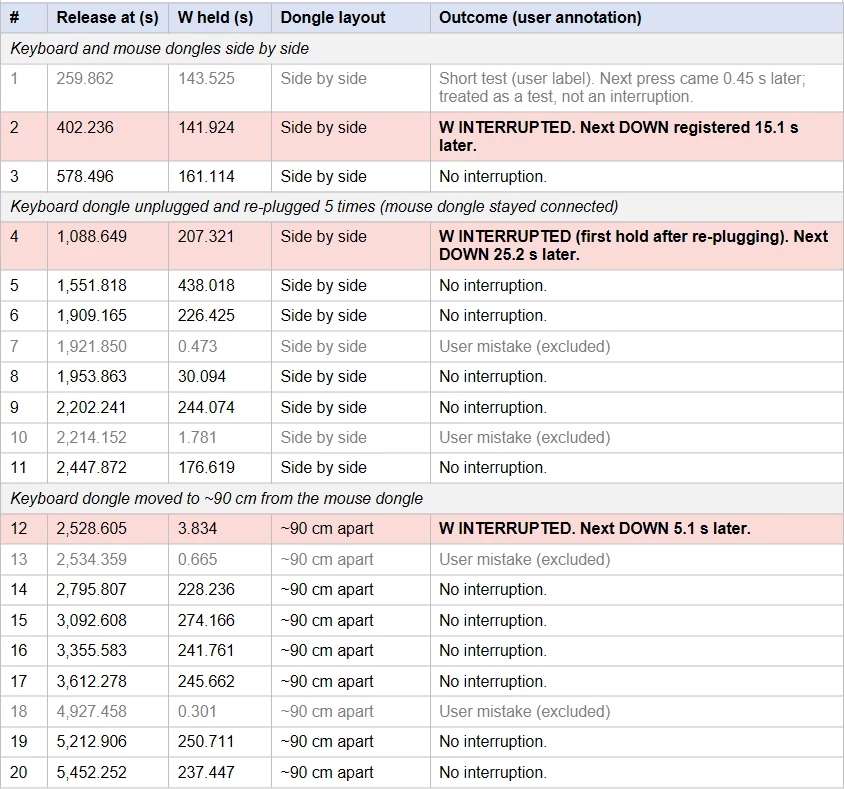
Now a new issue appeared: while W is physically held in HyperSpeed 2.4 GHz mode, Windows registers W as released (tested in Windows, War Thunder and CS2). What I noticed in War Thunder this does not happen in wired mode.

  • Keyboard: Razer BlackWidow V4 Low Profile HyperSpeed (Orange switches), keyboard firmware 1.04.01, dongle firmware 1.04.01 → basically the latest firmware version as of today.
  • Mouse: Razer Naga V2 HyperSpeed, with its own dongle
  • System: Windows 11, Synapse 4.0. [removed by moderator]
  • Extra information: keyboard battery above 80%, polling rate 1000 Hz, keyboard dongle also tested about 90 cm from the mouse dongle and laptop.

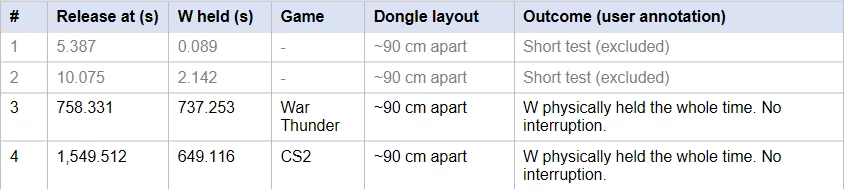
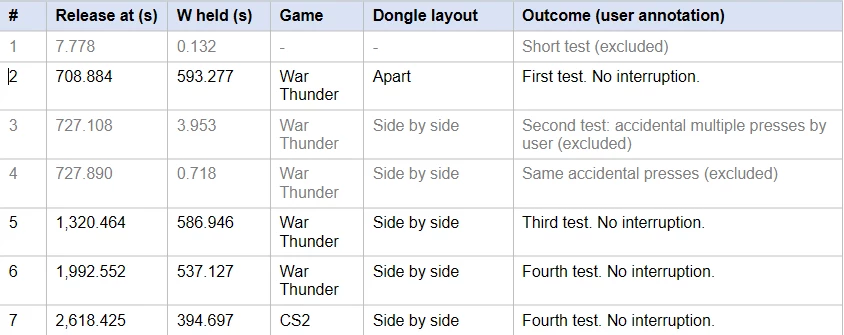
I've measured the behavior with a PowerShell script that reads the W key state from Windows (GetAsyncKeyState, virtual key 0x57) every 1 ms and writes a timestamped line on every state change. This is the state that games read, so it shows what Windows received. The log has no information about the circumstances, so each release below is annotated by the me. Releases marked "excluded" are short tests or accidental key presses.
I will paste my findings as pictures since Yahoo does not have an editable tabular format:
Summary:

* Continuous time W was held, excluding short tests and accidental presses.

Log 1: 30.09.2026
Keyboard dongle moved away from the mouse dongle's port, about 90 cm apart.

Log 2: 01.10.2026

Log 3: 02.10.2026

Already ruled out:

  • Dongle placement: the issue occurs with both dongles side by side and with the keyboard dongle about 90 cm away.
  • Keyboard battery above 80%.
  • Polling rate is 1000 Hz.
  • Re-plugging the keyboard dongle shows no clear pattern.
  • In one test, the Naga on Bluetooth did not produce the issue.

Shall I expect generally if RMA → replace to get a “fixed” lot or it’s just a gamble?


NELiXERY1738

Regarding RMA most companies send a brand new replacement if not at least refurbished replacement.