

Blade 16 2025 daily freezes and crashes | Razer Insider
Skip to main content
Question

Blade 16 2025 daily freezes and crashes

  • September 16, 2025
  • 2 replies
  • 340 views

I bought a Blade 16 2025 edition (RTX 5090 Ryzen 9 HX370) and pretty much since I got it, I've been experiencing half-daily freezes and crashes.

At first I thought this may be a drivers/firmware issue but 3 months and many updates later the issue peersists.

For the most part it happens when I first load into videogames (but with any game). Sometimes when the game is first loading, sometimes in its main menu and sometimes shortly after I load a mission -- a few times it happened later on after playing for a while.
After the computer crashes and reboots, I can usually play without issues for the rest of the day, but on the next day (I usually put the computer to sleep at night) the issue will probably happen again the first time I load a game.

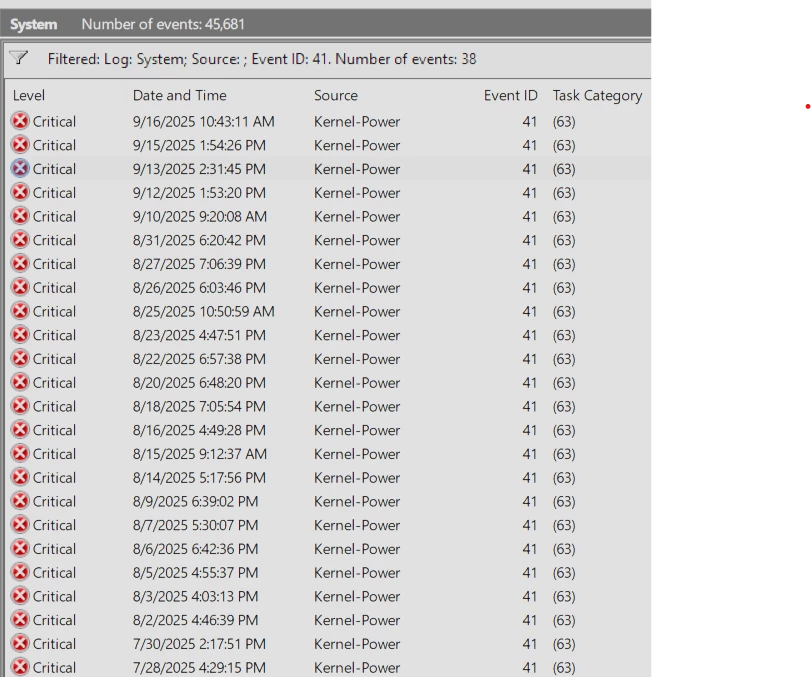
I checked the System logs and every time a scrash happens I find a Critical EventID 41 report, which seems to indicate a power issue.
If I check into each one of these I find some with no BugCheckCode (meaning the crash happened too suddenly for windows to register its cause) but others with a variety including 59, 80, 275, 278, 307, 268435582, and more. 45k crashes in 3 months.

Most of the time the crash is an instant reboot; my external monitor (I play only with an external TV connected via HDMI with the laptop closed) goes dark and the fans suddenly go quiet. A few crashes had the screen freezing, and a few of the crashes had the laptop still on with the lighting frozen in place (I have the rainbow effect) and I have to force reboot it.

The issue has been getting slightly better over time - it would happen many times a day earlier and now it seems to happen once a day with occasionall lulls for days or weeks. Maybe some of the updates helped but I'm losing my patience here.

This is not an overheating issue, I used HWInfo to track temperatures and log them and they never get past 90C on any chipset from CPU to GPU.


My current Nvidia driver version is 581.29, and I already applied the Customer Firmware Update relesed on Aug 20th and the bios updated released in May.

Do I need to get my laptop RMA'd with support or is this a driver/config issue that is being worked on?


This topic has been closed for replies.

2 Replies

niklifeone
  • Insider Mini
  • September 29, 2025

I bought a Blade 16 2025 edition (RTX 5090 Ryzen 9 HX370) and pretty much since I got it, I've been experiencing half-daily freezes and crashes.

At first I thought this may be a drivers/firmware issue but 3 months and many updates later the issue peersists.

For the most part it happens when I first load into videogames (but with any game). Sometimes when the game is first loading, sometimes in its main menu and sometimes shortly after I load a mission -- a few times it happened later on after playing for a while.
After the computer crashes and reboots, I can usually play without issues for the rest of the day, but on the next day (I usually put the computer to sleep at night) the issue will probably happen again the first time I load a game.

I checked the System logs and every time a scrash happens I find a Critical EventID 41 report, which seems to indicate a power issue.
If I check into each one of these I find some with no BugCheckCode (meaning the crash happened too suddenly for windows to register its cause) but others with a variety including 59, 80, 275, 278, 307, 268435582, and more. 45k crashes in 3 months.

Most of the time the crash is an instant reboot; my external monitor (I play only with an external TV connected via HDMI with the laptop closed) goes dark and the fans suddenly go quiet. A few crashes had the screen freezing, and a few of the crashes had the laptop still on with the lighting frozen in place (I have the rainbow effect) and I have to force reboot it.

The issue has been getting slightly better over time - it would happen many times a day earlier and now it seems to happen once a day with occasionall lulls for days or weeks. Maybe some of the updates helped but I'm losing my patience here.

This is not an overheating issue, I used HWInfo to track temperatures and log them and they never get past 90C on any chipset from CPU to GPU.


My current Nvidia driver version is 581.29, and I already applied the Customer Firmware Update relesed on Aug 20th and the bios updated released in May.

Do I need to get my laptop RMA'd with support or is this a driver/config issue that is being worked on?

Hi, I have same problem with blade 18 5080, same record in event log and same behavior, I’m not using external monitor, also in hwinfo temps looks normal but random shutdowns(hard reboots) persist, please update upon your situation, I have no option for rma or warranty because system was bought in may in Germany and I’m living currently in another country with no Razer office nearby


Razer.Speedcr0ss

Hi Dassiel and niklifeone. I suggest contacting our Support Team through this link: https://mysupport.razer.com/app/warranty-support to have it investigated by submitting a case. In terms of warranty claims, allow the team to suggest the next course of action, especially for those located outside our shipping network. I appreciate your cooperation.