[BUG] (Tartarus Pro) D-pad not customizable when joystick axis is assigned to analog key | Razer Insider

Skip to main content

[BUG] (Tartarus Pro) D-pad not customizable when joystick axis is assigned to analog key
  • August 7, 2025
  • 134 replies
  • 4866 views

Show first post

134 Replies

  • Insider Mini
  • August 8, 2025

Not sure if this is the same for everyone else but suddenly the mapping is working again with regular WSAD


My 4-way is still not working. Have to use the 8-way D-Pad.

I have also tried exporting and importing the profile. Does not work for me.

Let me put down what I have done in case it works for some people.

  • Delete the profile. (Or just) Add a new one.
  • Disable all the 4-way.
  • Set the Keyboard Function for Up, Down, Left, Right (8-way).
  • Disable the 4 corners (8-way).
  • Now you can set the Keyboard Function for the 19 keys and the Scroll.

I have done this 3 times. Works on all 3 times.


  • Insider Mini
  • August 8, 2025

Not sure if this is the same for everyone else but suddenly the mapping is working again with regular WSAD


My 4-way is still not working. Have to use the 8-way D-Pad.

I have also tried exporting and importing the profile. Does not work for me.

Let me put down what I have done in case it works for some people.

  • Delete the profile. (Or just) Add a new one.
  • Disable all the 4-way.
  • Set the Keyboard Function for Up, Down, Left, Right (8-way).
  • Disable the 4 corners (8-way).
  • Now you can set the Keyboard Function for the 19 keys and the Scroll.

I have done this 3 times. Works on all 3 times.


all I did to get my pre-Aug 8 patch profiles to work was

all is working as expected after exporting the profile set and then importing it


  • Insider Mini
  • August 8, 2025

Not sure if this is the same for everyone else but suddenly the mapping is working again with regular WSAD


My 4-way is still not working. Have to use the 8-way D-Pad.

I have also tried exporting and importing the profile. Does not work for me.

Let me put down what I have done in case it works for some people.

  • Delete the profile. (Or just) Add a new one.
  • Disable all the 4-way.
  • Set the Keyboard Function for Up, Down, Left, Right (8-way).
  • Disable the 4 corners (8-way).
  • Now you can set the Keyboard Function for the 19 keys and the Scroll.

I have done this 3 times. Works on all 3 times.

Yep can confirm this works, I created new profiles and deleted the ones using 4 way Dpad.


  • Insider Mini
  • August 8, 2025

I used the arrow keys to the right of the right CTRL key and set them in TARTARUS. They're also listed in the options for my game, Guild Wars 2. It's been working fine for 30 minutes. (Until the next patch????)
(In German: "OBEN" changed to "NACH-OBEN")


Exact same issue, its really annoying the softaware didnt even ask if I wanted it to be updated, just updated itself


  • Insider Mini
  • August 8, 2025

I want to add that I had uninstalled the software and reinstalled Synapse 4 and created a new profile before I had changed the d-pad from 4 way to 8 way. Last night this worked perfectly. Before all that I had tried to export and import the profile and that didn’t help it. I think uninstalling is not necessary and after I created the new profile it still didn’t work on the 4 way setup. Using 8 way fixed mine. 


tcxalbinorhino

The only thing that helped me was uninstalling Synapse 4 and reinstalling Synapse 3

Razer Synapse 3 - Cloud-Based Hardware Configuration Tool | Razer United States ← link to download v3 if anyone else wants to try. This worked for me. I had v3 before v4, so my keybinds loaded right back up! 


  • Insider Mini
  • August 8, 2025

I have the same issue. I got on support chat with Razer. They didn’t know what was wrong. They sent me a link to upload a log file. but of course the Log Collector didn’t work and kept saying connection error. Well looking at all these reports, I say it was there update that broke it. I’m going to get back on chat and let them Know. 


ra4ok1234
  • Insider Mini
  • August 8, 2025

I made it even easier by taking the "old" Tartarus V2 out of the closet. No problems with it.


  • Insider Mini
  • August 8, 2025

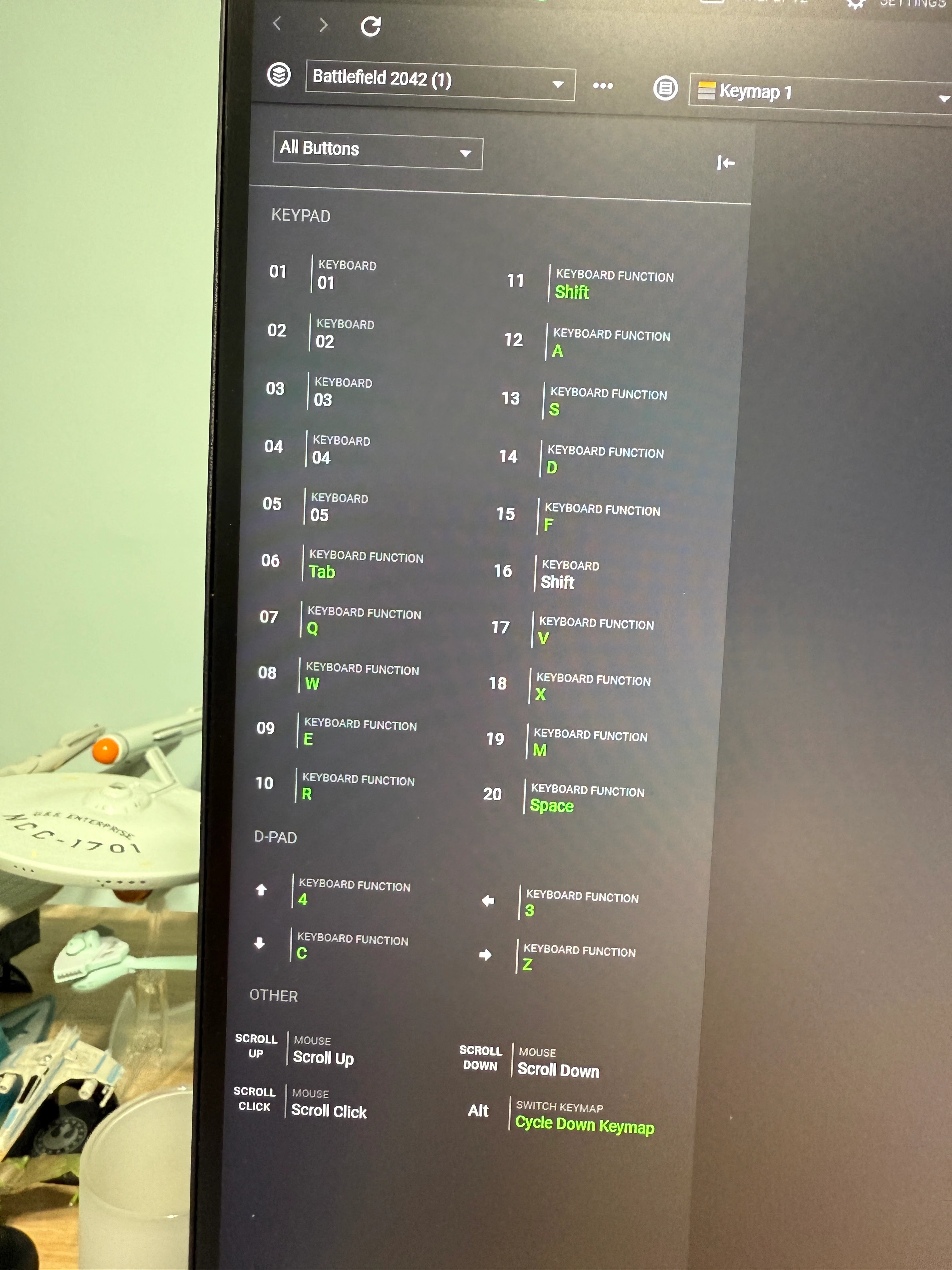
This is my key layout. Someone mentioned the d-pad didn’t work after changing other keys. But I can confirm it does in 8 way mode after changing other buttons too. 


LORD.EBLIS
  • Insider Mini
  • August 8, 2025

Hey guys,

I have the same bug and my DPAD ISN’T WORKING IN ANY PROFILE as is,  it happened after the update this morning (I live in France, so maybe we do not have the same update schedule). I played the whole night and I use my DPAD a lot (Valorant for basically all my utils) and it was fine.

The version I have is 4.0.86.2508050339.

I can also confirm IT COMES 100% FROM THIS UPDATE because when I restart my computer, the DPAD works on my login screen as intended up left right down, when I log in AND BEFORE RAZER SYNAPSE START I launch Notepad and can use the DPAD, it also works in my start menu and on the desktop. AS SOON as Synapse start and load the profiles, DPAD is dead. Plugging, unplugging, changing, usb, creating new profiles, deleting eveything, reinstalling, nothing works but:

  • The solution given by one of you (THANKS A LOT) to disable every button in DPAD 4 way and assign the 4 directions in the 8 way tab and disabling the diagonals works 75% of the time for me, give it a try.

I mean Razer come on… We’ve been waiting for SNAP TAP for months and months on our 150€ Tartarus Pro, we don’t get it and we now do not have our DPAD??? COME OOOOON!!!


EDIT: Am I dreaming or do we have SNAP TAP NOW? Tartarus disappeared from “coming soon” devices XD.


I have reverted to Synapse 3 and now I am back in business. My legacy profiles were there, so I didn’t lose anything but time.


I really didn’t understand the benefit of Synapse 4 anyways.


jimusbobus
  • Insider Mini
  • August 8, 2025

Idk if it's just me, but I duplicated the keypad profile, deleted the original and the renamed back to original name, then tested in notepad and mapped keys worked.


I still have to manually start synapse 4 after every start up.


  • Insider Mini
  • August 8, 2025

I have also across this problem. My d pad isnt using its keybinds


  • Insider Mini
  • August 8, 2025

Just found this thread.  Trying everything mentioned so far…  We’ll see what works.

So happy to be troubleshooting my hardware on a Friday evening instead of playing a game.  *thinly veiled sarcasm*


Just found this thread.  Trying everything mentioned so far…  We’ll see what works.

So happy to be troubleshooting my hardware on a Friday evening instead of playing a game.  *thinly veiled sarcasm*

Go back to Synapse 3 for Friday night if you want to have fun :)


  • Insider Mini
  • August 8, 2025

Only reason I use a Taurus is because the far superior Logitech G13 stopped being produced, and Razor’s horrible programming and issues reminds me at least once a week why I hate Razor products.

Y’all reinstalling, rebooting, factory resetting… and the problem is 100% Razor’s broken update.  Doesn’t surprise me at all Razor forces an update they didn’t even test, and won’t bother taking a look at their forums to realize the broke everyone’s Taurus for at least another week.


  • Insider Mini
  • August 8, 2025

Only reason I use a Taurus is because the far superior Logitech G13 stopped being produced, and Razor’s horrible programming and issues reminds me at least once a week why I hate Razor products.

Y’all reinstalling, rebooting, factory resetting… and the problem is 100% Razor’s broken update.  Doesn’t surprise me at all Razor forces an update they didn’t even test, and won’t bother taking a look at their forums to realize the broke everyone’s Taurus for at least another week.

 If you are trying to use your d-pad for keyboard shortcuts like myself just change it to 8 way mode and disable the 4 angle directions. This worked for me but fyi I did create new profiles before I changed that. The new profile did not work for me in the 4 way mode. I hope Razer fixes this. You may not need a new profile so just test it first. 


  • Insider Mini
  • August 8, 2025

I can get it to work but it doesn't persist through a reboot


i cant say its really working, it wont combine W+A+S+D for combined movement. If I try to move diagonally, it stops working. 


  • Insider Mini
  • August 9, 2025

I can get it to work but it doesn't persist through a reboot

I noticed like some others have reported that Synapse 4 isn’t loading when Windows starts. The system tray icon is there but Synapse isn’t loading up with it. Check and see. If it isn’t then click it in the system tray to make it load. I am currently checking if it’s a Windows startup issue but I am betting this is because of the Razer update too. 


theJway
  • Insider Mini
  • August 9, 2025

Getting the Same issues. Even when thru a 20 step Testing with Razer support… 
Reboot
Recreate profiles
Try guest
Try this provided Test account...
Send us a video of the issue….
reinstall 
Check Windows updates…..
Not once did they even hint they updated last night.
Even seen one glich whil i was messing with it trying to create the profiles again the 4way was set to wasd and when i clicked to remap another key they flashed back to up,down,left, right for a split second and stopped working.
But hey Your Ticket is being looked at………..


Same issue swapped over to the joystick binds and bound them to what I wanted for the dpad binds works for now I guess.


The date is august 8th and my dpad keeps using default as of yesterday. I'm glad it's just a bug and will be fixed… i hope


  • Insider Mini
  • August 9, 2025

Same issue here. I’m unable to remap the keys on the D-PAD. Can’t they test there update before screw up people.


D-PAD 8 directions didn’t work for me. 

I tested to get back to Synapse 3 and it works. Ty you for the advice 


  • Insider Mini
  • August 9, 2025

I’ve also gone back to synapse 3 and the d pad is working now but I have to start synapse manually to get it to load my Tartarus pro, looking at swapping to Azeron if they get back to me and confirm they don’t force push updates to their software…..