[BUG] (Tartarus Pro) D-pad not customizable when joystick axis is assigned to analog key | Razer Insider

Skip to main content

[BUG] (Tartarus Pro) D-pad not customizable when joystick axis is assigned to analog key
  • August 7, 2025
  • 134 replies
  • 4866 views

Show first post

134 Replies

The sidepanel does allow you to set WASD, works in notepad but not in CP2077. I might get lucky with sidepanel and CP2077 if done at right time or I set thumbpad to default in every game. Multiple games have wasd controls for multiple functions(vehicles, maps, movement) and to set to something else requires more than 4 buttons. Some key bindings are even hidden and are not changable.


Not sure if this is the same for everyone else but suddenly the mapping is working again with regular WSAD


My 4-way is still not working. Have to use the 8-way D-Pad.

I have also tried exporting and importing the profile. Does not work for me.

Let me put down what I have done in case it works for some people.

  • Delete the profile. (Or just) Add a new one.
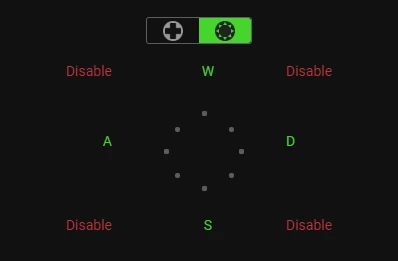
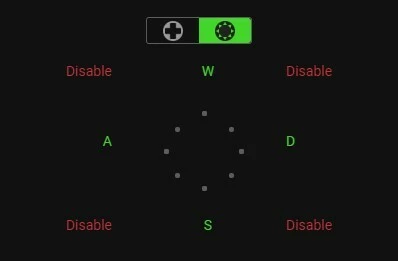
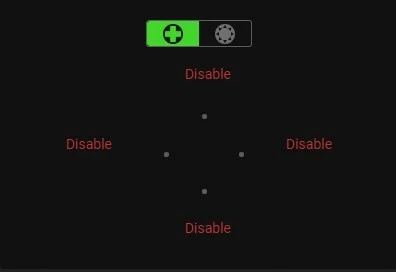
  • Disable all the 4-way.
  • Set the Keyboard Function for Up, Down, Left, Right (8-way).
  • Disable the 4 corners (8-way).
  • Now you can set the Keyboard Function for the 19 keys and the Scroll.

I have done this 3 times. Works on all 3 times.

Yep can confirm this works, I created new profiles and deleted the ones using 4 way Dpad.

How do you disable keys. Multiple times I have got it to work in notepad but not in CP2077. Once CP2077 starts up, Dpad back to up down left right.

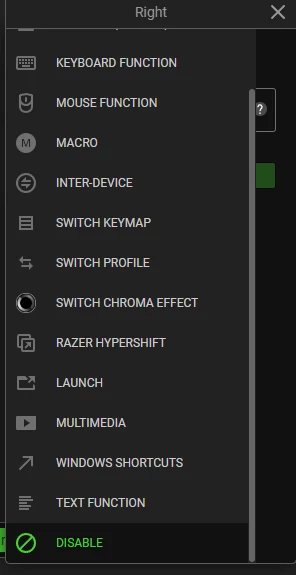
Edit: Found it. Had to scroll down in options to see disable. Works in CP2077. Thank you!

Well that’s an evening wasted.


Lu__ar
  • Insider Mini
  • August 9, 2025

same here :(


cereberman
  • Insider Mini
  • August 9, 2025

This helped me:
1 - export profile to file
2 - reset profile to factory settings
3 - load saved profile from file


Same issue I think, though I’ve only just bought mine recently so no previous software versions to revert to.

I change the D-pad to respond to WASD instead of direction arrows, software shows the change, but it doesn’t work. I have managed to make it work once or twice briefly, but it always fails next time I try.


  • Insider Mini
  • August 9, 2025

Same issue I think, though I’ve only just bought mine recently so no previous software versions to revert to.

I change the D-pad to respond to WASD instead of direction arrows, software shows the change, but it doesn’t work. I have managed to make it work once or twice briefly, but it always fails next time I try.35

Try creating a new profile and change the Dpad from 4 directions to 8 and then disable the diagonal directions and then bind the dpad directions as usual.

I’ve found doing this only works on a new profile, lots of people have posted here that it works and it did for me.

I have another problem where Synapse 4 doesn’t detect the Tartarus Pro when the Pc starts but detects it when I open Synapse. I’ve been in contact with support via email and much to my better judgment followed their instructions which completely stopped Tartarus working while Synapse was running, fortunately I have software which can completely clear any left overs after a uninstall which got it working again.


  • Insider Mini
  • August 9, 2025

Have the same issue, tried rebinding, changing from the 4 direction d pad to the 8 direction for the stick… nothing. Really anoying


ArrowOfTruth
  • Insider Mini
  • August 9, 2025

Happening to me, no workarounds or fixes at the moment.


  • Insider Mini
  • August 9, 2025

Have the same issue, tried rebinding, changing from the 4 direction d pad to the 8 direction for the stick… nothing. Really anoying

Try deleting your profile setup and create a new one using the d-pad as 8 way. I took pictures of my setup before doing this to make it easier on me. 


ArrowOfTruth
  • Insider Mini
  • August 9, 2025

Have the same issue, tried rebinding, changing from the 4 direction d pad to the 8 direction for the stick… nothing. Really anoying

Try deleting your profile setup and create a new one using the d-pad as 8 way. I took pictures of my setup before doing this to make it easier on me. 

This does not work if you customize your 1-19 buttons at all or use the d-pad for keymap switching or hypershift button.


  • Insider Mini
  • August 9, 2025

Have the same issue, tried rebinding, changing from the 4 direction d pad to the 8 direction for the stick… nothing. Really anoying

Try deleting your profile setup and create a new one using the d-pad as 8 way. I took pictures of my setup before doing this to make it easier on me. 

This does not work if you customize your 1-19 buttons at all or use the d-pad for keymap switching or hypershift button.

Yes it does work. Mine is working right now and I setup most of the numbered buttons too. 


  • Insider Mini
  • August 9, 2025

I’m trying my best not to drop cuss words here. I spent $150 on this device, and it should just work.

Right now, there’s a bug in Synapse 4 where the Tartarus Pro thumbstick will let you bind WASD only until you customize any other key. The moment you change another keybind, the thumbstick reverts to arrow keys only.

Razer will probably never fix this unless enough people complain — because hardcore PC gamers stick to WASD on the keyboard, so Razer doesn’t see the thumbstick as a priority. Financial decision, plain and simple.

Workaround for Windows:
If you never use arrow keys on your keyboard, here’s how to convert them to WASD everywhere:

  1. Download AutoHotKey (version 1.1, not 2.0).

  2. Open Notepad, paste this, and save it as arrowstowasd.ahk:

    ; Remap Arrow Keys to WASD

    Up::w

    Left::a

    Down::s

    Right::d

  3. Double-click the .ahk file to run it (AHK will show in your system tray).

  4. In Synapse, bind the thumbstick to arrow keys. AHK will intercept them and send WASD instead.

  5. Close AHK if you ever need the arrow keys again.

Tested in WoW — works perfectly.

It sucks that we have to jump through these hoops after spending over $100 on this thing. I love Razer, but my loyalty has limits. Between this and other issues, this might be my last Razer purchase.


  • Insider Mini
  • August 9, 2025

They implemented snap tap with this update. I used to be available a year ago until removed. Now Corsair added snap tap recently and Razer quickly reenabled it in Synapse for Tartarus. And with this terrible update, the D-Pad customization is no longer working.


  • Insider Mini
  • August 9, 2025

Have the same issue, tried rebinding, changing from the 4 direction d pad to the 8 direction for the stick… nothing. Really anoying

Try deleting your profile setup and create a new one using the d-pad as 8 way. I took pictures of my setup before doing this to make it easier on me. 

This does not work if you customize your 1-19 buttons at all or use the d-pad for keymap switching or hypershift button.

It does work but you need to disable the diagonal dpad directions in the 8 way.


  • Insider Mini
  • August 9, 2025

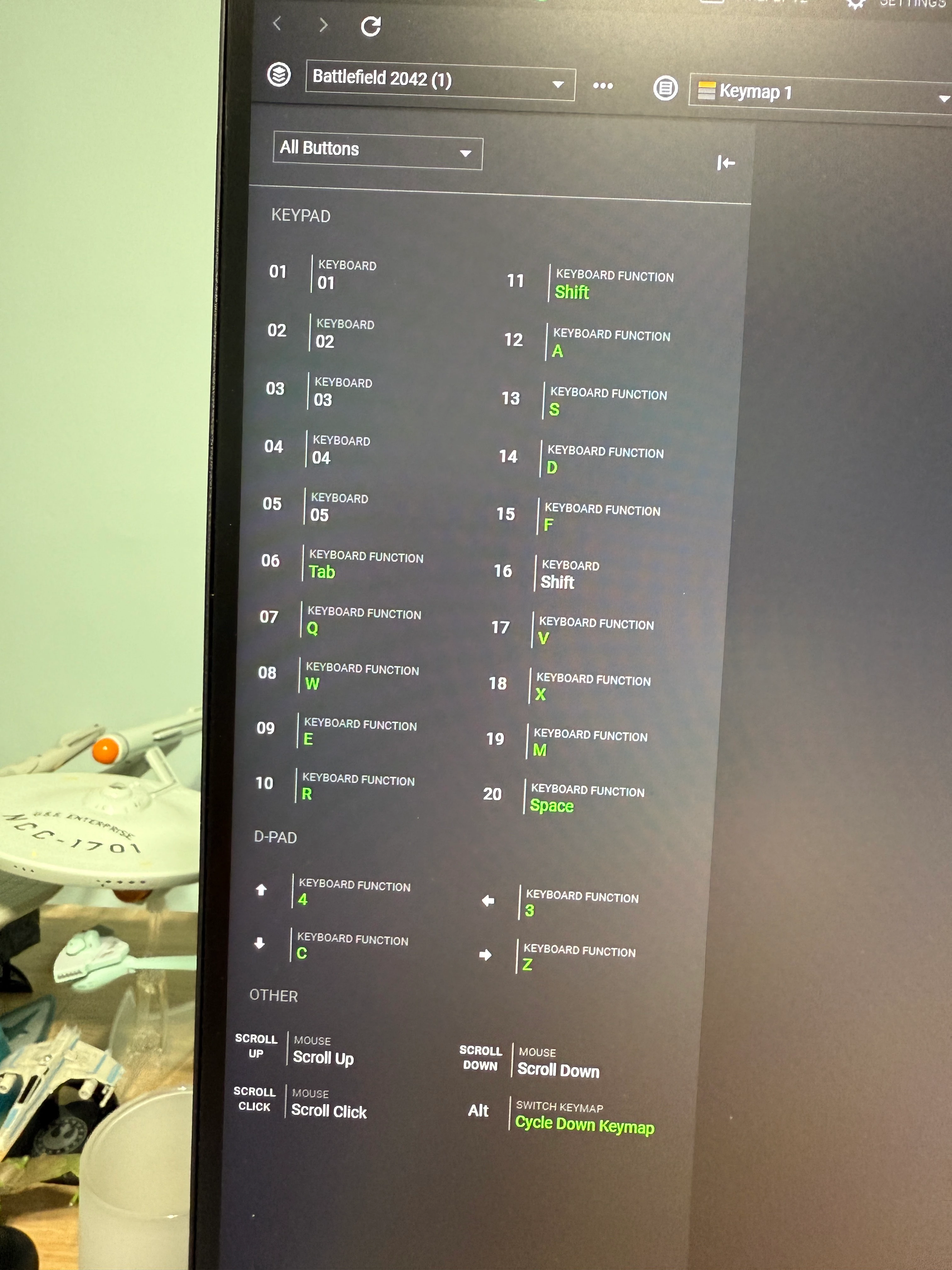
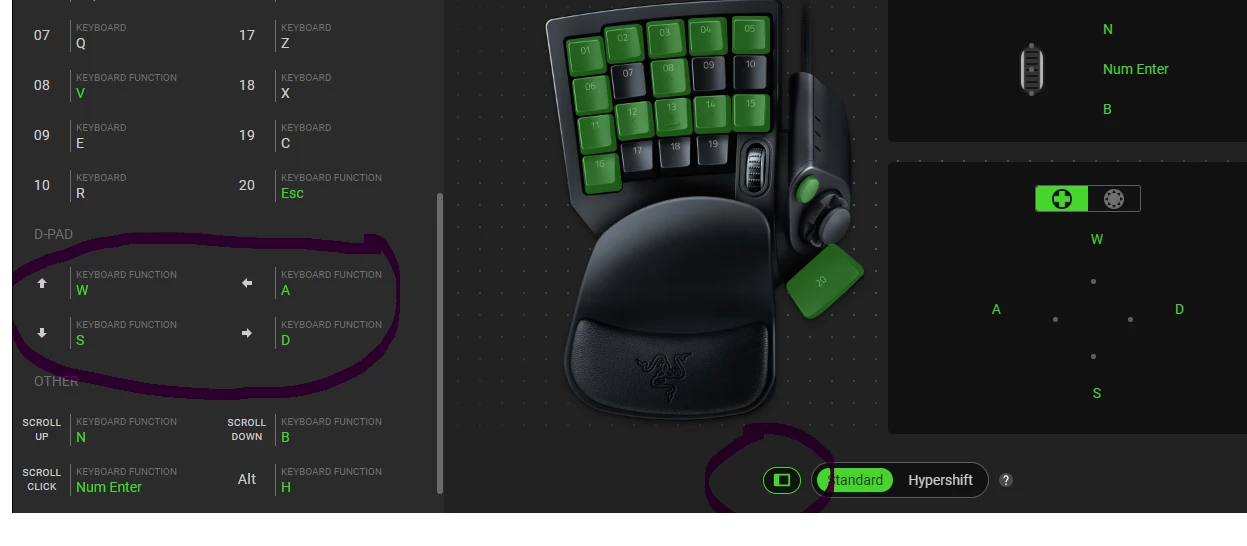
I can’t speak to using the d-pad for W, S, A, D because I don’t use it for movement in the Battlefield games. I do have it set to 3, 4, C, Z that I use for secondary weapons, crouching and going prone. That works and I do have the angles disabled. You can see (in green) the keys I did manually setup so far.


  • Insider Mini
  • August 10, 2025

my dpad is also broken.


radioportalClaret052

Try duplicating the profile that worked for me, nothing else did tried reinstalling yada yada. 


DPAD settings

When Clicking on Dpad buttons to disable, scroll down to Disable. 4way dpad is not customisable, use 8way with diagonals disabled for WASD.

May need to delete all Keymaps and make a new one, May need to delete all profiles and start over.


  • Insider Mini
  • August 10, 2025

I have other old profiles. The old profiles do not work. The new profile with 4way disabled, 8way corners disabled, works. The old profiles do not affect the new profile in my case.


  • Insider Mini
  • August 10, 2025

Just to add to the chorus; i’m having the same mapping issues


Behelith
  • Author
  • Insider Mini
  • August 10, 2025

I have another problem where Synapse 4 doesn’t detect the Tartarus Pro when the Pc starts but detects it when I open Synapse. I’ve been in contact with support via email and much to my better judgment followed their instructions which completely stopped Tartarus working while Synapse was running, fortunately I have software which can completely clear any left overs after a uninstall which got it working again.

I have that issue too as well as a few others with Synapse 4. The fact that they blackmail us into upgrade to Synapse 4 before Jan 2026 while it’s pure garbage is making my blood boil … again.


nexy33
  • Insider Mini
  • August 10, 2025

I’m trying my best not to drop cuss words here. I spent $150 on this device, and it should just work.

Right now, there’s a bug in Synapse 4 where the Tartarus Pro thumbstick will let you bind WASD only until you customize any other key. The moment you change another keybind, the thumbstick reverts to arrow keys only.

Razer will probably never fix this unless enough people complain — because hardcore PC gamers stick to WASD on the keyboard, so Razer doesn’t see the thumbstick as a priority. Financial decision, plain and simple.

Workaround for Windows:
If you never use arrow keys on your keyboard, here’s how to convert them to WASD everywhere:

  1. Download AutoHotKey (version 1.1, not 2.0).

  2. Open Notepad, paste this, and save it as arrowstowasd.ahk:

    ; Remap Arrow Keys to WASD Up::w Left::a Down::s Right::d

  3. Double-click the .ahk file to run it (AHK will show in your system tray).

  4. In Synapse, bind the thumbstick to arrow keys. AHK will intercept them and send WASD instead.

  5. Close AHK if you ever need the arrow keys again.

Tested in WoW — works perfectly.

It sucks that we have to jump through these hoops after spending over $100 on this thing. I love Razer, but my loyalty has limits. Between this and other issues, this might be my last Razer purchase.


auto hot key running could potentially get you banned in several games as a lot of script kiddies use it for repetitive tasks in some games or just outright cheating.


  • Insider Mini
  • August 10, 2025

Same here, working fine yesterday, complet inacceptable way of doing things, razer is letting me down for more than 5 years now with all their product now have factory problem and no solution (the d pad button switch used for the tartarus is a joke for exemple)


  • Insider Mini
  • August 10, 2025


DPAD settings

When Clicking on Dpad buttons to disable, scroll down to Disable. 4way dpad is not customisable, use 8way with diagonals disabled for WASD.

May need to delete all Keymaps and make a new one, May need to delete all profiles and start over.

When you disable Diagonal Directions you need to leave it selected to 8 directions and just bind up, down, left and right do not turn it back to 4 directions. Yes you need to use this on new profiles.


  • Insider Mini
  • August 10, 2025

I thought going back to Synapse 3 would work, but it is not functioning the way it did previously. 

I have been able to map WASD to the directional pad again, but I can no longer move diagonally. So pressing up+right, which is mapped to W and D, does not move the character forward and to the right. I can move in any of the four directions only, For example, if I am back pedaling and roll the pad to the left or right it cancels the movement. I tried all of the fixes that were mentioned. 

I buy about one of these a year as the directional pad always fails. This didn't seem like a huge deal as using that for movement wears it out quickly, but software issues are making me lean towards another product.

If anyone has a fix for diagonal movement, it will be greatly appreciated!