Cannot update firmware for Basilisk v3 X Hyperspeed (while trying to fix the restart issue) | Razer Insider
Skip to main content
Question

Cannot update firmware for Basilisk v3 X Hyperspeed (while trying to fix the restart issue)

  • August 13, 2025
  • 9 replies
  • 983 views

I have been facing this issue for a while now - mouse automatically shuts down and starts again in a few seconds. This takes like 5-10s to happen each time and happens like 30-40 times in a day. And sometimes it happens consecutively that the mouse is just unusable for like a full minute.

I tried looking for a fix, and found that some threads in Razer Insider suggested that I update the mouse firmware using this tutorial. My mouse’s model number is RZ01-0487 and it is different from the model number mentioned in the tutorial. Since I cannot find a firmware updater for my model, I decided to try this one out. 

But I am stuck at this screen below becuase the updater does not recognize the dongle when connected.
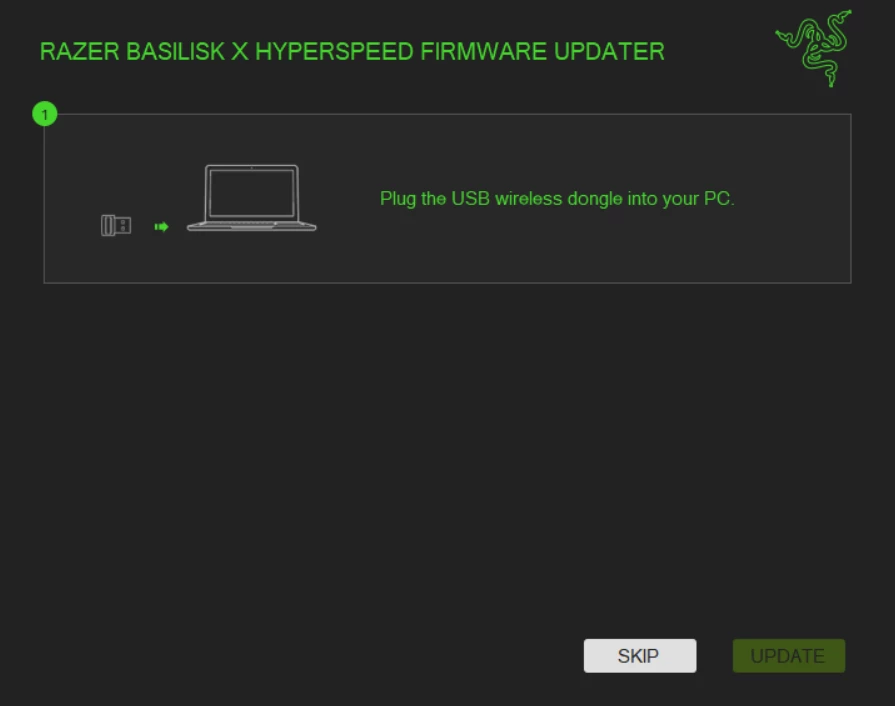
 

I don’t know what else to do now. Can someone please share a link to the right firmware updater for my mouse model (RZ01-0487) and/or help me fix this restart issue? 

Much thanks. 

Looking forward to hearing from the Razer Support.

9 Replies

  • Insider Mini
  • September 20, 2025

I have the same issue with firmware update, it does not detect the mouse, why ?? (PM2525H30300663)


Seydenek
  • Insider Mini
  • September 29, 2025

Same problem with my mouse, it started to losing connection via 2.4 ghz. I wanted to update it but  I cant 


i have the same problem with the Basilisk X Hyperspeed, but on the next step. The update arrive at 40% then it blocks and starts from the beginning by making my click “update” again, and i do this cycle for a big amount of time before closing the updater


  • Insider Mini
  • December 21, 2025

Same problem, actually there doesnt seem to be a firmware/software for the V3 X Hyperspeed, only V3 and old Hyperspeed.
How to get support into this?


KhaWtAaN
  • Insider Mini
  • December 23, 2025

Same problem. Why any support, reply on this question?


pulsefeverArcticLime952

Same problem, 

I hope someone has a fix for this problem and replies to this.


pulsefeverArcticLime952

So guys, 
I just found a solution for me:

I have a 2.4 GHz Headset and when I turned it off, the mouse is working completly fine. So i guess it has problems with other 2.4 Ghz devices.


chrysothrix
  • Insider Mini
  • February 15, 2026

Stuck on the same screen


  • Insider Mini
  • July 13, 2026

DUDES, HOLY SHIET I GOT IT!!

Razer updaters are stupid AF so search up your mouse and model number. So example: razer basilisk v3 pro RZ01-0462 drivers. Find your SPECIFIC driver for your mouse model number (model number is either on the bottom on the mouse or sometimes, outside of the box the mouse came in. Update the mouse and dongle here.


If you are having issues pairing with razer hyperpolling wireless dongle, these steps below should resolve the issue, AFTER THE MOUSE AND 1K DONGLE UPDATE. The mouse updates are super important to get the 8k dongle to pair.


After your mouse and 1k usb dongle are updated, pull up razer synapse.

Plug in the 8k polling dongle to your original usb c cable that came with the razer mouse.

Open Razer Synapse app, click on your 8k polling dongle.

Select pair your device option on the left

Click on the pair mouse button, hold your Razer mouse next to the 8k polling dongle and hold down your left and right click buttons until it pairs successfully. I used another mouse to click on the pairing button.


If you dont have another mouse, you can plug your 1k usb dongle to your computer's front usb hubs and remove it right after clicking pair.


Good luck fellas!