

DeathAdder V4 Pro wireless not working | Razer Insider
Skip to main content
Solved

DeathAdder V4 Pro wireless not working

  • November 20, 2025
  • 4 replies
  • 374 views

Got a new DeathAdder V4 Pro today which works when connected directly to my PC but not through the wireless dongle. When the mouse is turned on and the dongle is connected to the PC, the LEDs on the dongle remain off and the mouse’s LED flashes twice when it is moved. I cannot get the LEDs on the dongle to turn on at all. I have tried: 

  • Fully charging the mouse
  • Connecting to another PC. Same issue occurs
  • Updating firmware of the mouse and dongle to 1.20.00. No change
  • Pairing the dongle using the mouse pairing utility. It recognizes when the mouse and dongle are connected and says pairing is successful however it still doesn’t work
  • Removing and reinstalling drivers using the device detection troubleshoot tool. This did not change anything
  • Uninstalling/reinstalling Synapse 4. This also did not change anything. Synapse can configure the mouse when it is directly connected to the PC, however when the dongle is connected and the mouse is turned on wirelessly, Synapse says the device is switched off. The situation is the same when synapse is not installed.
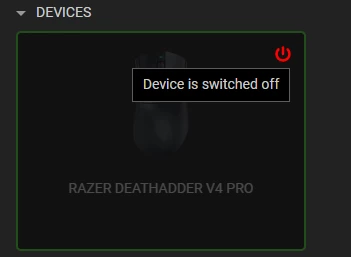
    Seeing as both the mouse and dongle are separately detected I’m not sure if I’m doing something wrong? Has anyone else had this problem?

Best answer by bingent

Update:

Contacted support giving the reason as a wireless connectivity issue.

They shipped out a replacement dongle, and after pairing it the problem has been completely resolved. 


Not sure how I can close this thread, but the issue is resolved.


4 Replies

The same just happened to me. Mouse is working when connected directly to the PC, but the dongle suddenly not turning on, used to be working fine for a couple of months, now no lights as if it’s dead.


  • Insider Mini
  • November 22, 2025

The same just happened to me. Mouse is working when connected directly to the PC, but the dongle suddenly not turning on, used to be working fine for a couple of months, now no lights as if it’s dead.

Hapening to me too. I was able to get the dongle back a few times but unplugging it and plugging it back in after a short delay. I’m hoping this is enough.

Keep in mind if the mouse itself is off or flat, the lights won’t come on.


  • Author
  • Insider Mini
  • Answer
  • November 26, 2025

Update:

Contacted support giving the reason as a wireless connectivity issue.

They shipped out a replacement dongle, and after pairing it the problem has been completely resolved. 


Not sure how I can close this thread, but the issue is resolved.


Metals21
  • Insider Mini
  • November 29, 2025

I had an issue with the dongle not working / lighting up on a startup. Moving USB ports made no difference.

The fix was unplugging the cable and plugging it into the mouse itself. Then after the mouse works directly, plug the cable back into the dongle.