How to act | Razer Insider
Skip to main content
Question

How to act

  • March 29, 2026
  • 1 reply
  • 6 views

prasadKUMARnayak

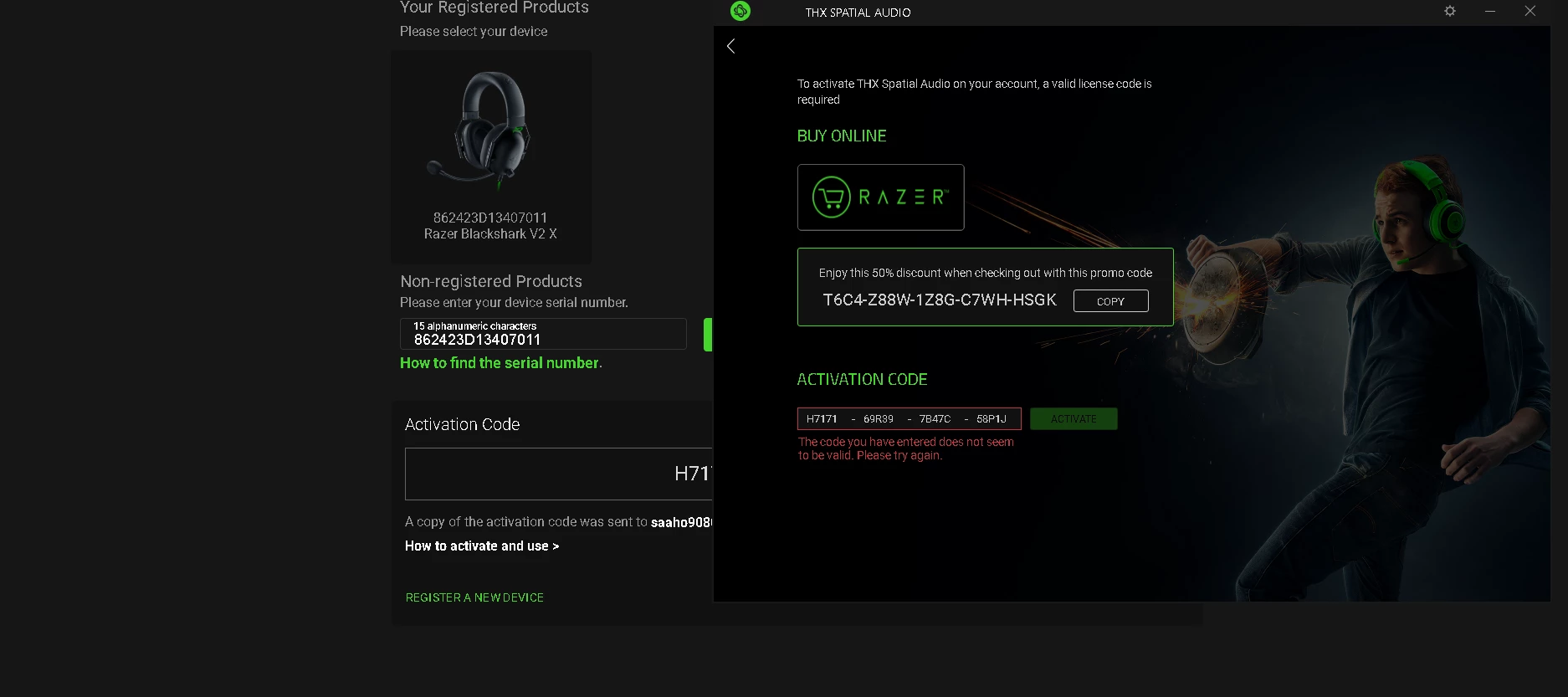
How to activate 7.1 SURROUND SOUND with Razer BlackShark V2 X USB i tried many times but its failed i have right the correct code but still showing this what to do

 

This topic has been closed for replies.

1 Reply

Razer.ScarletRouge

Hey there, ​@prasadKUMARnayak 

I understand that you are having issues activating the 7.1 Surround Sound on your Razer BlackShark V2 X. Please note that your device supports 7.1 Surround Sound, not THX Spatial Audio. Upon checking your screenshot, it appears that the activation code is being entered in the THX Spatial Audio app, which is why the activation keeps failing. The 7.1 code will not work in that application.

To resolve this, please follow the steps below to activate your code:

  1. Download the 7.1 Surround Sound software.

  2. Run the 7.1 Surround Sound installer.

  3. Click “INSTALL”.

    7.1 Surround Sound Install window

  4. Launch the 7.1 Surround Sound app when the installation is completed.

  5. Log in with your Razer ID.

  6. Enter the activation code that came with your purchase.

    If you need help activating a code, see the answer below for more details.

  7. Click “ACTIVATE”.

    7.1 Surround Activate window


If you are still experiencing issues while activating your code, please send me a PM so I can assist you promptly. Thank you!


*Thread locked to curb the conversation to PMs.