


How to organize our profiles in Synapse 4 ? | Razer Insider
Skip to main content
Question

How to organize our profiles in Synapse 4 ?

  • August 20, 2025
  • 3 replies
  • 100 views

UltimaTom

Hello everyone !

When I was using Synapse 3, my different profiles (I created one mouse profile for each of my games) were organized alphabetically, so if for some reason it didn’t switch automatically when I launched my game, I just had to go to the system tray and launch the correct profile there, and it was easy to find.

Now, with Synapse 4, all my profiles are in some kind of random order, I have no clue why they’re organized like that, and it’s not even the same order between the mouse and the dock !

Here it is :
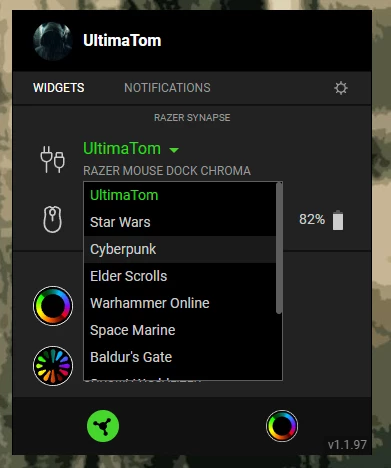
 

Do you know of any way to get back to an alphabetical order ?

Thanks a lot !


3 Replies

  • Insider Mini
  • November 1, 2025

i would love an answer to this if its been resolved i switched back to synapse 3 right after 4 dropped specifically for this reason. i refuse to try switching over again until this is fixed or has a way to organize them back to alphabetical


  • Insider Mini
  • November 10, 2025

The profiles appear in the order you create them. Test it, add a new profile and it will appear at the bottom of the list. 


The main purpose of this software is to spy on you, actually making your hardware useable is just the “carrot”.


If Azeron ever upgrades the small clamps on their hardware that keep breaking to metal, I’ll throw my tartarus in the trash.


UltimaTom
  • Author
  • Insider
  • December 4, 2025

This is sooooooo annoying, I’m not gonna erase all of my profiles and recreate them in the alphabetical order just because this stupid app can’t sort things alphabetically 😡


Anyone found a solution to this maybe ?