Huntsman V3 Pro TKL Change Profile Issue with Fn Keys | Razer Insider
Skip to main content
Question

Huntsman V3 Pro TKL Change Profile Issue with Fn Keys

  • August 31, 2025
  • 8 replies
  • 263 views

Hi Guys.


Im having an issue where i can change the profile once or twice using the fn key however then wont change again unless i open synapse and change it manually then i can change it again with the fn key once or twice before it stops working again and i have to repeat the process.

Anyone had this issue or have any idea how to fix it?


Thanks in advance!

8 Replies

  • Insider Mini
  • September 20, 2025

I have same issue and yet no fix for that issue.


lifefreshDeepViolet185

I was having 0 issues when I first bought this keyboard 1 month ago. I recently switched over to a new pc and am having this exact issue now. Did you ever find a solution?


  • Author
  • Insider Mini
  • October 13, 2025

I was having 0 issues when I first bought this keyboard 1 month ago. I recently switched over to a new pc and am having this exact issue now. Did you ever find a solution?

Nope still waiting for someone to put a solution on here lol


  • Insider Mini
  • November 16, 2025

I got the same problem and kinda found a solution for that:


I found somewhere on the web a key combo for factory resetting razer keyboards. For the huntsman pro v3 it is [Esc]+[Caps]+[Space]. Here is how it went.

First unplug the keyboard usb cable, then press the key combination mentioned above. Keep the buttons pressed while plugging the usb cable back in. 

The keyboard will show number 1-5 if you press the [fn] key. Repeat that process another time for the full reset as I understand this. 


So all I had to was this and now the [fn] profile switching work well again. 


So it seems to be an issue with out keyboards.

I hope this will keep working in the future as I do not expect that this was a solution for the problem just a band aid.


  • Insider Mini
  • November 17, 2025

I got the same problem and kinda found a solution for that:


I found somewhere on the web a key combo for factory resetting razer keyboards. For the huntsman pro v3 it is [Esc]+[Caps]+[Space]. Here is how it went.

First unplug the keyboard usb cable, then press the key combination mentioned above. Keep the buttons pressed while plugging the usb cable back in. 

The keyboard will show number 1-5 if you press the [fn] key. Repeat that process another time for the full reset as I understand this. 


So all I had to was this and now the [fn] profile switching work well again. 


So it seems to be an issue with out keyboards.

I hope this will keep working in the future as I do not expect that this was a solution for the problem just a band aid.

As I can't seem to be able to edit this on mobile I will have to double post.

In another post the key combination I mentioned was used to enter and leave the demo mode of the keyboard. So I think I was wrong saying it was the combination to resetting to firmware settings.

Nonetheless it worked for me to enter and leave the demo mode. Since then the profile switching with the fn key works again. 

(I noticed the horrible grammar and tipos in my first post) 


  • Author
  • Insider Mini
  • December 7, 2025

I got the same problem and kinda found a solution for that:


I found somewhere on the web a key combo for factory resetting razer keyboards. For the huntsman pro v3 it is [Esc]+[Caps]+[Space]. Here is how it went.

First unplug the keyboard usb cable, then press the key combination mentioned above. Keep the buttons pressed while plugging the usb cable back in. 

The keyboard will show number 1-5 if you press the [fn] key. Repeat that process another time for the full reset as I understand this. 


So all I had to was this and now the [fn] profile switching work well again. 


So it seems to be an issue with out keyboards.

I hope this will keep working in the future as I do not expect that this was a solution for the problem just a band aid.

As I can't seem to be able to edit this on mobile I will have to double post.

In another post the key combination I mentioned was used to enter and leave the demo mode of the keyboard. So I think I was wrong saying it was the combination to resetting to firmware settings.

Nonetheless it worked for me to enter and leave the demo mode. Since then the profile switching with the fn key works again. 

(I noticed the horrible grammar and tipos in my first post) 


Thanks so much for the reply. After trying this multiple times i still cant get mine to work properly
the profile switch will always work once but never again after that unless i manually change it on synapse. So frustrating!
Glad it fixed your issue though!


  • Insider Mini
  • December 10, 2025

I had the same problem with you, but I still haven’t found a fix in Synapse or anywhere that could fix the issue, I feel like this is a combination of issue from Synapse and the firmware. But I found a workaround that’ll enable profile switching, it’s not foolproof though but it’ll get the job done if you wanna switch profile using the Fn key

In all my profile, I set the xbox game bar key (Second key on the left next to the Volume Switch) to Profile Switching to “Cycle up”, once I did that I can switch profile easily and I can use the Fn key to change profile, but it’s the same as your issue where I can only switch profile 1-2 times before I need to click my xbox game bar button to switch profiles. It’s what I have for now, I feel like this is a firmware issue from synapse 4 that’ll need to be checked


Jameegi
  • Insider Mini
  • December 13, 2025

I had this same issue where the FN keys would not function at all when trying to swap profiles on the Huntsman V3 Pro, or any other function key to that matter almost. Sometimes it would only work once, and then stop. Resetting the keyboard through space+caps+escape after plugging the device back in did not work neither.


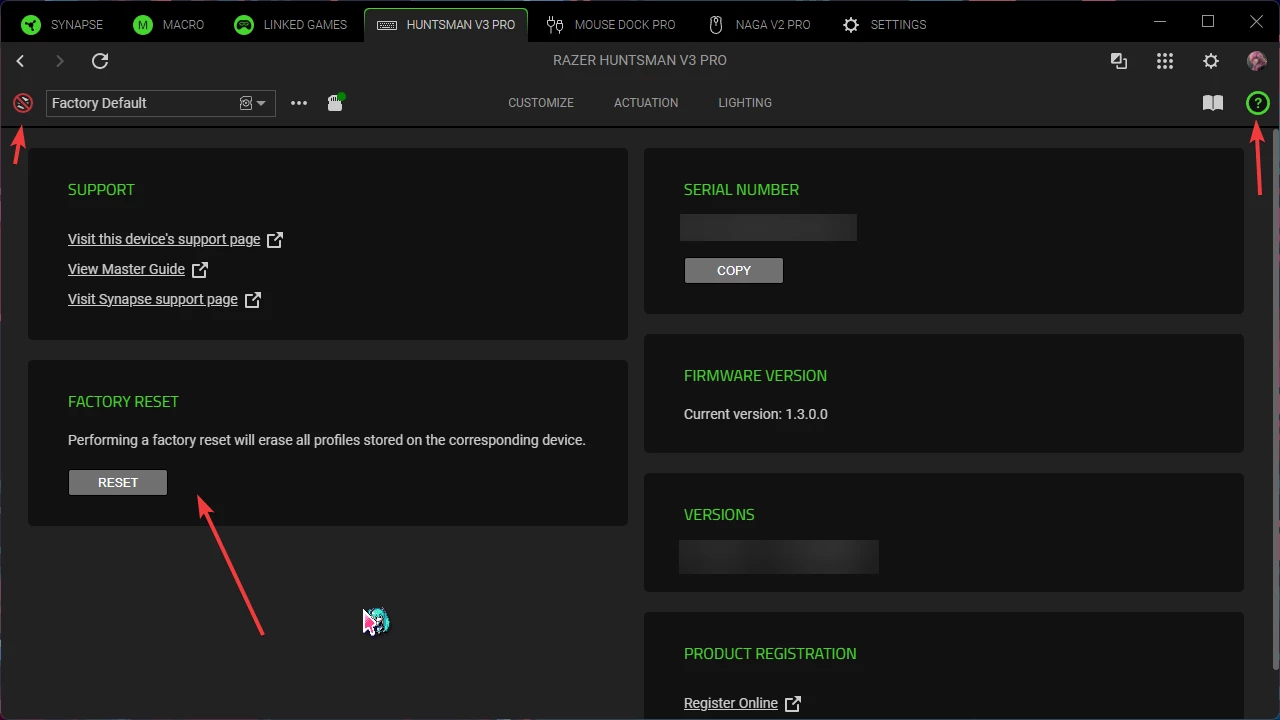
My partner eventually found a hidden option to force reset the device on Synapse itself. Which restored profiles to default (and stopped synapse trying to sync the profiles again, which seemed to be the issue). This basically all started after Synapse wanted me to choose which profile to sync to. Either the keyboard, or Synapse. Then it stopped working after that.


To find this and hopefully fix it like it did with mine, go onto Synapse, click your Huntsman V3 Pro or similar keyboard>Click the ? icon below your avatar’s picture>Factory Reset in the bottom left near support. After that, your function keys should work as normal again. Even the notification saying which profile it swapped to, worked again for me. You’ll know it worked as well after resetting, when there’s a big red icon on the profiles icon image.


I have included an image below to also show how it should look. I hope this helps for anyone else who has this odd issue.