

Kiyo Pro not connecting any more | Razer Insider
Skip to main content
Question

Kiyo Pro not connecting any more

  • December 1, 2025
  • 2 replies
  • 24 views

labJuneBudsmart416

My Razor Kiyo Pro has suddenly stopped connecting to my computer. It has worked perfectly up to now on the same computer and port/cable.  My PC is an Alienware Aurora R13.

I’ve tried 3 different USB ports and cables, and a laptop too. It doesn’t work on any of them.    P/No RZ19-03640100.

When I plug it in, Windows 11 pops up a notification saying “Power Surge on the USB port. Unknown USB device needs more power than the USB port can supply.”

A window also pops up, below.
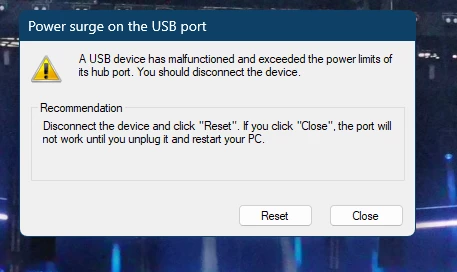
 

Any suggestions on how to fix the problem?

Thanks  in anticipation!

This topic has been closed for replies.

2 Replies

labJuneBudsmart416

More info - it doesn’t show up in device manager. The S/N is 


Razer.ScarletRouge

Hey there, ​@labJuneBudsmart416 


Thank you so much for sharing your concern here regarding your Razer Kiyo not connecting to your PC. I understand that you have performed a troubleshooting steps to help resolve the issue, but to no avail. 


Please send me a private message together with your device's serial number and proof of purchase/receipt in PDF format for a possible warranty claim. You can upload your proof of purchase to your Google Drive and send me the link. Make sure that the link is set the sharing settings to "Anyone with the link can view".


Also, I have edited your post and removed your device's serial number for security purposes. Thank you!


*Thread locked to curb conversation to PM.

