kraken v4 doesnt enjoy using both game and chat audio | Razer Insider
Skip to main content
Question

kraken v4 doesnt enjoy using both game and chat audio

  • February 7, 2025
  • 10 replies
  • 1296 views

RaspberryPinkeverbox390

Ive had my kraken v4 headset for about a month and a half. I am being forced to use the game audio for EVERY audio output when i want to have discord set to chat audio. The reason for this is whenever changing discord to use chat audio when audio comes from discord after a few seconds all audio from the headset will cease, i can easily replicate this by changing the output and spamming my mute key which will cut it out. I have updated the headset and dongle firmware, and disabled all exclusive settings,  i saw a few people on here talk about something similar, but not exact a few months ago, does anyone have a solution?

10 Replies

Tommyisawesome

+1 I’m in the same boat


webbestEggshell311

Same issue


  • Insider Mini
  • March 1, 2025

i can’t even get ANY audio to come through on the chat channel now no matter what i try or how i route the audio


  • Insider Mini
  • March 18, 2025

bump +1


  • Insider Mini
  • March 18, 2025

Same Issue. Very annoying. It worked, then it didn’t.  


  • Insider Mini
  • March 22, 2025

I have this issue as well.  I own a Kraken v4 Pro headset, I got it about a week ago.  If I want to use Discord chat, the default headset has to be the AG Bluetooth option.  I can hear games, I can hear system prompts, etc. using this.  I played Monster Hunter Wilds today using this setting.

If I want to talk to anyone IN-GAME I have to change my settings to the Kraken - Chat setting.  This turns off all sounds except the game I’m playing.  My microphone will not work in-game unless I do this.

To troubleshoot today, I attempted to update my settings in Synapse 4 (required for my headset) and it forced me to change the default sound device to Kraken - Game and Kraken - Chat, but then it would not pick up my microphone or my system.  When I changed my default settings back to AG Bluetooth, everything worked fine again outside the game, but I couldn’t communicate in-game anymore.


  • April 1, 2025

Same issue...Also there are multi-function buttons on the right side earmuff, if you bump these it can change the settings for BT, hyper wireless etc.


DAYI95
  • Insider Mini
  • April 9, 2025

I have same issue too . I realy liked kraken v4 but I hope this issue about software and they would be fix . Also there is no app support at mobile , you cant control  with razer audio app


  • Insider Mini
  • July 27, 2025

Can confirm, same issue here as well.. Like how TFUQ do you charge so much money for something and can’t get the features working properly. I’ve tried every combination of audio settings imaginable and cannot get “Chat” audio to function… This is why I stopped buying Rzr products all those years ago, same crap over and over and over and over again. 

Don’t get me started on the darned thing setting all audio to “0” in my volume mixer every single time I boot my computer.


silv3rRav3n
  • Insider Mini
  • October 27, 2025

Hello,

I am not sure if it is the same, but I had a very similar issue with Kraken Tournament Edition.

Whenever I set the Discord audio output to “Chat”, I didn’t hear the incoming audio.

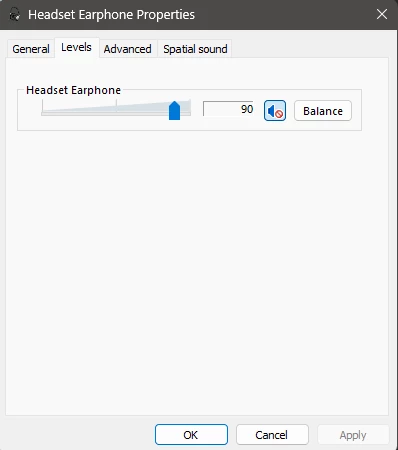
..then I discovered that the chat audio was muted (!!!) in the windows sound settings.

Windows 11

Start menu -> Settings -> System -> Sound -> More sound settings -> Playback Tab -> "Razer audio controller - Chat"

and there I went to the "Levels" tab, where I discovered that the small speaker icon has a red crossed circle on it (muted). Unmuting this solved the issue for me.

Note: I did not mute it myself, no idea how this got muted.

Ever since it works for me


Maybe this helps to some of you.