Mouse Dock Pro + Naga V2 Pro Profile is not working | Razer Insider
Skip to main content
Question

Mouse Dock Pro + Naga V2 Pro Profile is not working

  • August 19, 2023
  • 5 replies
  • 272 views

Naga V2 Pro profile is not working on my new PC using Mouse Dock Pro.

For example, non-default assignments such as "Left" and "Right" in the screenshot do not work. Nothing happens when I roll the scroll to the left or right.
All default functions work.
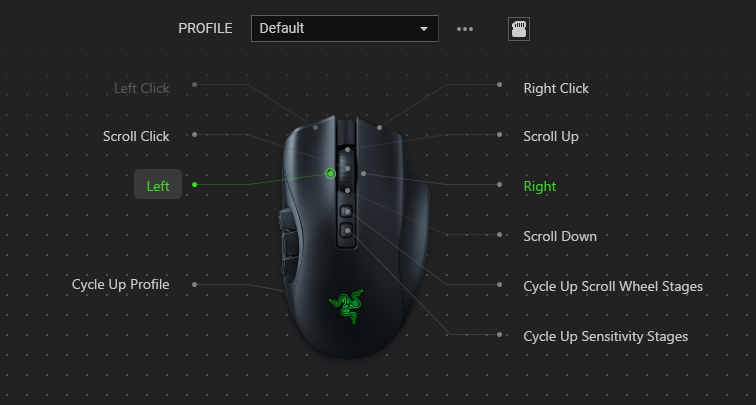
What I tried

  • I tried, but it didn't solve the problem.
    • Factory reset of MouseDock Pro and NagaV2Pro
    • Firmware Update of MouseDock Pro and NagaV2Pro
      • Mouse Dock Pro: 1.1.0.0
      • Naga V2 Pro: 1.1.0.0
    • Create New Profile
    • Reinstall Synapse
    • Change the USB port on the Mouse Dock Pro
      • I tried 4 ports on the front and back of the PC
    • Reboot PC

What I found out

  • Profile works fine when Naga V2 Pro is connected USB cable.
  • Profile works fine with the 2.4 receiver included with the Naga V2 Pro.
  • Profile works fine with Mouse Dock Pro if Synapse is not running.
    • Is Naga V2 Pro running on an internal profile?

Thank you

5 Replies

ZerefDraggneel

i am also having the same issue profiles works fine when not paired with dock and it says im running my profile in synpase but its actually using the default buttons


  • Insider Mini
  • June 24, 2025

one year later and this still isn’t fixed. Can’t say I’m surprised to be honest. I have wasted hours on this over the last couple of weeks. Profile switching does not work when my cobra pro or naga pro is paired via the mouse dock pro. Works fine when paired with the original mouse dongle. Come on Razer fix this !!!!


MiranaWL
  • November 17, 2025

I have no idea if that will help but here it goes! I had a similar problem on Synapse 4. Here is what worked for me:

  • Uninstall Synapse 4 and completely wipe out files and registry entries with revo uninstaller (make a restore point before you do that, just in case something goes wrong)
  • Restart pc and install Synapse 4 again (only Synapse, I didn’t bother with Chroma)
  • Unpair dock and mouse
  • Connect mouse with USB cable and perform factory reset on both the mouse and the dock
  • Restart pc
  • Pair the dock and the mouse again

I hope it helps, have a good day :)


  • Insider Mini
  • November 21, 2025

@MiranaWL while the fix might be temporary it is not a long term fix. This usually works for maybe a day or 2 for me, and then goes back to not working again.

We should not be having to uninstall and reinstall a program just to get profiles working. For the price we pay for this equipment it should be working with no issues. 

It is definitely related to the mouse dock pro. When the mouse is going through the dock pro, the issues start happening. When the mouse (Naga Pro V2) is connected by USB directly in the PC, the profiles work fine.


  • Insider Mini
  • December 2, 2025

This happens even without a dock. My Naga V2 Pro profiles switch according to a logic I don't understand. I have button settings, they are not clear how and when they are loaded into the mouse.


Even if you delete the profile, the new one will not load. The mouse is connected at 2.4 Hz