my blackshark v3 pro no sound | Razer Insider
Skip to main content
Question

my blackshark v3 pro no sound

  • July 27, 2026
  • 1 reply
  • 21 views

오늘 제 헤드셋(Blackshark - 채팅)에서 2.4GHz 동글을 사용해도 소리가 나지 않았습니다. 그래서 오디오 소스를 Blackshark - 게임으로 변경했더니 인터넷 브라우저에서는 소리가 나왔지만 게임이나 Spotify에서는 소리가 나지 않았습니다. 컴퓨터에서는 오디오가 재생 중이라고 표시되었는데도 말이죠. 


유선으로 연결해서 테스트해 보니 컴퓨터에서는 오디오가 정상적으로 작동합니다. 블루투스 동글 없이 PC/휴대폰에서 연결해도 정상적으로 작동합니다.

This topic has been closed for replies.

1 Reply

Razer.ScarletRouge
Forum|alt.badge.img

Hey there, ​@AZXC1632 

Please note that Razer Insider does not have support for your preferred language. I can only communicate in English. Please post your inquiry or concern in English across all boards and continue to communicate in English going forward. 

I understand that your Razer BlackShark V3 Pro headset is experiencing audio issues when connected via the 2.4GHz wireless dongle. Please try the troubleshooting steps below to help resolve the issue: 
 

  • Power is important. Make sure your headset is fully charged before troubleshooting.

  • Switch it ON. Make sure the wireless mode is ON or the button is switched to the correct wireless mode. Check your product user guide on how to configure the wireless mode of your headset.

  • Get the latest Windows update.

  • Update the firmware on your headset if it is on the list.

  • Download and run the Pairing Utility of your headset. If your device is not listed, skip this step.

  • Fix sound or audio problems in Windows.

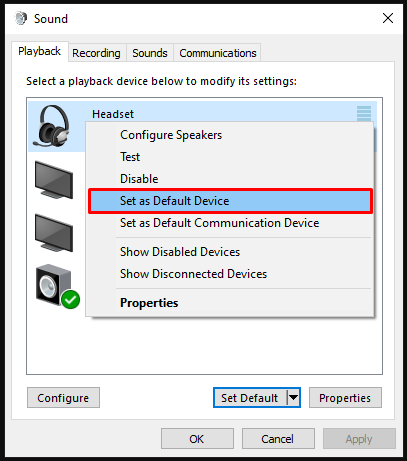
  • Ensure your headset is set as the default playback device.

    Default playback device

  • Rule out software issues. Close all audio enhancing software including Razer Synapse, Razer 7.1 Surround Sound, THX Spatial Audio and check if the issue persists.

    Razer Synapse on the system tray

  • If closing Razer Synapse fixed the issue, reinstall your headset drivers, including Razer SynapseRazer 7.1 Surround Sound or THX Spatial Audio. Restart your PC then test your headset.

  • Check if the issue persists with a different PC.


 If the issue persists after performing the troubleshooting steps, please send me a private message along with your device's serial number so I can check its details in our system and assist you further. Thank you!


*Thread locked to curb conversation to PM.