New Razer Blackshark V3 Pro's left headphone will not play audio. | Razer Insider
Skip to main content
Question

New Razer Blackshark V3 Pro's left headphone will not play audio.

  • August 26, 2026
  • 2 replies
  • 16 views

Hello, the title’s pretty self-explanatory, but here’s the detailed version.
I’d basically just bought this brand-spanking new Razer Blackshark V3 after some unfortunate mishaps with my previous headset. I’m noticing that today, the left headset won’t work, no matter which mode I set it to. I’ve set it on both wired and bluetooth, connected via the dongle. I’m seeing people say that I should adjust the levels of each headphone through my computer’s sound settings, but there’s no option to do so at all, and even after updating firmware it doesn’t help. What step should i take going forward? 

This topic has been closed for replies.

2 Replies

FiszPL
Vanguard
Forum|alt.badge.img+1
  • VANGUARD
  • August 26, 2026

I’d test it on another device first to rule out some HW problem with headset ifself. If it’s the same - RMA the headset.


Razer.Aero
Forum|alt.badge.img
  • Razer Support
  • August 26, 2026

Hello, the title’s pretty self-explanatory, but here’s the detailed version.
I’d basically just bought this brand-spanking new Razer Blackshark V3 after some unfortunate mishaps with my previous headset. I’m noticing that today, the left headset won’t work, no matter which mode I set it to. I’ve set it on both wired and bluetooth, connected via the dongle. I’m seeing people say that I should adjust the levels of each headphone through my computer’s sound settings, but there’s no option to do so at all, and even after updating firmware it doesn’t help. What step should i take going forward? 

Hello marshymela,

Thanks for reaching out! I understand your frustration with the left side of your Razer BlackShark V3 not working in both wired and wireless modes. Have you tested the headset with multiple devices? This can help identify if the issue lies with the headset or the original device. Also, have you tried using it without the dongle to see if the audio works via wired connection?
Please try the recommended steps below to fix the issue:

  1. Get the latest Windows update.

  2. Connect your headset directly to the PC and not a USB hub. Also try another USB port.

  3. Update the firmware on your headset if it is on the list.

  4. Fix sound or audio problems in Windows.

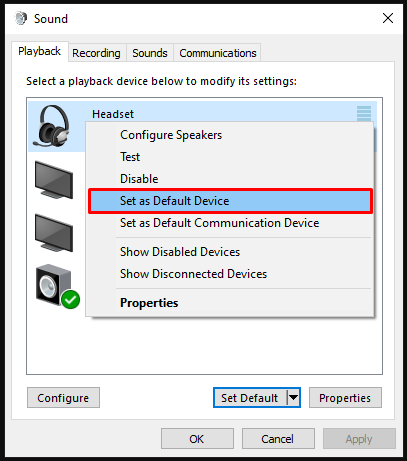
  5. Ensure that your headset is set as the default playback device.

    Default playback device

  6. Rule out software issues. Close all audio enhancing software including Razer Synapse, THX Spatial Audio and check if the issue persists.

    Razer Synapse on the system tray

  7. If closing Razer Synapse fixed the issue, reinstall your headset drivers, including Razer SynapseRazer 7.1 Surround Sound or THX Spatial Audio. Restart your PC then test your headset.

  8. Check if the issue persists with a different PC.

If the problem persists, please send me a PM with your device serial umber and proof of purchase/invoice for warranty verification. All the best!

*Thread locked to curb conversation to PM.