New Razer Blade 14 (2025) latency audio issues | Razer Insider
Skip to main content
Solved

New Razer Blade 14 (2025) latency audio issues

  • September 5, 2025
  • 20 replies
  • 625 views

Hello everyone, I bought a new Razer Blade 14 about a month ago. The first few days there were no problems, but lately I’ve been experiencing sound issues with all kinds of videos. The audio runs out of sync with the video — either heavily delayed or ahead of it — and on top of that, I keep getting crackling noises. Funny enough, the problem doesn’t occur when I connect my Razer headphones via USB wireless, but that’s not a long-term solution either. Also, this doesn’t happen when gaming.

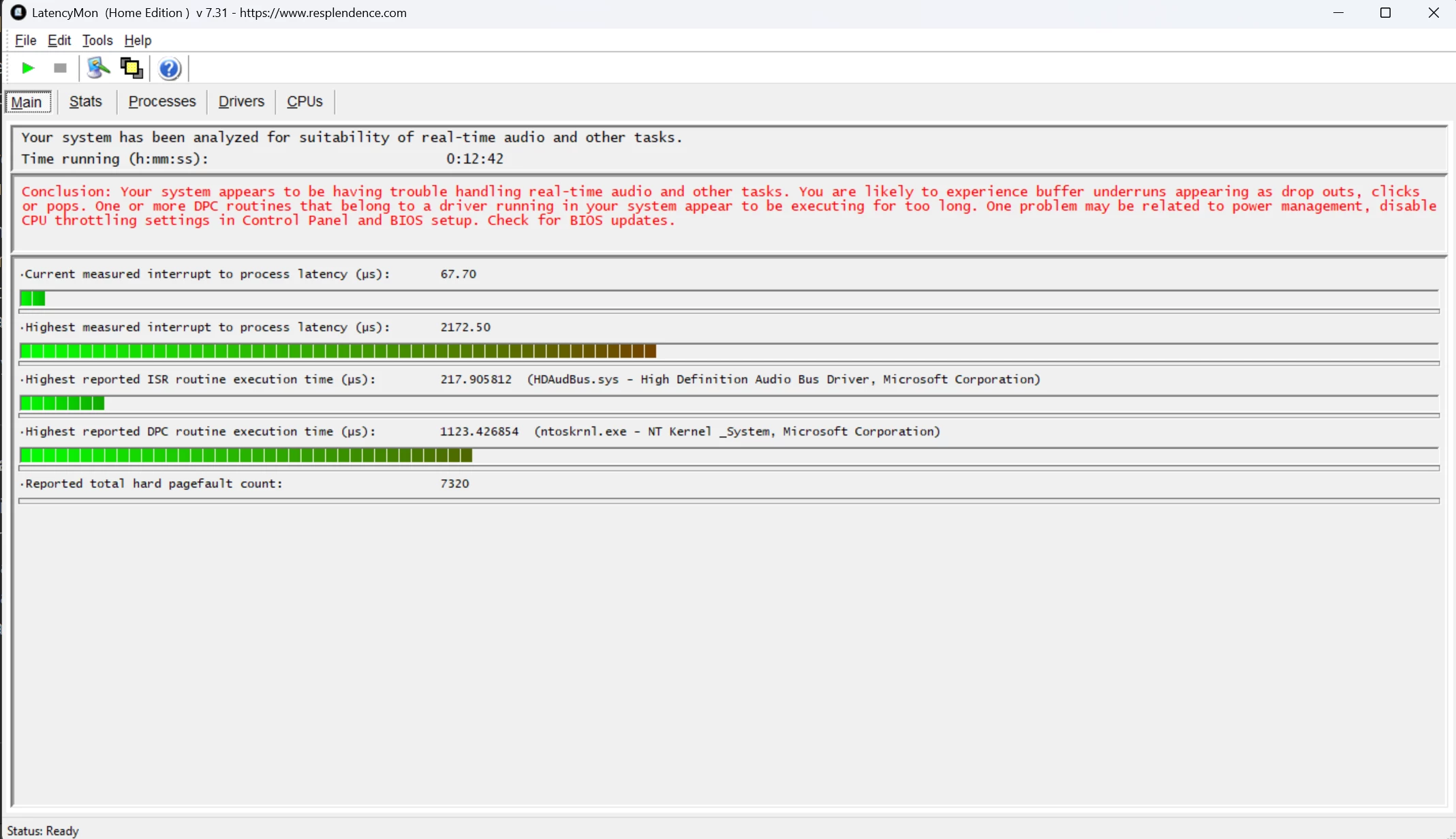
Does anyone have an idea what could be causing this? LatencyMon reports that the drivers nvlddmkm.sys, ntoskrnl.exe, and dxgkrnl.sys are causing issues, but I have no idea what to do with that information. I’m just frustrated that this started happening after the return period expired, and neither driver updates nor a fresh Windows installation have fixed it.

Thank you for your answers!

Best answer by Pascal619

I’m experiencing the same issue.
After some testing, I noticed it only happens when running on battery. The difference is that Synapse automatically switches the display down to 60 Hz to save power.
If you disable that feature and keep the refresh rate locked at 120 Hz while on battery, the problem goes away — though of course it will drain more battery.

20 Replies

Jobingles
  • Insider Mini
  • September 5, 2025

I don’t have a solution but I'm having the same issues.


  • Author
  • Insider Mini
  • September 5, 2025

I don’t have a solution but I'm having the same issues.

Maybe its a thing for the guarantee via Razer?


Jobingles
  • Insider Mini
  • September 5, 2025

Btw, I noticed if I disable synapse from starting up the issue goes away. So it looks like it’s related to synapse 4.


Jobingles
  • Insider Mini
  • September 5, 2025

Btw, I noticed if I disable synapse from starting up the issue goes away. So it looks like it’s related to synapse 4.

Actually, I was wrong, but I do think updating the AMD software + chipset drivers might have fixed the issue. You might try it and see.


  • Author
  • Insider Mini
  • September 5, 2025

Btw, I noticed if I disable synapse from starting up the issue goes away. So it looks like it’s related to synapse 4.

Actually, I was wrong, but I do think updating the AMD software + chipset drivers might have fixed the issue. You might try it and see.

I tried it, but the Problem was still there… All drivers are updated, the bios is up to date and i made already a clean reinstall of windows… Now i installed realtek audio drivers without thx, i will see if this help...


Jobingles
  • Insider Mini
  • September 6, 2025

Btw, I noticed if I disable synapse from starting up the issue goes away. So it looks like it’s related to synapse 4.

Actually, I was wrong, but I do think updating the AMD software + chipset drivers might have fixed the issue. You might try it and see.

I tried it, but the Problem was still there… All drivers are updated, the bios is up to date and i made already a clean reinstall of windows… Now i installed realtek audio drivers without thx, i will see if this help...

That help?


  • Author
  • Insider Mini
  • September 6, 2025

Btw, I noticed if I disable synapse from starting up the issue goes away. So it looks like it’s related to synapse 4.

Actually, I was wrong, but I do think updating the AMD software + chipset drivers might have fixed the issue. You might try it and see.

I tried it, but the Problem was still there… All drivers are updated, the bios is up to date and i made already a clean reinstall of windows… Now i installed realtek audio drivers without thx, i will see if this help...

That help?

It helped a little, the bass-sound isnt good with that, but the cracking is gone. Little lags of the video are still there.


Jobingles
  • Insider Mini
  • September 6, 2025

I did a factory reset of mine today and noticed that on a fresh install there are no crackles or lags. Which leads me to believe it is some update. Going to see if I can isolate it.


  • Author
  • Insider Mini
  • September 8, 2025

I did a factory reset of mine today and noticed that on a fresh install there are no crackles or lags. Which leads me to believe it is some update. Going to see if I can isolate it.

Still no further issues?


Jobingles
  • Insider Mini
  • September 8, 2025

No there is some update that triggers it it seems. I just can’t narrow it down.


  • Insider Mini
  • September 8, 2025

I was thinking about buying a razer blade 14 but this scares me lol 


Jobingles
  • Insider Mini
  • September 8, 2025

I have decided to return mine. It’s an awesome laptop but this a killer bug atm and I'm too nervous that they won't fix it and I'll just be stuck with it.


  • Author
  • Insider Mini
  • September 8, 2025

I have decided to return mine. It’s an awesome laptop but this a killer bug atm and I'm too nervous that they won't fix it and I'll just be stuck with it.

I think thats the only solution… Im stuck with the support, because my refund-time is over, and the issue came later… I hope I get a refund or they change my device and it will work...


Pascal619
  • Insider Mini
  • Answer
  • September 27, 2025

I’m experiencing the same issue.
After some testing, I noticed it only happens when running on battery. The difference is that Synapse automatically switches the display down to 60 Hz to save power.
If you disable that feature and keep the refresh rate locked at 120 Hz while on battery, the problem goes away — though of course it will drain more battery.


  • Author
  • Insider Mini
  • October 8, 2025

@Pascal619 

Youre a lifesaver mate, thank you so much, it worked for me! I watched now half an hour and no further issues so far. Do you know where exactly the issue is, so the issue can be solved and you can set your laptop back to 60hz on battery? Because it drains the battery much more… 


Pascal619
  • Insider Mini
  • October 8, 2025

Im happy it helped you mate. Cheers.

I KNOW how to fix it. But it can only be fixed by razer. Its a software issue and they need address it.

The display refresh rate change alters the video timing clock, but the audio clock stays stable. Without proper correction from the player or driver, this clock drift accumulates into an audio/video sync delay.


  • Author
  • Insider Mini
  • October 8, 2025

@Pascal619 

I was close to get my second replacement device because of this bug and was close to get my refund for the device. With the situation solved I will keep my device. But that people send their devices back should be good reason to keep an eye on the goddamn software… I wrote it already to the support and I hope that they made a ticket for the technical support to work on this…

Thank you again mate! If I get a solution (Im working in a company full of softwarenerds, but they was unable to identify the issue) I will keep you updated. Maybe they have a solution now the issue is named.

A last question: You got a solution for the fans while watching videos? Its going on for 1min, then theyre 6-7min quiet, but this drains also battery...


Pascal619
  • Insider Mini
  • October 8, 2025

I don’t have a solution for the fan issue, but trust me, it bothers me too. The problem only occurs in battery mode since Synapse doesn’t allow any control when running on battery.


I found this thread recently and have a 2025 Razer 14.  I was having the same issue.  I uninstalled the AMD radeon software for the integrated 880m.  Seems to have fixed it.  I left the chipset drivers installed, but uninstalled the Radeon Adrenaline software.  Could someone else try this and see if it works for them?  Everything seems to be back to normal now.


  • Insider Mini
  • November 16, 2025

I have the same issue. I bought mine (14inch 2025) a week ago and initially the sound was okay, but after a few window updates, I am seeing this problem.