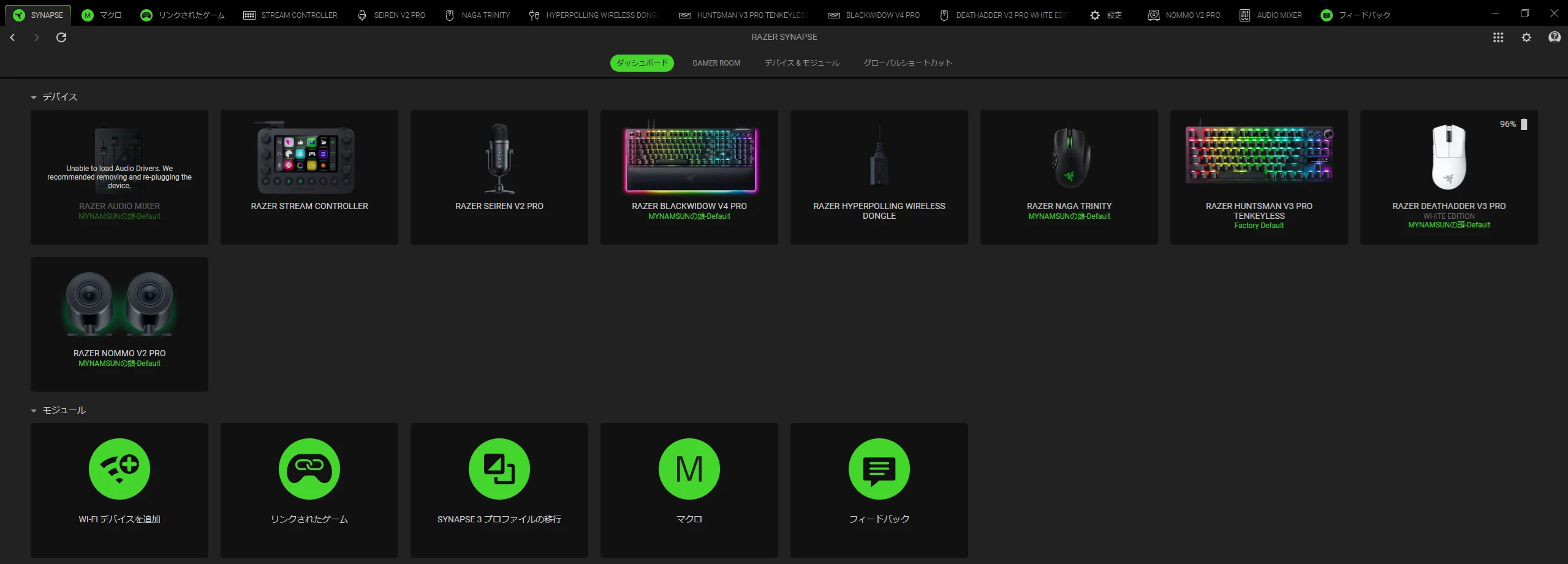
Hello, I need some help with my Razer Audio Mixer.
In Razer Synapse 4, my Audio Mixer shows this message:
“Unable to load Audio Drivers. We recommended removing and re-plugging the device.”
I have already tried unplugging and reconnecting the device many times, but the problem still does not go away.
At the moment, the Audio Mixer is detected in Synapse, but I cannot use it properly because of this driver error.
Here is what I have already tried:
-
Unplugging and reconnecting the Audio Mixer multiple times
-
Restarting Synapse
-
Restarting my PC
-
Trying different USB ports
Additional information:
-
OS: Windows 11 Version 25H2
-
Razer Synapse 4 version: 4.0. [removed by moderator]
-
USB ports tested: front and rear ports
-
Cable connections tested: USB-A to USB-C, and USB-C to USB-C
-
Audio Mixer firmware version: I could not find where to check this
Has anyone experienced this before, or knows how to fix it?
I would really appreciate any advice. Thank you.