

Razer Barracuda X (2022) | RZ04-04430 Firmware update issues and Linux connectivity | Razer Insider
Skip to main content
Question

Razer Barracuda X (2022) | RZ04-04430 Firmware update issues and Linux connectivity

  • September 4, 2025
  • 1 reply
  • 188 views

I’m seeing lots of posts about being unable to update to latest firmware. I’ve had problems updating since v1.7.0. The updater shows the latest version, then as soon as I plug in the dongle the latest version switches to 1.7.0 (currently v2.1.1_rc2). I’ve tried from several different computers, all with Win 11 (Pro) 24H2.

Screen shots and log file below.

I have also had an issue with Bluetooth connectivity in Linux. I’ve tried a few different dongles, the issue has persisted since firmware version 1.6.x. I’ve updated and tried multiple playback techniques, switching from various playback codecs, drivers, systems (currently wireplumber on Fedora 42).

After anywhere from 30 minutes to a few hours, the headset just powers off. I can then power on and it reconnects.
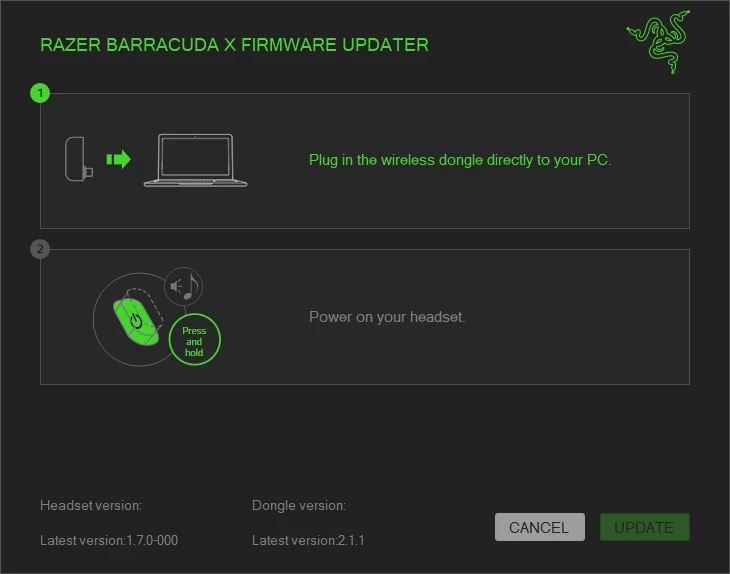


Log file output:

[00:34:47:818]connect_auto_select
[00:34:47:821]connect_auto_select
[00:34:47:822]connect_auto_select
[00:34:47:822]connect_auto_select
[00:34:48:327]connect_auto_select
[00:34:48:839]connect_auto_select
[00:34:49:353]connect_auto_select
[00:35:05:700]connect_auto_select
[00:35:05:700]\\?\hid#vid_1532&pid_0552&mi_03&col01#7&dd335c2&0&0000#{4d1e55b2-f16f-11cf-88cb-001111000030}
[00:35:05:700]\\?\hid#vid_1532&pid_0552&mi_03&col02#7&dd335c2&0&0001#{4d1e55b2-f16f-11cf-88cb-001111000030}
[00:35:05:700]id=VID=1532,PID=0552
[00:35:05:700]    caps.Usage=0x0
[00:35:05:700]    caps.UsagePage=0xFF00
[00:35:05:700]    caps.InputReportByteLength=64
[00:35:05:700]    caps.OutputReportByteLength=64
[00:35:05:700]    attributes.VendorID=0x1532
[00:35:05:700]    attributes.ProductID=0x552
[00:35:05:700]    SerialNumberString=1234
[00:35:05:700]    ManufacturerString=Macronix
[00:35:05:700]    ProductString=Razer Barracuda X 2.4
[00:35:05:716]CloseHandleX
[00:35:05:716]id=VID=1532,PID=0552
[00:35:05:716]    caps.Usage=0x1
[00:35:05:716]    caps.UsagePage=0xC
[00:35:05:716]CloseHandleX
[00:35:05:716]try_path=\\?\hid#vid_1532&pid_0552&mi_03&col01#7&dd335c2&0&0000#{4d1e55b2-f16f-11cf-88cb-001111000030}
[00:35:05:716]tryConnect_AWTXh
[00:35:05:716]    InputReportByteLength=64
[00:35:05:716]    OutputReportByteLength=64
[00:35:05:716]HID_Connected=\\?\hid#vid_1532&pid_0552&mi_03&col01#7&dd335c2&0&0000#{4d1e55b2-f16f-11cf-88cb-001111000030}
[00:35:05:716]ystech_read_fw_version
[00:35:05:716][HID_TX]02-84-01-DE-52-01-00-00-00-00-00-00-00-00-00-00-00-00-00-00-00-00-00-00-00-00-00-00-00-00-00-00-00-00-00-00-00-00-00-00-00-00-00-00-00-00-00-00-00-00-00-00-00-00-00-00-00-00-00-00-00-00-00-00
[00:35:05:732][Incorrect function.
][System.IO.IOException]
[00:35:05:732]   at System.IO.__Error.WinIOError(Int32 errorCode, String maybeFullPath)
   at System.IO.FileStream.BeginWriteCore(Byte[] bytes, Int32 offset, Int32 numBytes, AsyncCallback userCallback, Object stateObject)
   at System.IO.FileStream.WriteCore(Byte[] buffer, Int32 offset, Int32 count)
   at System.IO.FileStream.Write(Byte[] array, Int32 offset, Int32 count)
   at TwsTester.hid.HID.ystech_write64(Byte hid_cmd, Byte[] cmds)
[00:35:05:732]CloseHandleX
[00:35:05:732][connect HID device fail : Incorrect function.
][System.Exception]
[00:35:05:732]   at TwsTester.hid.HID.ystech_write64(Byte hid_cmd, Byte[] cmds)
   at TwsTester.hid.HID.ystech_read_fw_version()
   at TwsTester.hid.HID.test_is_ystech()
[00:35:06:753]tryConnect_AWTXm
[00:35:06:753]    InputReportByteLength=64
[00:35:06:753]    OutputReportByteLength=64
[00:35:06:753]HID_Connected=\\?\hid#vid_1532&pid_0552&mi_03&col01#7&dd335c2&0&0000#{4d1e55b2-f16f-11cf-88cb-001111000030}
[00:35:06:753]MXIC_GetMode_IsAPP
[00:35:06:753][HID_TX]01-40-00-00-00-00-00-00-00-00-00-00-00-00-00-00-00-00-00-00-00-00-00-00-00-00-00-00-00-00-00-00-00-00-00-00-00-00-00-00-00-00-00-00-00-00-00-00-00-00-00-00-00-00-00-00-00-00-00-00-00-00-00-00
[00:35:06:754][HID_TX_ack]01-40-01-01-00-00-00-00-00-00-00-00-00-00-00-00-00-00-00-00-00-00-00-00-00-00-00-00-00-00-00-00-00-00-00-00-00-00-00-00-00-00-00-00-00-00-00-00-00-00-00-00-00-00-00-00-00-00-00-00-00-00-00-00
[00:35:06:754]path_connected=\\?\hid#vid_1532&pid_0552&mi_03&col01#7&dd335c2&0&0000#{4d1e55b2-f16f-11cf-88cb-001111000030}
[00:35:06:754][HID_TX]01-80-13-50-41-06-01-0D-00-25-34-12-5A-5A-01-00-00-00-F0-00-00-00-00-00-00-00-00-00-00-00-00-00-00-00-00-00-00-00-00-00-00-00-00-00-00-00-00-00-00-00-00-00-00-00-00-00-00-00-00-00-00-00-00-00
[00:35:06:754][HID_TX_ack]01-80-0F-50-49-01-C0-A5-07-00-00-07-00-06-81-00-F0-00-00-00-00-00-00-00-00-00-00-00-00-00-00-00-00-00-00-00-00-00-00-00-00-00-00-00-00-00-00-00-00-00-00-00-00-00-00-00-00-00-00-00-00-00-00-00
[00:35:06:754][HID_TX_ack]01-80-02-00-00-00-00-00-00-00-00-00-00-00-00-00-00-00-00-00-00-00-00-00-00-00-00-00-00-00-00-00-00-00-00-00-00-00-00-00-00-00-00-00-00-00-00-00-00-00-00-00-00-00-00-00-00-00-00-00-00-00-00-00
[00:35:06:769]50-41-06-01-0D-00-25-34-12-5A-5A-01-00-00-00-F0-00-00-00 [CMD_SENT][OTA_CMD_IOCTL][READ_MAX_LEN=240]
[00:35:06:769]50-49-01-C0-A5-07-00-00-07-00-06-81-00-F0-00-00-00
[00:35:06:769]MXIC_GetMode_IsAPP
 

This topic has been closed for replies.

1 Reply

Razer.Speedcr0ss

I’m seeing lots of posts about being unable to update to latest firmware. I’ve had problems updating since v1.7.0. The updater shows the latest version, then as soon as I plug in the dongle the latest version switches to 1.7.0 (currently v2.1.1_rc2). I’ve tried from several different computers, all with Win 11 (Pro) 24H2.

Screen shots and log file below.

I have also had an issue with Bluetooth connectivity in Linux. I’ve tried a few different dongles, the issue has persisted since firmware version 1.6.x. I’ve updated and tried multiple playback techniques, switching from various playback codecs, drivers, systems (currently wireplumber on Fedora 42).

After anywhere from 30 minutes to a few hours, the headset just powers off. I can then power on and it reconnects.
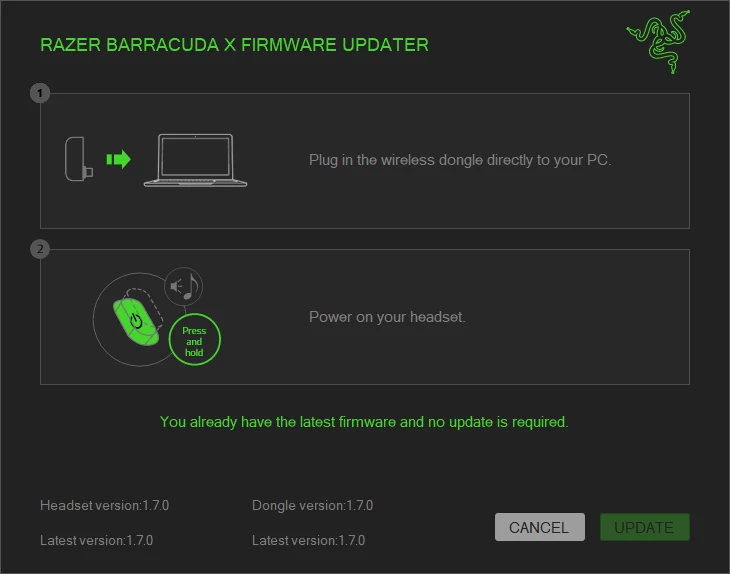


Log file output:

[00:34:47:818]connect_auto_select
[00:34:47:821]connect_auto_select
[00:34:47:822]connect_auto_select
[00:34:47:822]connect_auto_select
[00:34:48:327]connect_auto_select
[00:34:48:839]connect_auto_select
[00:34:49:353]connect_auto_select
[00:35:05:700]connect_auto_select
[00:35:05:700]\\?\hid#vid_1532&pid_0552&mi_03&col01#7&dd335c2&0&0000#{4d1e55b2-f16f-11cf-88cb-001111000030}
[00:35:05:700]\\?\hid#vid_1532&pid_0552&mi_03&col02#7&dd335c2&0&0001#{4d1e55b2-f16f-11cf-88cb-001111000030}
[00:35:05:700]id=VID=1532,PID=0552
[00:35:05:700]    caps.Usage=0x0
[00:35:05:700]    caps.UsagePage=0xFF00
[00:35:05:700]    caps.InputReportByteLength=64
[00:35:05:700]    caps.OutputReportByteLength=64
[00:35:05:700]    attributes.VendorID=0x1532
[00:35:05:700]    attributes.ProductID=0x552
[00:35:05:700]    SerialNumberString=1234
[00:35:05:700]    ManufacturerString=Macronix
[00:35:05:700]    ProductString=Razer Barracuda X 2.4
[00:35:05:716]CloseHandleX
[00:35:05:716]id=VID=1532,PID=0552
[00:35:05:716]    caps.Usage=0x1
[00:35:05:716]    caps.UsagePage=0xC
[00:35:05:716]CloseHandleX
[00:35:05:716]try_path=\\?\hid#vid_1532&pid_0552&mi_03&col01#7&dd335c2&0&0000#{4d1e55b2-f16f-11cf-88cb-001111000030}
[00:35:05:716]tryConnect_AWTXh
[00:35:05:716]    InputReportByteLength=64
[00:35:05:716]    OutputReportByteLength=64
[00:35:05:716]HID_Connected=\\?\hid#vid_1532&pid_0552&mi_03&col01#7&dd335c2&0&0000#{4d1e55b2-f16f-11cf-88cb-001111000030}
[00:35:05:716]ystech_read_fw_version
[00:35:05:716][HID_TX]02-84-01-DE-52-01-00-00-00-00-00-00-00-00-00-00-00-00-00-00-00-00-00-00-00-00-00-00-00-00-00-00-00-00-00-00-00-00-00-00-00-00-00-00-00-00-00-00-00-00-00-00-00-00-00-00-00-00-00-00-00-00-00-00
[00:35:05:732][Incorrect function.
][System.IO.IOException]
[00:35:05:732]   at System.IO.__Error.WinIOError(Int32 errorCode, String maybeFullPath)
   at System.IO.FileStream.BeginWriteCore(Byte[] bytes, Int32 offset, Int32 numBytes, AsyncCallback userCallback, Object stateObject)
   at System.IO.FileStream.WriteCore(Byte[] buffer, Int32 offset, Int32 count)
   at System.IO.FileStream.Write(Byte[] array, Int32 offset, Int32 count)
   at TwsTester.hid.HID.ystech_write64(Byte hid_cmd, Byte[] cmds)
[00:35:05:732]CloseHandleX
[00:35:05:732][connect HID device fail : Incorrect function.
][System.Exception]
[00:35:05:732]   at TwsTester.hid.HID.ystech_write64(Byte hid_cmd, Byte[] cmds)
   at TwsTester.hid.HID.ystech_read_fw_version()
   at TwsTester.hid.HID.test_is_ystech()
[00:35:06:753]tryConnect_AWTXm
[00:35:06:753]    InputReportByteLength=64
[00:35:06:753]    OutputReportByteLength=64
[00:35:06:753]HID_Connected=\\?\hid#vid_1532&pid_0552&mi_03&col01#7&dd335c2&0&0000#{4d1e55b2-f16f-11cf-88cb-001111000030}
[00:35:06:753]MXIC_GetMode_IsAPP
[00:35:06:753][HID_TX]01-40-00-00-00-00-00-00-00-00-00-00-00-00-00-00-00-00-00-00-00-00-00-00-00-00-00-00-00-00-00-00-00-00-00-00-00-00-00-00-00-00-00-00-00-00-00-00-00-00-00-00-00-00-00-00-00-00-00-00-00-00-00-00
[00:35:06:754][HID_TX_ack]01-40-01-01-00-00-00-00-00-00-00-00-00-00-00-00-00-00-00-00-00-00-00-00-00-00-00-00-00-00-00-00-00-00-00-00-00-00-00-00-00-00-00-00-00-00-00-00-00-00-00-00-00-00-00-00-00-00-00-00-00-00-00-00
[00:35:06:754]path_connected=\\?\hid#vid_1532&pid_0552&mi_03&col01#7&dd335c2&0&0000#{4d1e55b2-f16f-11cf-88cb-001111000030}
[00:35:06:754][HID_TX]01-80-13-50-41-06-01-0D-00-25-34-12-5A-5A-01-00-00-00-F0-00-00-00-00-00-00-00-00-00-00-00-00-00-00-00-00-00-00-00-00-00-00-00-00-00-00-00-00-00-00-00-00-00-00-00-00-00-00-00-00-00-00-00-00-00
[00:35:06:754][HID_TX_ack]01-80-0F-50-49-01-C0-A5-07-00-00-07-00-06-81-00-F0-00-00-00-00-00-00-00-00-00-00-00-00-00-00-00-00-00-00-00-00-00-00-00-00-00-00-00-00-00-00-00-00-00-00-00-00-00-00-00-00-00-00-00-00-00-00-00
[00:35:06:754][HID_TX_ack]01-80-02-00-00-00-00-00-00-00-00-00-00-00-00-00-00-00-00-00-00-00-00-00-00-00-00-00-00-00-00-00-00-00-00-00-00-00-00-00-00-00-00-00-00-00-00-00-00-00-00-00-00-00-00-00-00-00-00-00-00-00-00-00
[00:35:06:769]50-41-06-01-0D-00-25-34-12-5A-5A-01-00-00-00-F0-00-00-00 [CMD_SENT][OTA_CMD_IOCTL][READ_MAX_LEN=240]
[00:35:06:769]50-49-01-C0-A5-07-00-00-07-00-06-81-00-F0-00-00-00
[00:35:06:769]MXIC_GetMode_IsAPP

 

 Please try removing all Razer-related files from your Windows PC by downloading and installing the Razer Driver Clean Up tool through this link. Once done, please restart your computer, reinstall the Razer Synapse, including its updates. Feel free to send me a PM should you need additional assistance.


*Thread is now locked
