Razer Blade 13 120hz | Razer Insider
Skip to main content
Question

Razer Blade 13 120hz

  • April 8, 2025
  • 1 reply
  • 40 views

Hi All, need your help.

I have an issue on my Razer Blade 13 (2020) - after reinstalling my Windows, the display is showing 64Hz only, and I can’t change it.  (My screen is definitely 120Hz, before reinstalling all were working great). I’ve tried to do it in a Windows settings, Razer Synapse, and Nvidia App but everywhere it’s showing only 64Hz max.

Also, I noticed that performance is now worse. Didn’t tried to check it in games yet, but all windows soft and chrome is freezing. This has never happened before.

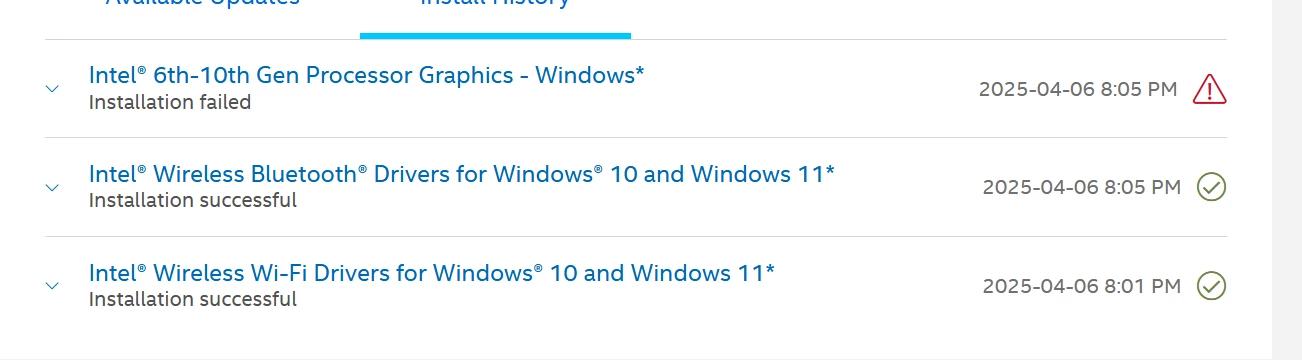
After this I start updating all drivers. In windows Updater only one driver has an error while installing - Intel Corporation - Display - 26.20.100.7463. Error - Install error - 0x80070103

When I was trying to install Intel Display Driver with Intel Driver & Support Assistant or with a driver file from Intel web site, the laptop was turning off, and then every restart showing  windows blue screen with error igdkmdn64.sys. Only System Restore to last “saving” is helping in this situation and all drivers need to be installed again. I’ve tried it 3 times with different versions of Intel Display Driver and the error was the same.

So, I believe, all the problem is this Intel Driver, but idk how to solve this.

Maybe somebody can help me with this? Thank you 

Screens attached



This topic has been closed for replies.

1 Reply

Razer.Speedcr0ss

Hi All, need your help.

I have an issue on my Razer Blade 13 (2020) - after reinstalling my Windows, the display is showing 64Hz only, and I can’t change it.  (My screen is definitely 120Hz, before reinstalling all were working great). I’ve tried to do it in a Windows settings, Razer Synapse, and Nvidia App but everywhere it’s showing only 64Hz max.

Also, I noticed that performance is now worse. Didn’t tried to check it in games yet, but all windows soft and chrome is freezing. This has never happened before.

After this I start updating all drivers. In windows Updater only one driver has an error while installing - Intel Corporation - Display - 26.20.100.7463. Error - Install error - 0x80070103

When I was trying to install Intel Display Driver with Intel Driver & Support Assistant or with a driver file from Intel web site, the laptop was turning off, and then every restart showing  windows blue screen with error igdkmdn64.sys. Only System Restore to last “saving” is helping in this situation and all drivers need to be installed again. I’ve tried it 3 times with different versions of Intel Display Driver and the error was the same.

So, I believe, all the problem is this Intel Driver, but idk how to solve this.

Maybe somebody can help me with this? Thank you 

Screens attached
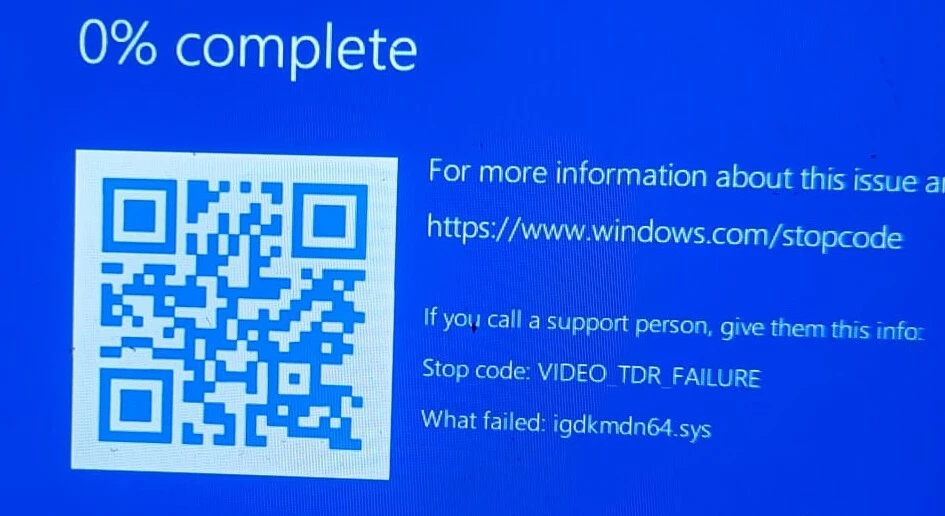


Are you using its original SSD? When you restored the Windows OS of your unit, did you use its built-in recovery file using this process or you’ve download the recovery image file through our Razer Online Service? You can try looking up the stop codes here, then get tip on how to resolve BSOD errors through this article.

*Thread is now locked. Feel free to send me a PM if you needs further assistance.