
Razer Blade 14 2024 stuck in 60hz after AMD driver update | Razer Insider
Skip to main content
Solved

Razer Blade 14 2024 stuck in 60hz after AMD driver update

  • Feb 19, 2025 5:41 PM UTC
  • 8 replies
  • 840 views

JaydonH1

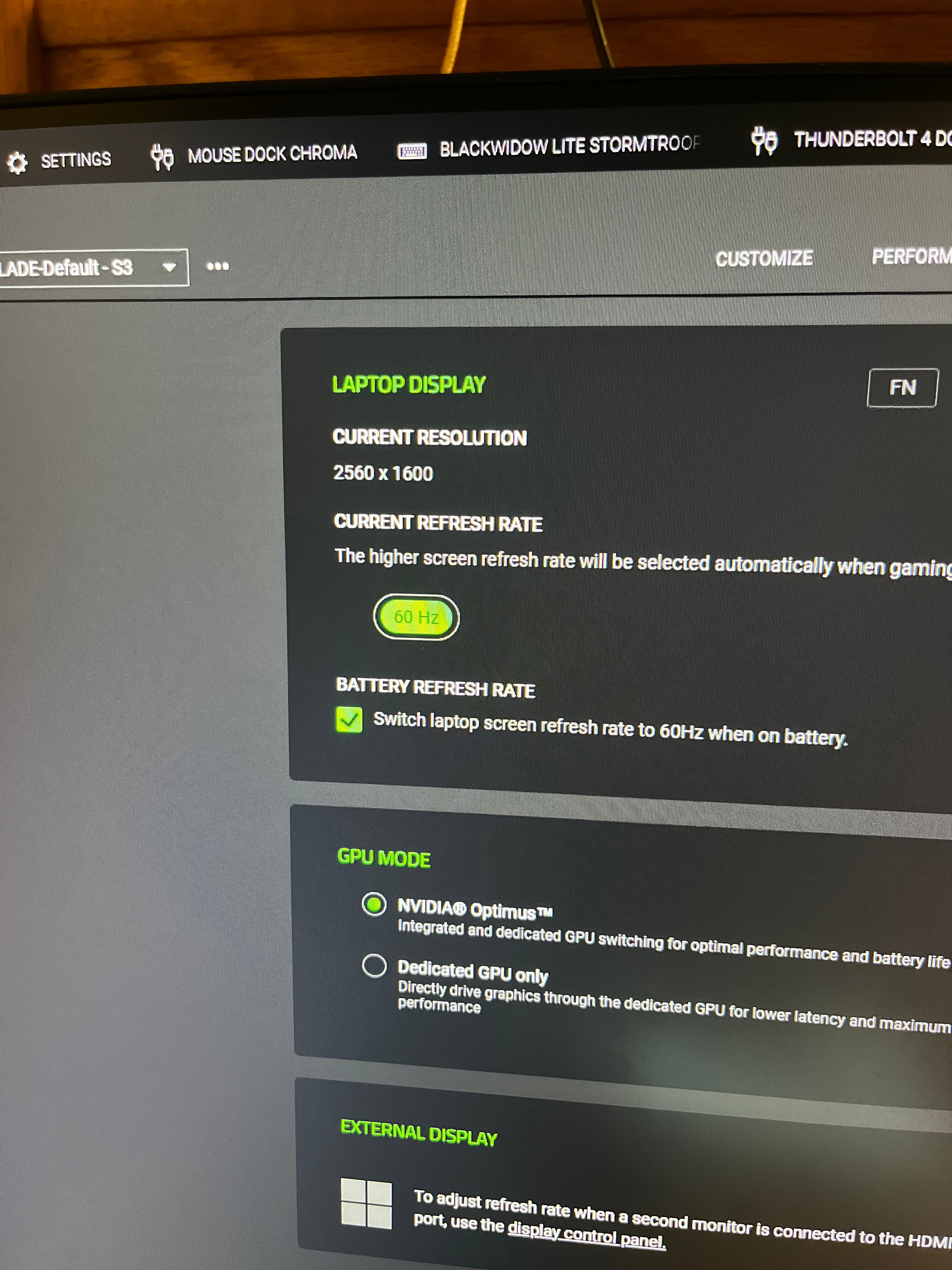
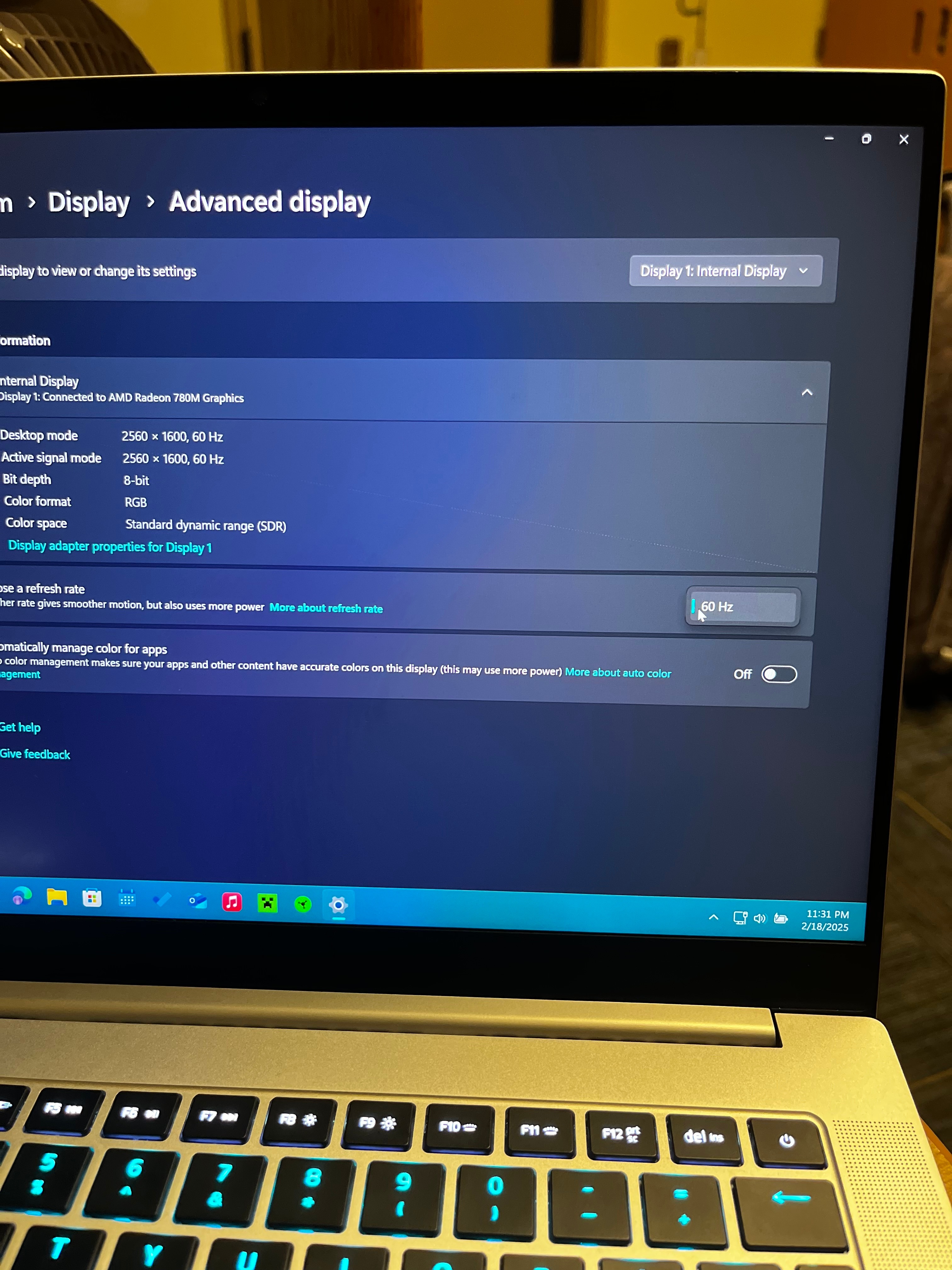
I have a 2024 Razer Blade 14 and after updating my AMD drivers from version 24.2.1 to 24.12.1 in AMD adrenaline my laptop’s screen becomes stuck at 60hz. This wouldn’t be an issue but Windows 11 24h2 automatically updates these AMD drivers with no way to roll them back. I have tried many versions of the AMD driver with no luck. I have removed the AMD and NVIDIA drivers, reinstalled them and nothing. Synapsis and Windows display both show no 240hz option. I have rolled back the drivers and am currently staying on 23h2 and it is working fine but I would like to update eventually.
 

Best answer by Dlexius

Hello, I had the same issue as you. It is due to the Adrenalin update.

Just download the cleanup utility from AMD to remove all the drivers

https://www.amd.com/en/resources/support-articles/faqs/GPU-601.html

Then download 24.8.1 from the previous version on AMD website, it is the most stable and it won’t lock at 60hz anymore.

https://www.amd.com/en/support/downloads/previous-drivers.html/processors/ryzen/ryzen-8000-series/amd-ryzen--9-8945hs.html

*Remember to turn off auto update for windows, because windows will just update it for you then it will just go back to 60hz again.

Search bar “Advance System Setting” > Hardware > Device Installation Setting > No.

Hope this helps 😀

View original

8 Replies

Dlexius
  • Insider Mini
  • Answer
  • Mar 22, 2025 1:54 AM UTC

Hello, I had the same issue as you. It is due to the Adrenalin update.

Just download the cleanup utility from AMD to remove all the drivers

https://www.amd.com/en/resources/support-articles/faqs/GPU-601.html

Then download 24.8.1 from the previous version on AMD website, it is the most stable and it won’t lock at 60hz anymore.

https://www.amd.com/en/support/downloads/previous-drivers.html/processors/ryzen/ryzen-8000-series/amd-ryzen--9-8945hs.html

*Remember to turn off auto update for windows, because windows will just update it for you then it will just go back to 60hz again.

Search bar “Advance System Setting” > Hardware > Device Installation Setting > No.

Hope this helps 😀


JaydonH1
  • Author
  • Insider Mini
  • Mar 22, 2025 5:35 PM UTC

That worked great, thank you so much!


labthinkVividMulberry493

This worked great for me on a 2023 razer blade. 


For others in the future, I also installed firmware to better support Netflix: Razer Blade 14 (2023) Firmware Updater | RZ09-0482x


  • Insider Mini
  • Dec 15, 2025 1:07 PM UTC

I’m still running 24.8.1 as was also stuck at 60hz


Has anyone found a new driver version that doesnt lock to 60hz as I would like a newer driver if possible?


  • Insider Mini
  • Dec 28, 2025 6:51 PM UTC

I’m still running 24.8.1 as was also stuck at 60hz


Has anyone found a new driver version that doesnt lock to 60hz as I would like a newer driver if possible?

Also videos crash using 24.8.1


  • Insider Mini
  • Feb 3, 2026 1:36 AM UTC

It’s crazy that almost one year later, this issue still remains and this is the only “fix”…. to use an outdated version.

Razer’s support on these laptops remind me of the 2010 era Android phones, where support was basically next to non-existent the moment it launches 💀


LemonLimetruckclassic381

After a debugging session with Claude, this is the current best workaround I have arrived at.
I have the 2023 model blade 14, but it appears the panel is the same in the 2024 model.
I am sharing it here since I personally would rather have newer drivers and 144hz, as opposed to 240hz and drivers that are two years out of date..

Would be great if AMD and Razer could implement a proper fix so this compromise wouldn’t be necessary, but I am not holding my breath..

Implemented and tested on AMD Adrenalin 26.10.2 (driver 32.0.32015.12012).

Workaround

This can probably be done with CRU (untested, YMMV). Otherwise use the scripts linked at the bottom.

The panel must show as AUO5DA7.

  1. CRU → internal display → Extension blocks → edit the DisplayID 2.0 block → Detailed resolutions → Add (Manual):

      120 Hz 144 Hz
    Horizontal: active / front porch / sync / back porch 2560 / 48 / 32 / 80 2560 / 8 / 32 / 40
    Vertical: active / front porch / sync / back porch 1600 / 10 / 10 / 180 1600 / 10 / 10 / 180
    Pixel clock 587.52 MHz 684.29 MHz

    Sync polarity as the existing 240 Hz entry (H+, V−).

  2. Run restart64.exe (or reboot), then pick the rate in Windows display settings.

Undo: reset-all.exe + restart64.exe.

Not usable:

  • Anything below 60 Hz (garbled picture).
  • 145–239 Hz (driver drops to 6-bit; 200+ rejected).

Caveats

  • Tested on one unit only.
  • 26.10.2 with this workaround appears stable so far, but YMMV.
  • A driver reinstall or BIOS update can reset the override; just redo it.

Technical details

  • 240 Hz needs ~28 Gbps uncompressed. The internal link carries ~17, so 240 Hz requires display compression (DSC), which brings it to ~9.4.
  • Since 24.9.1, AMD's driver rejects the compressed 240 Hz mode for "not enough link bandwidth", so only 60 Hz is left. Not a panel or Razer firmware issue.
  • Confirmed with AMD's driver debug log:
    • 24.8.1 accepts the DSC 240 Hz mode.
    • 26.10.2 rejects it with DC_FAIL_DP_LINK_BANDWIDTH.
    • 24.9.1 and 26.6.x show the same symptom (cause not traced there).
  • It's not AMD's auto refresh-rate switching: disabling it changes nothing.
  • Earlier new drivers such as 26.3.1 also caused WHEA_UNCORRECTABLE_ERROR crashes on the test laptop. On 26.10.2 they appear to be gone.

For AMD/Razer: since 24.9.1, eDP modes that require DSC (2560×1600 @ 240 Hz, 1175 MHz) fail validation with DC_FAIL_DP_LINK_BANDWIDTH, although the panel supports DSC 1.1 (8 bpp, 2/4 slices) and the compressed stream fits the link. 24.8.1 accepts the same mode. Please file via AMD's Bug Report Tool if affected.

Scripts and optional extras (Windows dynamic refresh rate, other rates): https://github.com/Ndmjohansen/blade14-amd-refresh-fix


AngelsOfPandora

After a debugging session with Claude, this is the current best workaround I have arrived at.
I have the 2023 model blade 14, but it appears the panel is the same in the 2024 model.
I am sharing it here since I personally would rather have newer drivers and 144hz, as opposed to 240hz and drivers that are two years out of date..

Would be great if AMD and Razer could implement a proper fix so this compromise wouldn’t be necessary, but I am not holding my breath..

Implemented and tested on AMD Adrenalin 26.10.2 (driver 32.0.32015.12012).

Workaround

This can probably be done with CRU (untested, YMMV). Otherwise use the scripts linked at the bottom.

The panel must show as AUO5DA7.

  1. CRU → internal display → Extension blocks → edit the DisplayID 2.0 block → Detailed resolutions → Add (Manual):

      120 Hz 144 Hz
    Horizontal: active / front porch / sync / back porch 2560 / 48 / 32 / 80 2560 / 8 / 32 / 40
    Vertical: active / front porch / sync / back porch 1600 / 10 / 10 / 180 1600 / 10 / 10 / 180
    Pixel clock 587.52 MHz 684.29 MHz

    Sync polarity as the existing 240 Hz entry (H+, V−).

  2. Run restart64.exe (or reboot), then pick the rate in Windows display settings.

Undo: reset-all.exe + restart64.exe.

Not usable:

  • Anything below 60 Hz (garbled picture).
  • 145–239 Hz (driver drops to 6-bit; 200+ rejected).

Caveats

  • Tested on one unit only.
  • 26.10.2 with this workaround appears stable so far, but YMMV.
  • A driver reinstall or BIOS update can reset the override; just redo it.

Technical details

  • 240 Hz needs ~28 Gbps uncompressed. The internal link carries ~17, so 240 Hz requires display compression (DSC), which brings it to ~9.4.
  • Since 24.9.1, AMD's driver rejects the compressed 240 Hz mode for "not enough link bandwidth", so only 60 Hz is left. Not a panel or Razer firmware issue.
  • Confirmed with AMD's driver debug log:
    • 24.8.1 accepts the DSC 240 Hz mode.
    • 26.10.2 rejects it with DC_FAIL_DP_LINK_BANDWIDTH.
    • 24.9.1 and 26.6.x show the same symptom (cause not traced there).
  • It's not AMD's auto refresh-rate switching: disabling it changes nothing.
  • Earlier new drivers such as 26.3.1 also caused WHEA_UNCORRECTABLE_ERROR crashes on the test laptop. On 26.10.2 they appear to be gone.

For AMD/Razer: since 24.9.1, eDP modes that require DSC (2560×1600 @ 240 Hz, 1175 MHz) fail validation with DC_FAIL_DP_LINK_BANDWIDTH, although the panel supports DSC 1.1 (8 bpp, 2/4 slices) and the compressed stream fits the link. 24.8.1 accepts the same mode. Please file via AMD's Bug Report Tool if affected.

Scripts and optional extras (Windows dynamic refresh rate, other rates): https://github.com/Ndmjohansen/blade14-amd-refresh-fix

Dude, what a legend. AMD needs to be made aware of this.