Razer DeathAdder Essential Driver issue | Razer Insider
Skip to main content
Question

Razer DeathAdder Essential Driver issue

  • January 12, 2024
  • 10 replies
  • 4618 views

bitRoseValecove137

When I first bought this thing I thought I got ripped off with an offed version of the mouse, which might very well be the case here LOL.

So, I started off like with any razer product, my thing wouldn’t work and it wasn’t detected on Synapse, I’ve already owned a few keyboards before so I was familiar with the issue, but this mice just wouldn’t let me be.
I deep-dived a little into the tutorials and there was a constant amongst them, they all just seemed to have a different device. Whether it was on the Control Panel’s Devices tab, or when checking the drivers in the Device Manager, they were all at least labeled “Razer DeathAdder Essential” or had any trace of Razer in their components.
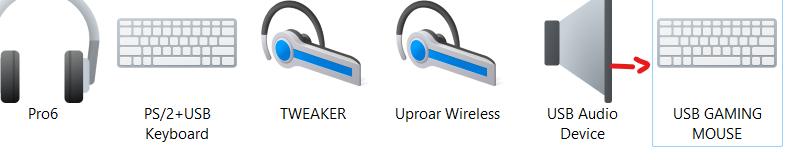
My device’s not like that, it’s not named “Razer DeathAdder Essential”, rather -> “USB Gaming Mouse” with no image preview of the model.
It has a driver, but it’s the same as any other driver labeled “HID-Compliant Mice”, and although there was a mini thread shortly discussing this same issue, the reply was botlike and didn’t offer any help besides redirecting me into razer support pages which I’ve already gone through.
I’m guessing this is why it’s not showing up in Synapse, or why it wouldn’t register in the Firmware updater even though it was plugged in, or why the drivers it came with wouldn’t budge a bit when trying to get other versions.
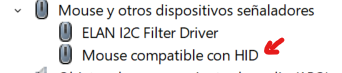

This is a call for help before I have to turn it in and move to Logitech, I need someone to provide me with the drivers so I have a chance at making it work.

10 Replies

FiszPL
Vanguard
Forum|alt.badge.img+1
  • VANGUARD
  • January 12, 2024

You can do below steps to remove any associated Razer drivers from system, then install Synapse to download the newest drivers again.

  1. Uninstall Synapse
  2. Download & run this tool: https://rzr.to/Tf53xj to remove any razer drivers/leftovers
  3. Then restart your PC
  4. After reboot install Synapse again (as administrator).

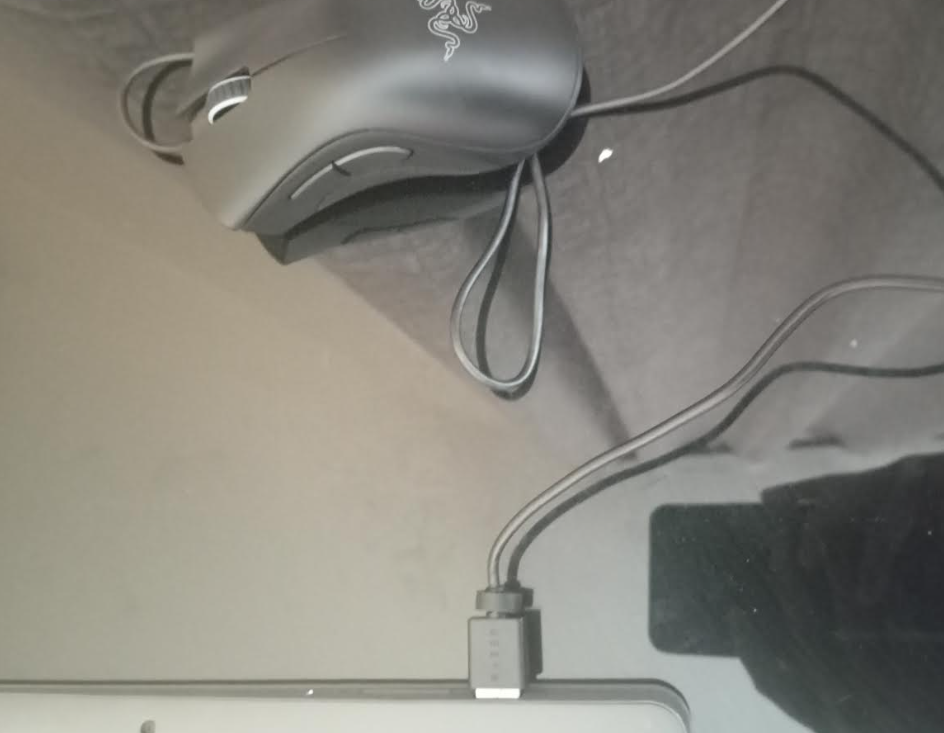
Also one thing that come in my mind - there are a lot of counterfeit DA Essential units, so you can make a photo ot the top and bottom of the mouse if you want to verify this.


bitRoseValecove137

You can do below steps to remove any associated Razer drivers from system, then install Synapse to download the newest drivers again.

  1. Uninstall Synapse
  2. Download & run this tool: https://rzr.to/Tf53xj to remove any razer drivers/leftovers
  3. Then restart your PC
  4. After reboot install Synapse again (as administrator).

Also one thing that come in my mind - there are a lot of counterfeit DA Essential units, so you can make a photo ot the top and bottom of the mouse if you want to verify this.

Alright, so uh.

Polling rate was 125hz
Dismantled the mouse, wrong RGB placement, no logo on the board, saw a video unboxing a fake one and it’s the exact same.
I bought it from one of the authorized resellers too, very odd.

Thanks still.


buzzPacificBluedepot430

You can do below steps to remove any associated Razer drivers from system, then install Synapse to download the newest drivers again.

  1. Uninstall Synapse
  2. Download & run this tool: https://rzr.to/Tf53xj to remove any razer drivers/leftovers
  3. Then restart your PC
  4. After reboot install Synapse again (as administrator).

Also one thing that come in my mind - there are a lot of counterfeit DA Essential units, so you can make a photo ot the top and bottom of the mouse if you want to verify this.

Dude same problem here i did the same thing u said but nothing it still not popping up :(


FiszPL
Vanguard
Forum|alt.badge.img+1
  • VANGUARD
  • December 22, 2024

You can do below steps to remove any associated Razer drivers from system, then install Synapse to download the newest drivers again.

  1. Uninstall Synapse
  2. Download & run this tool: https://rzr.to/Tf53xj to remove any razer drivers/leftovers
  3. Then restart your PC
  4. After reboot install Synapse again (as administrator).

Also one thing that come in my mind - there are a lot of counterfeit DA Essential units, so you can make a photo ot the top and bottom of the mouse if you want to verify this.

Dude same problem here i did the same thing u said but nothing it still not popping up :(


Was it detected before?

If not, then post a photo of the bottom of the mouse connected to pc.


buzzPacificBluedepot430

You can do below steps to remove any associated Razer drivers from system, then install Synapse to download the newest drivers again.

  1. Uninstall Synapse
  2. Download & run this tool: https://rzr.to/Tf53xj to remove any razer drivers/leftovers
  3. Then restart your PC
  4. After reboot install Synapse again (as administrator).

Also one thing that come in my mind - there are a lot of counterfeit DA Essential units, so you can make a photo ot the top and bottom of the mouse if you want to verify this.

Dude same problem here i did the same thing u said but nothing it still not popping up :(


Was it detected before?

If not, then post a photo of the bottom of the mouse connected to pc.

ok 


buzzPacificBluedepot430

You can do below steps to remove any associated Razer drivers from system, then install Synapse to download the newest drivers again.

  1. Uninstall Synapse
  2. Download & run this tool: https://rzr.to/Tf53xj to remove any razer drivers/leftovers
  3. Then restart your PC
  4. After reboot install Synapse again (as administrator).

Also one thing that come in my mind - there are a lot of counterfeit DA Essential units, so you can make a photo ot the top and bottom of the mouse if you want to verify this.

Dude same problem here i did the same thing u said but nothing it still not popping up :(


Was it detected before?

If not, then post a photo of the bottom of the mouse connected to pc.

ok 


it was detected before then after like 10 days i was playing and then it got disconnected


buzzPacificBluedepot430


buzzPacificBluedepot430

You can do below steps to remove any associated Razer drivers from system, then install Synapse to download the newest drivers again.

  1. Uninstall Synapse
  2. Download & run this tool: https://rzr.to/Tf53xj to remove any razer drivers/leftovers
  3. Then restart your PC
  4. After reboot install Synapse again (as administrator).

Also one thing that come in my mind - there are a lot of counterfeit DA Essential units, so you can make a photo ot the top and bottom of the mouse if you want to verify this.

Dude same problem here i did the same thing u said but nothing it still not popping up :(


Was it detected before?

If not, then post a photo of the bottom of the mouse connected to pc.

hllo? i sent pic , still waiting for some help 


am going through the same issue but ima try those steps


same issue here. try synapse 2, 3 and 4… razer deathadder essential never never never detected! so anoying =(