

Razer Deathadder V3 Freezing Fix | Razer Insider
Skip to main content
Question

Razer Deathadder V3 Freezing Fix

  • December 13, 2024
  • 4 replies
  • 4312 views

GodlessFreak

I was having an issue with my Razer Deathadder V3 where it would stop responding to any mouse movements for anywhere from a split second to a few seconds at a time. Very frustrating. I found out I was running old firmware, so I updated the firmware for my dongle and my mouse. This did NOT fix my issue. I cleaned the sensor with some alcohol, but this didn’t fix my issue either. I was on the verge of buying a new mouse, when I randomly tried something in the Razer Synapse software and, so far, my mouse is now working fine.


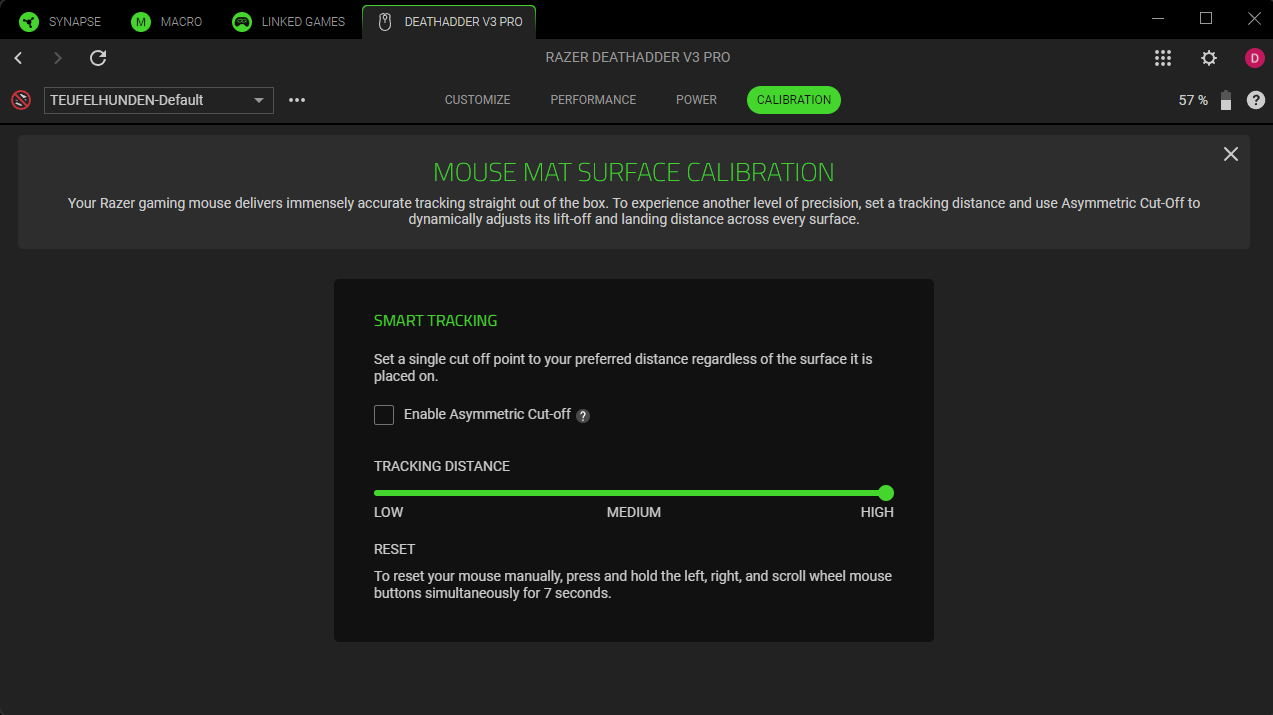
Under the Razer Synapse software, in the config section for the mouse there is a mouse pad surface calibration. In there it shows you how to reset it. I did this and so far, my mouse is working great. Hold the left mouse button, right mouse button and scroll wheel button all together for 7 seconds and it resets it. This fixed it for me. Try it and see if it works for you.
 

4 Replies

nPr0tect
  • Insider Mini
  • March 3, 2025

I am having this problem as well. It’s so frustrating that it freezes like a second or so randomly. Especially when I am playing FPS games like Valorant. I will try this fix.


Just for people that get here with a freezing mouse. Mine froze every second, totally unusable. Long story short, I own multiple machines, 3x Windows 11, 1x Windows 10:
 

  • Got a new Dongle, plugged into pc where I need it, Windows 11. Same bug happened.
  • Plugged my Dongle into seperate Windows 11 machine. Same bug still there.
  • Plugged my Dongle into separate Windows 10 machine. Bug gone (wtf?).
  • Plugged my Dongle back into pc where I need it (Windows 11), bug still gone.
  • Mouse works fine now.

No idea wtf happens here, but if it helps someone, it’s a win.


  • Insider Mini
  • May 3, 2025

I am having this problem as well. It’s so frustrating that it freezes like a second or so randomly. Especially when I am playing FPS games like Valorant. I will try this fix.

Hello, I have the same problem like you on the same game and it’s so frustrating….

I guess, I can only change the brand of my mouse if nothing can be fix :/ 


I have reinstalled, uninstalled, created new mousepads, tried this on other machines (no freezing). 

This is very obviously a Windows 11 and Razer mouse problem from my perspective. My mouse is unusable right now. Need a response from Razer.