Razer Inc - HIDClass - 6.2.9200.16547 - auto windows 11 update 2026 | Razer Insider
Skip to main content
Question

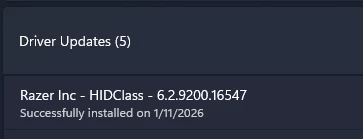
Razer Inc - HIDClass - 6.2.9200.16547 - auto windows 11 update 2026

  • January 11, 2026
  • 4 replies
  • 31 views

woeihaur84

Hi Razer support ;


after today windows auto update this driver , my razer viper 8k start cant working properly ! keep disconnect and cant detect device ! any solution for solve this ?

4 Replies

FiszPL
Vanguard
Forum|alt.badge.img+1
  • VANGUARD
  • January 11, 2026

Uninstall the mouse (with the driver) from device manager - restart PC. Let the Synapse install driver by itself.


woeihaur84
  • Author
  • Insider
  • January 11, 2026

Uninstall the mouse (with the driver) from device manager - restart PC. Let the Synapse install driver by itself.

try already ! still not working ! that problem still here ! during play game will more serious keep repeat detect device on off on off detection ! 


woeihaur84
  • Author
  • Insider
  • January 12, 2026

i tried format my windows 11 and reinstall , i expect problem on windows 11 25H2 update make some driver crashing ! after reinstall still problem on that viper 8kz device , after that i unplug in to my old pc windows 10 with razer synapse 4 no issue that viper 8kz ! 


FiszPL
Vanguard
Forum|alt.badge.img+1
  • VANGUARD
  • January 13, 2026

i tried format my windows 11 and reinstall , i expect problem on windows 11 25H2 update make some driver crashing ! after reinstall still problem on that viper 8kz device , after that i unplug in to my old pc windows 10 with razer synapse 4 no issue that viper 8kz ! 

Yeah… windows 11 is like a dice roll. You never know when and what will not work someday.