Razer Leviathan V2 RGB lighting is always on! | Razer Insider
Skip to main content
Question

Razer Leviathan V2 RGB lighting is always on!

  • March 6, 2026
  • 4 replies
  • 80 views

10ura1

Hello,
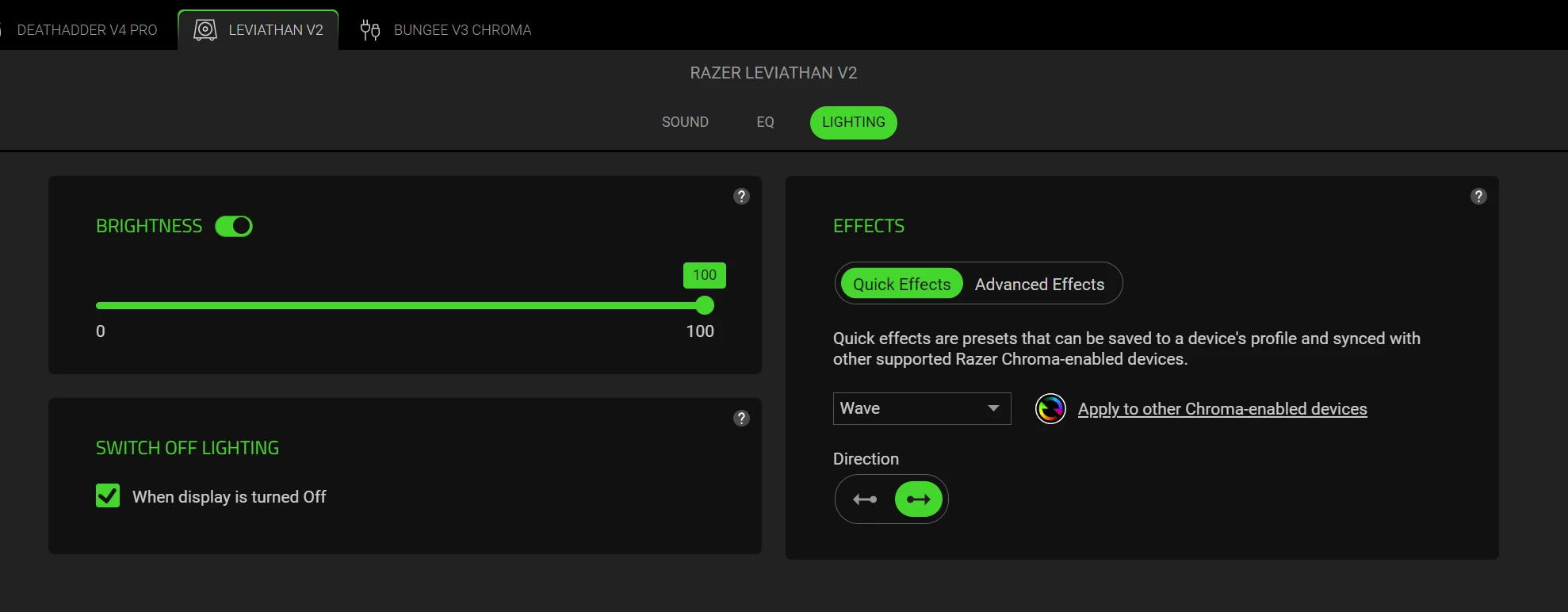
In the Razer Leviathan V2 settings, I checked the "Switch off lighting" option. But when I turn off the computer, the RAZER devices turn off automatically except for the Leviathan V2. It is always on RGB lighting. What steps do I need to take to make the device work properly?
 

4 Replies

10ura1
  • Author
  • Insider Mini
  • March 7, 2026

!--startfragment>

Dear Razer Support Team,

Here are the steps I have already taken:

  • Updated the firmware to v1.07.00.1043_r1
  • Performed a hard reset (held the power button for 10 seconds until indicators turned off)
  • Tried a factory reset
  • Disconnected all cables and held the power button for 20–30 seconds to discharge residual power
  • Switched and disabled USB ports to rule out connectivity issues

Unfortunately, none of these actions resolved the problem. The device is still not functioning as expected.

Could you please provide step-by-step official instructions on how to properly configure the Razer Leviathan V2 so that it meets the specified parameters after the firmware update?

Thank you for your assistance.

Best regards,

!--endfragment>


10ura1
  • Author
  • Insider Mini
  • March 7, 2026

Also for your information:
When I put my PC to sleep, the Razer Leviathan V2 speaker system turns off the RGB lighting. And when the PC is completely turned off, the RGB remains on.


10ura1
  • Author
  • Insider Mini
  • March 8, 2026

Dear Razer Support Team,
I am writing a follow‑up regarding my Razer Leviathan V2 soundbar. In my previous message I explained that I was trying to disable RGB lighting when the PC is powered off. Since then, I have reviewed suggestions from the Razer community forum and applied several BIOS adjustments on my ASUS Prime B650M‑A II motherboard (including enabling ErP Ready and modifying LED Lighting options).
Despite these changes, the Leviathan V2 RGB lighting remains active in S5 (shutdown) state. As these steps were based on community discussions rather than official Razer guidance, I would like to confirm the following directly with your support team:
- Does the Leviathan V2 officially support complete RGB shutdown in S5 state, or is it designed to remain powered via USB standby?
- Are there firmware updates or Razer Synapse settings that can disable RGB lighting when the PC is off?
- What configuration do you recommend to ensure proper energy‑saving compliance while disabling RGB illumination?
I appreciate your assistance and would be grateful for official clarification, as community advice has not resolved the issue.
Thank you for your continued support.
Best regards,

Yurii


10ura1
  • Author
  • Insider Mini
  • March 8, 2026

Dear Razer Support,
I would like to follow up on Case ID: 260308-000522.
I want to emphasize that I have spent a significant amount of time trying to configure my Razer Leviathan V2, carefully adjusting BIOS settings and Synapse options. The Synapse software clearly indicates the "Switch off lighting when display is off" function, which works correctly for other Razer devices I own. However, it does not work for the Leviathan V2, leaving the RGB lighting active even after shutdown.
For a premium product at this price point, this behavior feels unacceptable and misleading. It is frustrating to see a function officially listed in Synapse but not supported by the device. This creates unnecessary inconvenience and undermines customer trust.
I kindly ask you to escalate this case to your engineering team and provide a clear explanation and timeline for when this issue will be addressed in firmware or software updates. Customers deserve transparency and a proper solution.
Sincerely,

Yurii