

Razer Naga X (RZ01-0359) disappears from Synapse 4 after 1–2 seconds | Razer Insider
Skip to main content
Question

Razer Naga X (RZ01-0359) disappears from Synapse 4 after 1–2 seconds

  • September 25, 2026
  • 3 replies
  • 23 views

Hello,

I am experiencing an issue with my Razer Naga X (model RZ01-0359) on Windows 11. When I connect the mouse, Windows plays the USB connection sound, Synapse 4 detects the device for about 1–2 seconds, and then I hear the USB disconnection sound. After that, Synapse no longer recognizes the mouse.

The mouse itself continues to function for movement and clicks, but Synapse loses the connection, so I cannot configure lighting, profiles, or other features.

Details:

  • Device: Razer Naga X (RZ01-0359)

  • OS: Windows 11 (latest updates installed)

  • Software: Razer Synapse 4 (latest version)

  • Behavior: Device appears in Synapse for a couple of seconds, then vanishes. Windows plays connect/disconnect sounds.

  • History: I purchased the mouse in 2022 and it worked perfectly until mid‑2024, when the issue first appeared. At that time, disabling the RGB lighting was a workaround that kept the mouse stable. However, in July 2026, after a Synapse 4 update, the same problem returned even with lighting disabled.

  • Tried solutions: Reinstalling Synapse, cleaning registry and Razer folders, testing different USB ports. The issue persists.

It seems related to the RGB lighting and Synapse updates, because the mouse disconnects from Synapse as soon as the LEDs turn on. If I manage to disable the lighting quickly, the mouse stays connected, but this is very difficult to do since Synapse closes the device almost immediately.

Has anyone found a permanent fix for this problem? Is there a firmware update or an official solution from Razer?

Thank you in advance for any help.
3 Replies

  • Author
  • Insider Mini
  • September 26, 2026

Actually, my mouse does not just disappear from Synapse — it completely stops working after 1–2 seconds. Once I hear the USB disconnect sound, the Naga X no longer responds to movement or clicks at all.


  • Author
  • Insider Mini
  • September 27, 2026


  • Author
  • Insider Mini
  • September 28, 2026

Hello everyone,

I found a solution for the issue where the Razer Naga X (RZ01-0359) stops working completely after 1–2 seconds and disappears from Synapse 4.

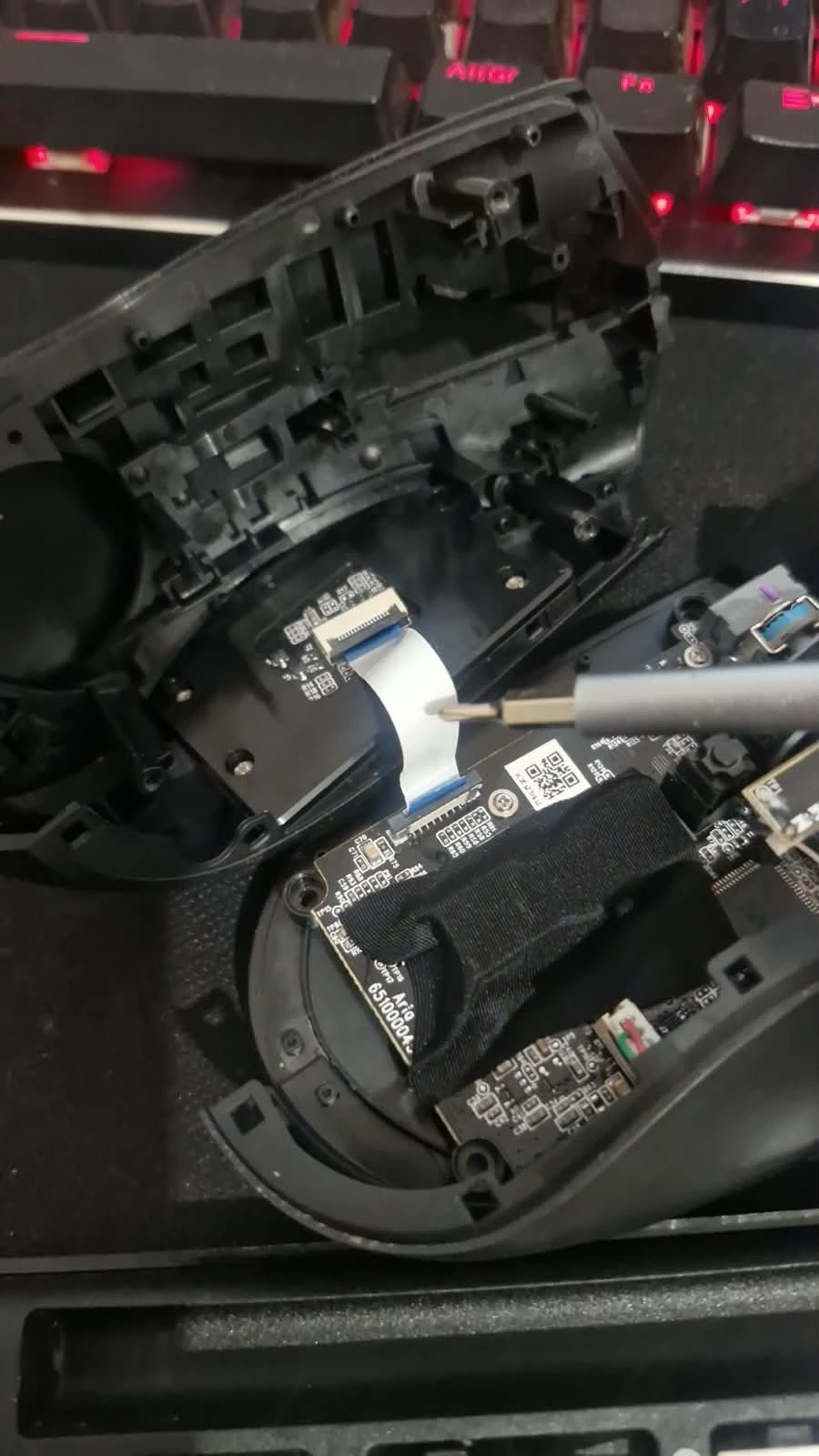
After trying software fixes without success, I decided to open the mouse. Inside, I noticed a small flat cable (similar to a ribbon cable) connected to the side numeric keypad. I carefully disconnected this cable and then plugged the mouse back into my PC.

With the cable disconnected, the mouse profile finally loaded correctly in Synapse 4, and the device started working perfectly again. It seems that the keypad connection was blocking the profile from loading.

Details:

Device: Razer Naga X (RZ01-0359)

OS: Windows 11

Software: Razer Synapse 4 Beta (but I believe this workaround would also apply to the regular Synapse 4 release)

Issue: Mouse stopped working after 1–2 seconds, Synapse 4 lost connection.

Solution: Open the mouse, disconnect the ribbon cable for the numeric keypad, reconnect to PC.