Razer Tartarus V2 Pro 8-way input not functioning as intended | Razer Insider
Skip to main content
Question

Razer Tartarus V2 Pro 8-way input not functioning as intended

  • Nov 12, 2026 8:48 PM UTC
  • 5 replies
  • 37 views

I bought and have been using the Tartarus V2 Pro, its a great product but has some software limitations that are holding it back.

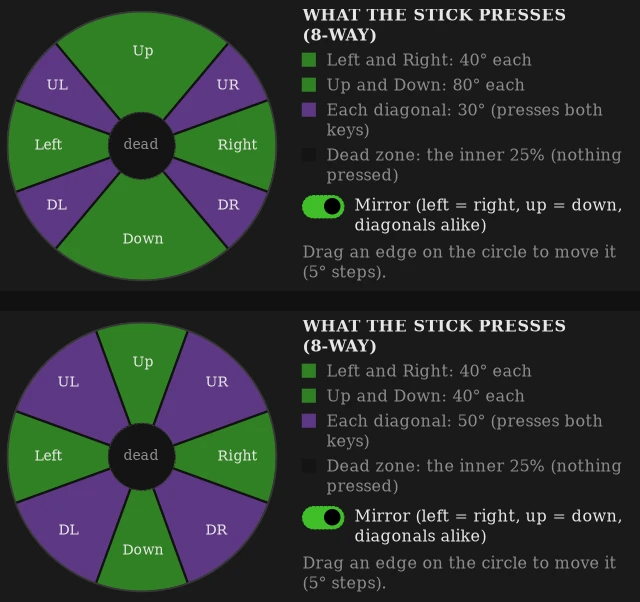
Mainly when using the 8-way directional mode, it does not register diagonal inputs at all and doesn’t seem to differentiate between 4-way mode and 8-way mode, making the usage of the device VERY limited in games where analog input isn’t possible due to limitations found in MANY games…

I just want to be able to use this device properly, please fix the 8-way directional mode and while you’re at it, add a way to add more than 1 keypress to a single input, such as (W+A) or (Up+Left) to allow for diagonal inputs.

5 Replies

Lrbrownii
  • Insider
  • Nov 12, 2026 9:30 PM UTC

Yeah, I tried to get Razer to acknowledge this. They have a month or two before I release the real fix for this. It works for me.

Here's a couple of examples of what I can do. I auotofil the 8way based on keys set in 4way or allow users to select which double key press to use. I also added dual zone thresholds to add shift at user selectable actuation points. Razer was  given exactly what's needed if they listen or not is on them.

I have a 1 star review on this device and will update the review after Razer has been given the opportunity to correct it. It's been two months or so since the release and at least a month since they closed my case and never acknowledged the issue.


Good Luck!


Lrbrownii
  • Insider
  • Nov 12, 2026 9:36 PM UTC

I bought and have been using the Tartarus V2 Pro, its a great product but has some software limitations that are holding it back.

Mainly when using the 8-way directional mode, it does not register diagonal inputs at all and doesn’t seem to differentiate between 4-way mode and 8-way mode, making the usage of the device VERY limited in games where analog input isn’t possible due to limitations found in MANY games…

I just want to be able to use this device properly, please fix the 8-way directional mode and while you’re at it, add a way to add more than 1 keypress to a single input, such as (W+A) or (Up+Left) to allow for diagonal inputs.

MANY games need keyboard presses. I also worked on a stick to analog keypress translator but never finished it yet. 


Lrbrownii
  • Insider
  • Nov 12, 2026 9:44 PM UTC

I talked to Razer in private to implement this. This is my public notice to the issue and if it's not resolved in a timely manner I will start the next steps to have this available to all.


Lrbrownii
  • Insider
  • Nov 12, 2026 9:48 PM UTC

I fixed Clio too. You left that a steaming pile. No center channel configuration on a 5.1 channel driver. Needs a minimum +10db/oct trim. No channel mixing.

I would not expect anything less with Tartarus v2 pro. Just leave out features and settings that make a world of difference.


  • Author
  • Insider Mini
  • Nov 12, 2026 11:14 PM UTC

Looks like they released some kind of a fix to the 8-way d-pad because now I CAN get inputs to go through the diagonal directions but Its NOT smooth at all, there’s still no feature to do (UP+Left / W+D) or something similar, I’ve tried making macros for this but it seems to STOP the input before switching to the macro which causes the player in whatever game to pause for a second, stop moving, and then continue moving after a second which is EXTREMELY game-breaking for any game requiring smooth/nuanced movement.

I am very disappointed in Razer for not being quicker to address the issue considering this is one of the MAIN feature sets to incentivize purchasing the product. 

Also Lrbrownii at this point I would gladly PAY for a fix to the issue, I am glad I am not the only one experiencing this. Its otherwise such a great product, its just sad the company that makes it is so slow to update/respond.